44
1
2
3
4
5
Introduction
Contents at
a Glance
Basic
Operation
Advanced
Operation
Advanced
Image Editing
and Printing
Editing
JPEG/TIFF
Images
Index
Processing
Large Numbers
of Images
Reference
1
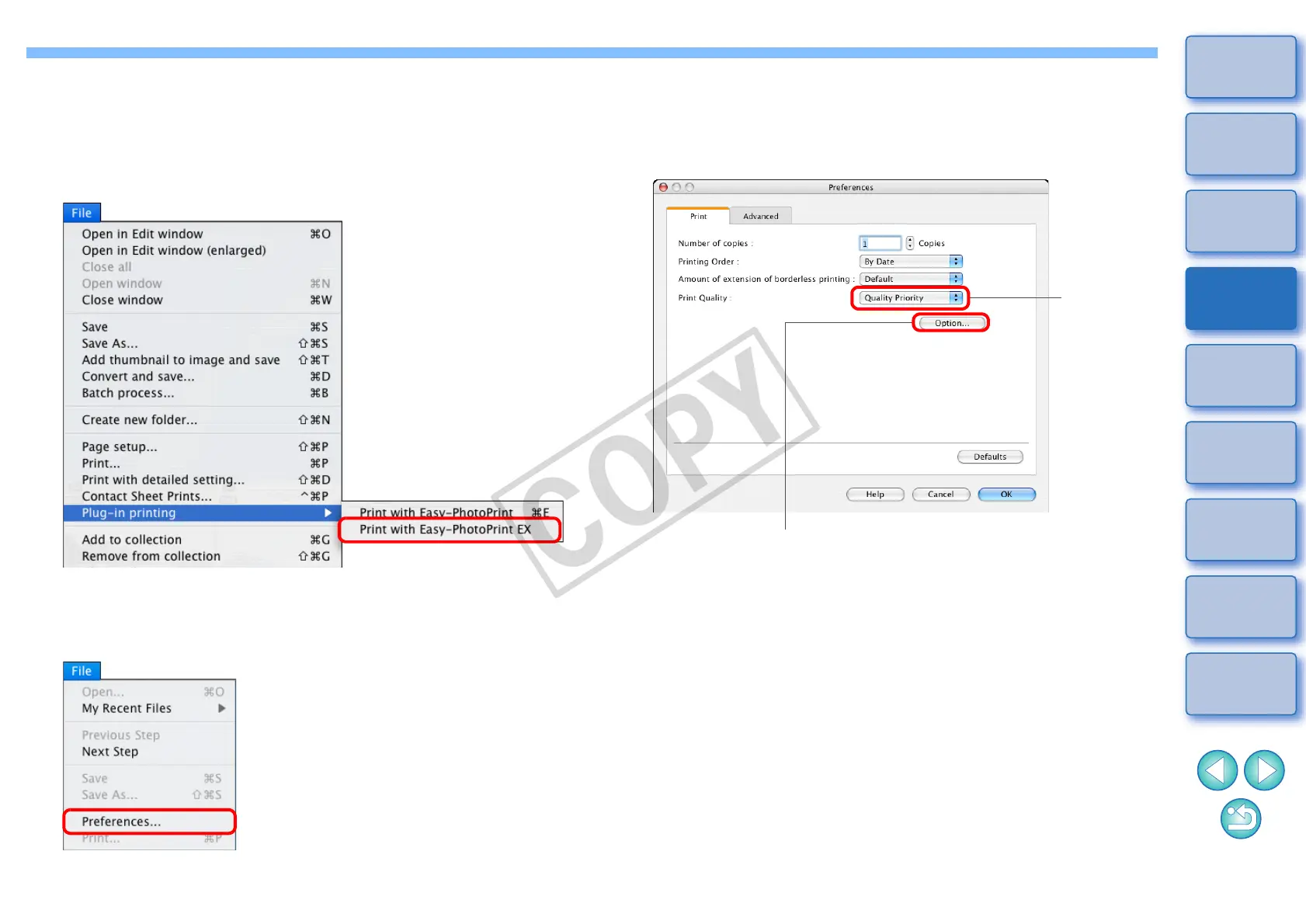
Select the image to be printed.
2
Start up EPP EX.
O Select the [File] menu [Plug-in printing] [Print with Easy-
PhotoPrint EX].
¿ EPP EX starts up.
3
In the EPP EX window, select the [File] menu
[Preferences].
¿ The [Preferences] window appears.
4
In [Print Quality], select [Quality Priority], click the
[Option] button, and then in the dialog box that
appears, checkmark [Print with the best quality when
you select [Quality Priority]].
5
Select the [Advanced] tab, checkmark [Enable ICC
profile], and then click the [OK] button.
¿ The [Preferences] window closes.
Select
Quality
Priority
Click and checkmark [Print with the best quality
when you select [Quality Priority]]










 To Next Page