72
1
2
3
4
5
Introduction
Contents at
a Glance
Basic
Operation
Advanced
Operation
Advanced
Image Editing
and Printing
Editing
JPEG/TIFF
Images
Index
Processing
Large Numbers
of Images
Reference
Printing with Shooting Information
You can freely lay out one image on one sheet of paper and print
together with titles and shooting information, etc.
1
Select one image to be printed.
2
Select the [File] menu [Print with detailed setting].
3
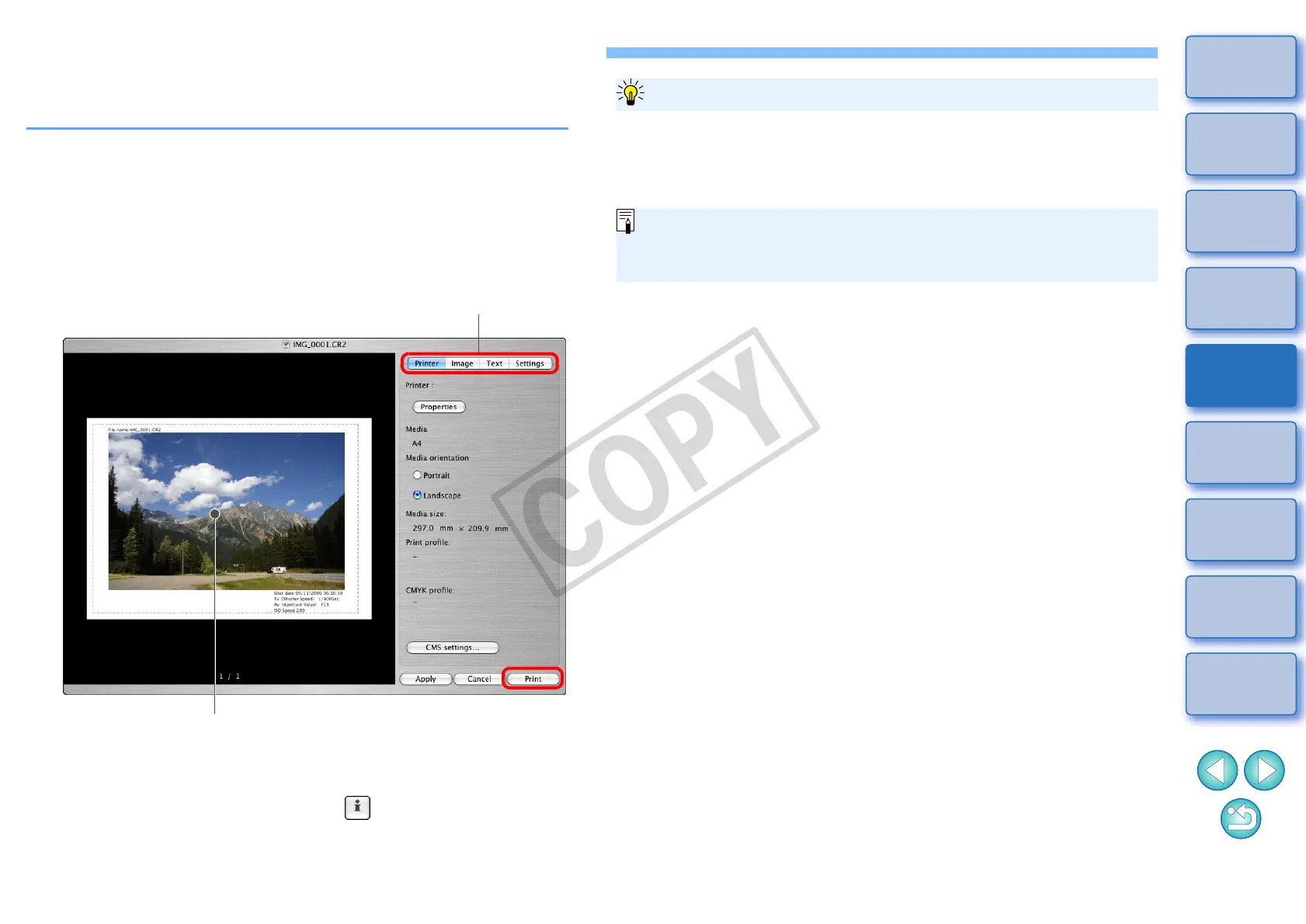
Specify the required settings for printing, and then
click the [Print] button.
O The image can be moved by dragging.
O Drag the four corners of the image to change the size.
O For the shooting information, click [ ] on the [Text] tab sheet
and select the necessary items in the window that is displayed.
Print preview
Switches the settings tab sheet
The settings of each tab sheet in step 3 are memorized when the [Apply]
button is clicked (excluding the contents of the [Text] tab sheet). The
settings can be applied to another image when printing.
To maintain the settings
O You can set printer profiles (p.80).
O If CMYK simulation has been set, the image is printed in the set
colors (p.80).










 To Next Page