EasyManua.ls Logo

Canon EOS 33 - How the Shutter Button Works; Pressing the Shutter Button

Canon EOS 33
108 pages
Print Icon
To Next Page IconTo Next Page
To Previous Page IconTo Previous Page
Loading...
How
the
Shutter
Button
Works
The
EOS
camera's
shutter
button
can
be
depressed
halfway
or
all
the
way.
There
Is
a
click
stop
at
the
halfway
point.
Pressing
the
Shutter
Button
Halfway
or
Completely
The
shutter
button
works
as
described
below.
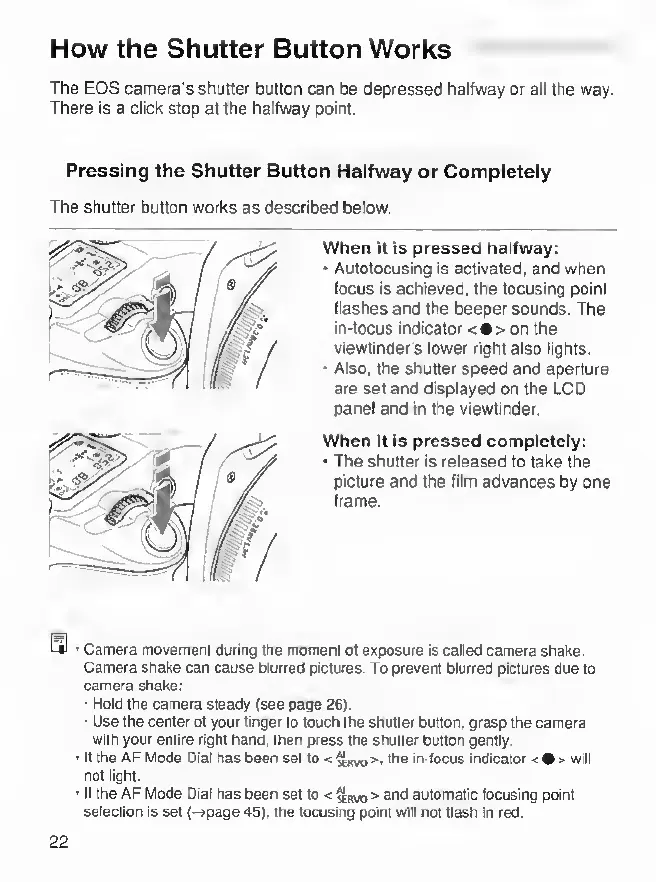
When
it
is
pressed
halfway:
*
Autofocusing
Is
activated,
and
when
focus
Is
achieved,
the
focusing
point
flashes
and
the
beeper
sounds.
The
In-focus
Indicator
<
•
>
on
the
viewfinder's
lower
right
also
lights.
*
Also,
the
shutter
speed
and
aperture
are
set
and
displayed
on
the
LCD
panel
and
in
the
viewfinder.
When
it
is
pressed
completely:
*
The
shutter
is
released
to
take
the
picture
and
the
film
advances
by
one
Irame.
Q
>
Camera
movement
during
the
rrtonienl
of
exposure
is
called
camera
shake
Camera
shake
can
cause
blurred
pictures.
To
prevent
blurred
pictures
due
to
camera
shake:
'
Hold
the
camera
steady
(see
page
26).
•
Use
the
center
of
your
linger
lo
touch
the
shuttw
button,
grasp
the
camera
with
your
entire
right
hand,
then
press
the
shutter
button
gently.
■
If
the
AF
Mode
Dial
has
been
set
to
<
the
in-focus
indicator
<
•
>
will
not
light.
■
If
the
AF
Mode
Dial
has
been
set
to
and
automatic
focusing
point
selection
is
set
(-^page
45).
the
focusing
pont
will
not
flash
in
red.
22