EasyManua.ls Logo

Canon EOS 33 - Quick Start Guide; Installing Batteries; Attaching a Lens; Loading the Film

Canon EOS 33
108 pages
Print Icon
To Next Page IconTo Next Page
To Previous Page IconTo Previous Page
Loading...
Quick
Start
Guide
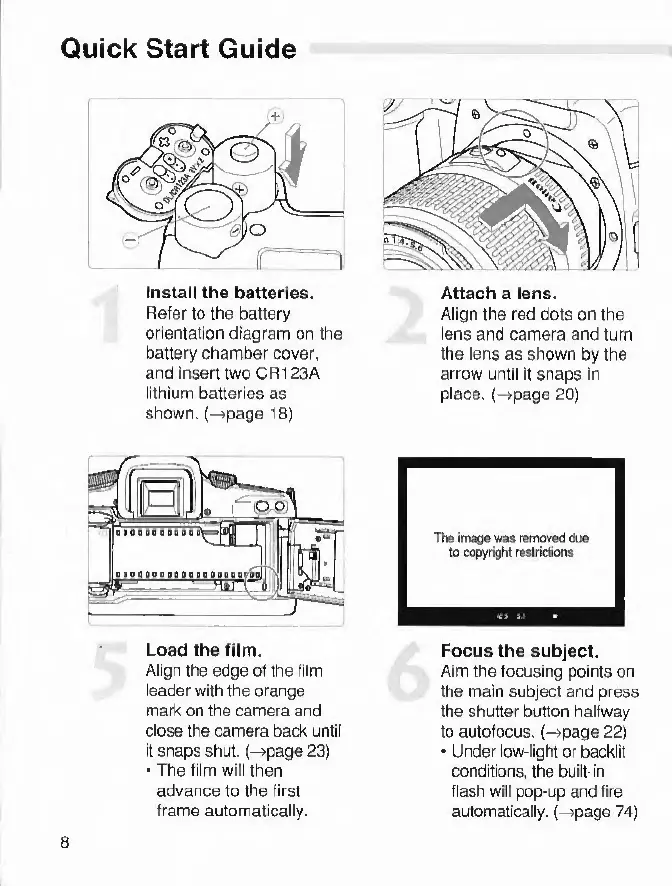
Install
the
batteries.
Refer
to
the
battery
orientation
diagram
on
the
battery
chamber
cover,
and
insert
two
CR123A
lithium
batteries
as
shown,
(-
page
18
)
Load
the
film.
Align
the
edge
of
the
film
leader
with
the
orange
mark
on
the
camera
and
close
the
camera
back
until
it
snaps
shut,
(-
page
23)
The
film
will
then
advance
to
the
first
frame
automatically.
Attach
a
lens.
Align
the
red
dots
on
the
lens
and
camera
and
turn
the
lens
as
shown
by
the
arrow
until
It
snaps
in
place,
(-
page
20
)
Focus
the
subject.
Aim
the
focusing
points
on
the
main
subject
and
press
the
shutter
button
halfway
to
autofocus.
(-»page
22)
Under
low-light
or
backlit
conditions,
the
built-in
flash
will
pop-up
and
fire
automatically,
(-
page
74)
8

Other manuals for Canon EOS 33

Related product manuals