EasyManua.ls Logo

Canon EOS 33 - Metering Mode

Canon EOS 33
108 pages
Print Icon
To Next Page IconTo Next Page
To Previous Page IconTo Previous Page
Loading...
®
Metering
Mode
The
camera
has
three
metering
modes:
Evaluative,
partial,
and
centerweighted
averaging
metering.
Use
the
metering
mode
most
suited
for
the
subject
or
situation.
•
The
metering
mode
can
be
selected
in
the
Creative
Zone
modes.
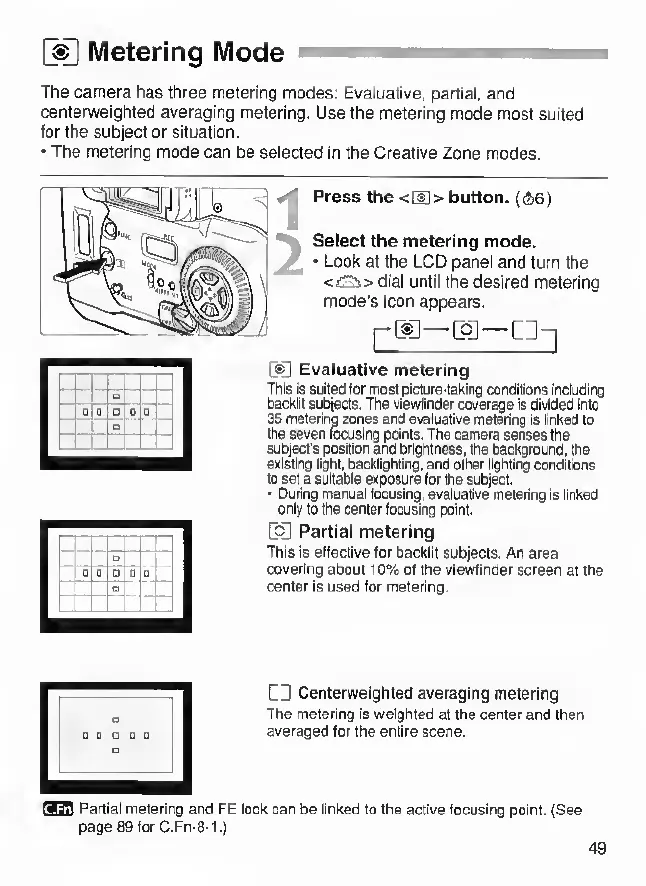
Press
the
<[!]>
button.
{S6)
Select
the
metering
mode.
•
Look
at
the
LCD
panel
and
turn
the
<£!Iis>
dial
until
the
desired
metering
mode's
icon
appears.
pcc—coj—c:-|
CC
Evaluative
metering
This
Is
suited
lor
most
picture-taking
conditions
including
Oackllt
subjects.
The
viewfinder
coverage
is
divided
Into
35
metering
zones
and
evaluative
metering
is
linked
to
the
seven
fusing
points.
The
camera
senses
the
subject's
position
and
brightness,
the
background,
the
existing
light,
backlighting,
and
other
lighting
conditions
to
set
a
suitable
exposure
for
the
subject.
•
During
manual
focusing,
evaluative
metering
is
linked
only
to
the
center
focusing
point.
Partial
metering
This
is
effective
for
backlit
subjects.
An
area
covering
about
10%
of
the
viewfinder
screen
at
the
center
Is
used
for
metering,
CD
Centerweighted
averaging
metering
The
metering
is
welpted
at
the
center
and
then
averaged
tor
the
entire
scene.
Partial
metering
and
FE
lock
can
be
linked
to
the
active
focusing
point.
(See
page
89forC.Fn-8-1.)
49