EasyManua.ls Logo

Canon EOS 33 - Page 40

Canon EOS 33
108 pages
Print Icon
To Next Page IconTo Next Page
To Previous Page IconTo Previous Page
Loading...
Imprinting
the
Date
or
Time
(OD
Model
only)
Setting
the
Date
and
Time
To
set
the
date
or
time,
follow
the
procedure
below.
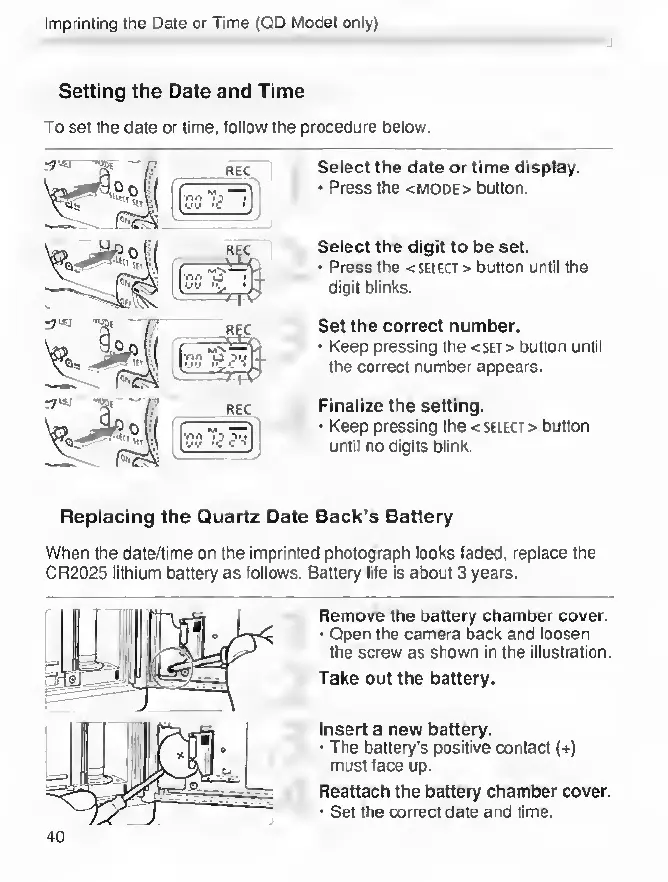
Select
the
date
or
time
display.
Press
the
<mode>
button.
Select
the
digit
to
be
set.
Press
the
<SELECT>
button
until
the
digit
blinks.
Set
the
correct
number.
Keep
pressing
the
<set>
button
until
the
correct
number
appears.
Finalize
the
setting.
Keep
pressing
the
<
select
>
button
until
no
digits
blink.
Replacing
the
Quartz
Date
Back's
Battery
When
the
date/time
on
the
imprinted
photograph
looks
faded,
replace
the
CR2025
lithium
battery
as
follows.
Sattery
life
is
about
3
years.
Remove
the
battery
chamber
cover.
Open
the
camera
back
and
loosen
the
screw
as
shown
In
the
Illustration.
Take
out
the
battery.
Insert
a
new
battery.
The
battery’s
positive
contact
(+)
must
face
up.
Reattach
the
battery
chamber
cover.
Set
the
correct
date
and
time.
40

Other manuals for Canon EOS 33

Related product manuals