EasyManua.ls Logo

Canon EOS 33 - Bulb Exposures; Long Exposure Photography

Canon EOS 33
108 pages
Print Icon
To Next Page IconTo Next Page
To Previous Page IconTo Previous Page
Loading...
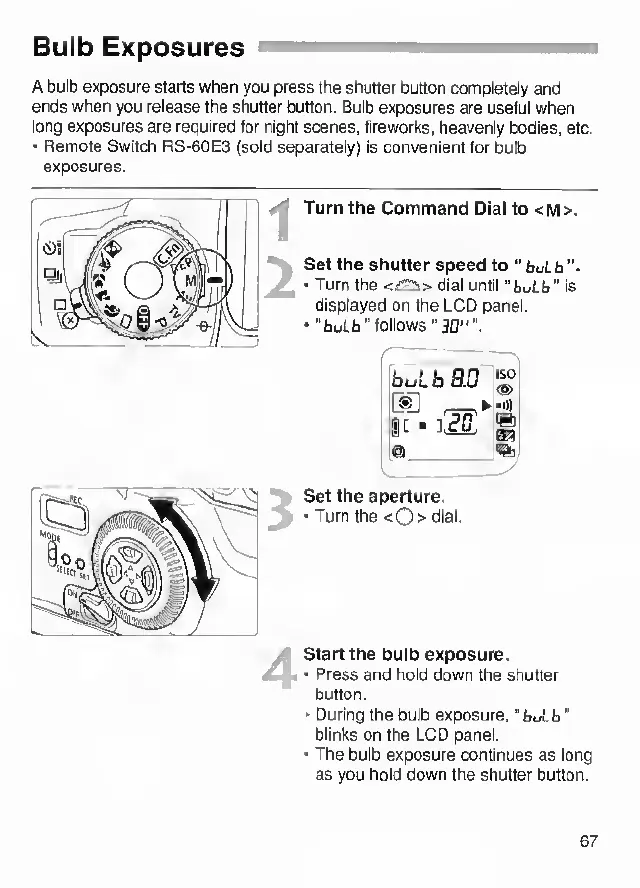
Bulb
Exposures
A
bulb
exposure
starts
when
you
press
the
shutter
button
completely
and
ends
when
you
release
the
shutter
button.
Bulb
exposures
are
useful
when
long
exposures
are
required
for
night
scenes,
fireworks,
heavenly
bodies,
etc.
•
Remote
Switch
RS-60E3
(sold
separately)
is
convenient
lor
bulb
exposures.
Turn
the
Command
Dial
to
<m>.
Set
the
shutter
speed
to
“
buLb
•
Turn
the
<£:2i>
dial
until
"buLfa"
Is
displayed
on
the
LCD
panel,
•"huib"
follows''
3D"".
Set
the
aperture.
•
Turn
the
<
0
>
cflal-
'
Start
the
bulb
exposure.
-
1
—
•
Press
and
hold
down
the
shutter
button.
■
During
the
bulb
exposure,
“buLb"
blinks
on
the
LCD
panel.
•
The
bulb
exposure
continues
as
long
as
you
hold
down
the
shutter
button.
67