EasyManua.ls Logo

Canon EOS 33 - Flash Exposure Compensation

Canon EOS 33
108 pages
Print Icon
To Next Page IconTo Next Page
To Previous Page IconTo Previous Page
Loading...
Using
the
Built-in
Flash
^
Flash
Exposure
Compensation
You
can
set
flash
exposure
compensation
with
the
built-in
flash
or
an
external,
EOS-dedicated
Speedlite
as
easily
as
normal
exposure
compensation.
The
settable
range
is
±2
stops
in
1/2-stop
increments.
Flash
exposure
compensation
works
in
the
Creative
Zone
modes.
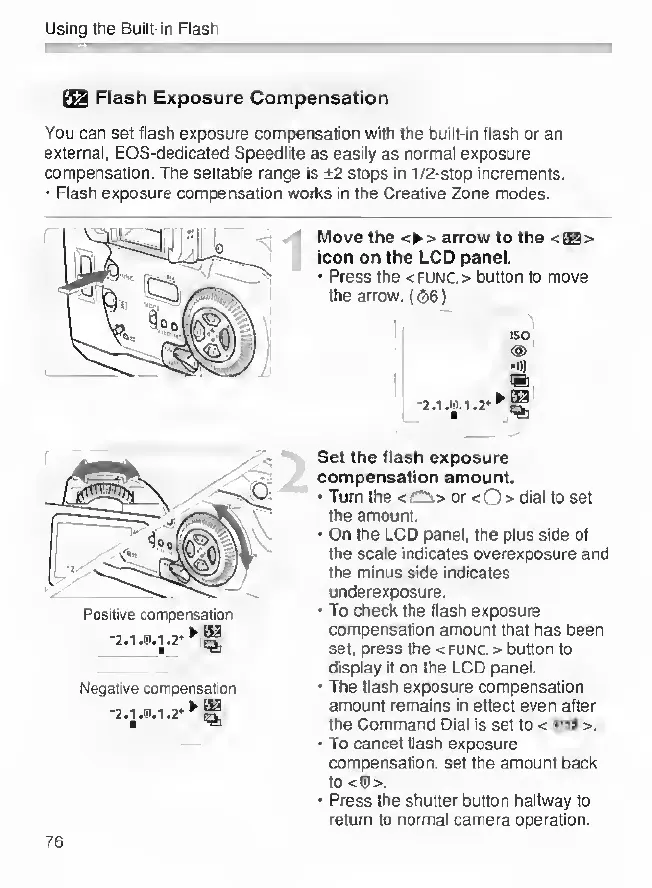
Move
the
>
arrow
to
the
<
ts
>
icon
on
the
LCD
panel.
Press
the
<
FUNC.
>
button
to
move
the
arrow.
((3)6)
ISO
(S>
.»)
Set
the
flash
exposure
compensation
amount.
Turn
the
or
<0
>
dial
to
set
the
amount.
On
the
LCD
panel,
the
plus
side
of
the
scale
indicates
overexposure
and
the
minus
side
indicates
underexposure.
To
check
the
flash
exposure
compensation
amount
that
has
been
set,
press
the
<
func.
>
button
to
display
it
on
the
LCD
panel.
The
flash
exposure
compensation
amount
remains
in
effect
even
after
the
Command
Dial
is
set
to
<
>.
'
To
cancel
flash
exposure
compensation,
set
the
amount
back
to
<®>.
Press
the
shutter
button
halfway
to
return
to
normal
camera
operation.
76

Other manuals for Canon EOS 33

Related product manuals