Recording Video and Photos
44
Left side of the screen
Top of t he screen
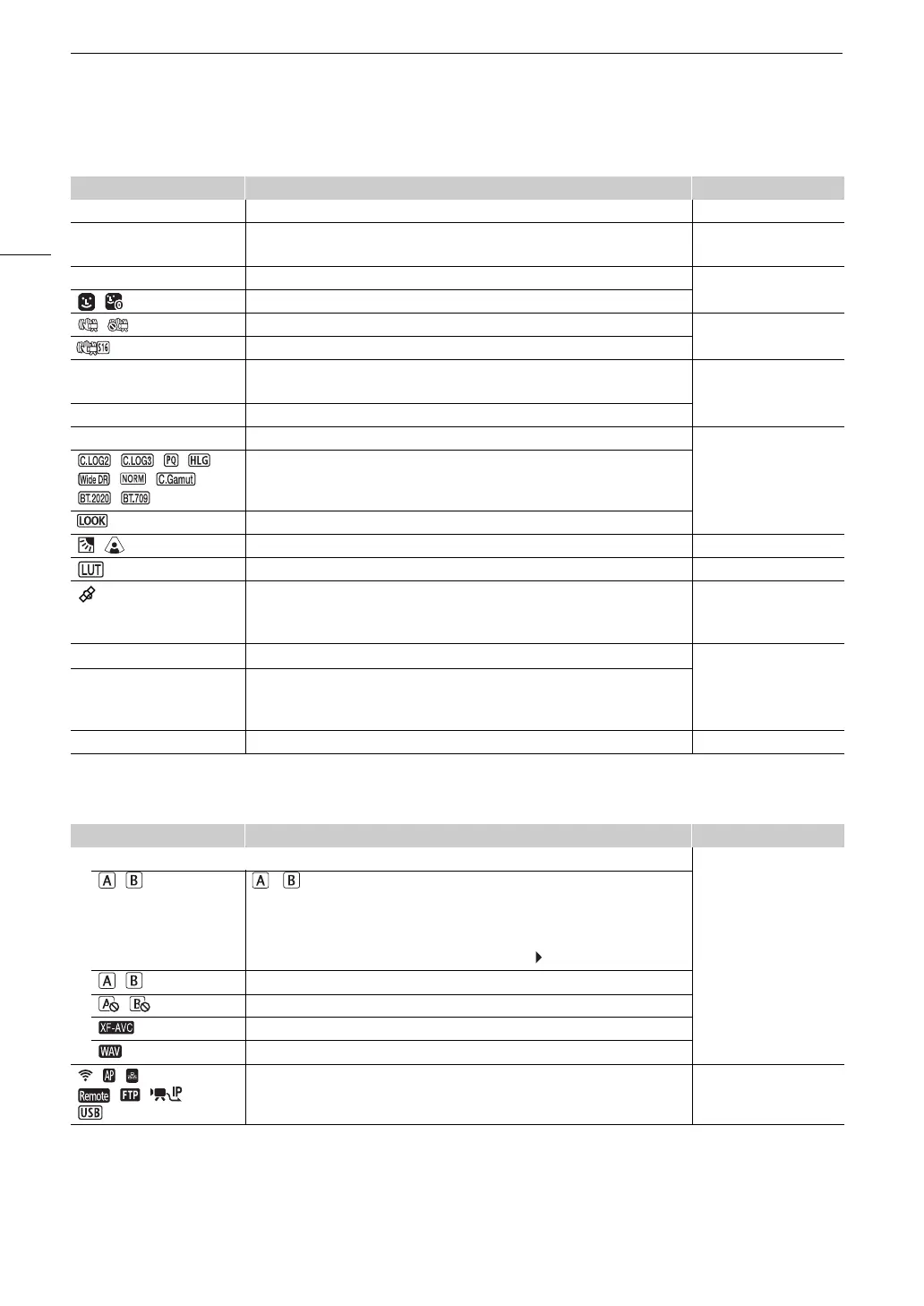
Icon/Display Description Custom Display
0000 mm Approximate focal length of the lens. 1: [Focal Length]
000.0 m Object distance (numeric).
• Only when an RF lens or certain EF Cinema lenses are attached.
1: [Object Distance
(Numeric)]
A
,
@
Focus mode (A 69). 1: [Focus Mode]
, Face AF (A 75).
, Image stabilization enabled/disabled (A 78). 1: [Digital IS]
Super16 Digital IS (A 78).
j (Lens information) Lens information.
• Depending on the lens, the information displayed may differ.
1: [Lens]
i
(in red) Lens error warning (A 184).
/
00 Custom picture file selected (
A
109). 1: [Custom Picture]
, , , ,
, , ,
,
[Gamma/Color Space] setting in the custom picture file (A 113).
Look Files (A 111).
, Light metering mode (A 65). 1: [Light Metering]
A viewing LUT has been applied (A 131). 1: [LUT]
GPS signal: continuously on - satellite signal acquired; flashing - satellite signal not
acquired.
• Displayed only when a GP-E2 GPS Receiver is connected to the camera.
2: [GPS]
`
Fan operation: in white – normal (A 39); in red – fan warning (A 184). 2: [Temperature/Fan]
b (in green)
Temperature warning (A 39).
• When the camera internal temperature rises above a certain level, b will
appear in yellow. If the temperature rises further, b will appear in red.
Q User memo (A 98). 2: [User Memo]
Icon/Display Description Custom Display
Recording media status, estimated remaining recording time and recording format 2: [Remaining Rec Time]
, (in green)
000 min
/ : SD card (primary clips).
The card’s status is indicated by the icon’s color: in green – can record; in yellow –
card almost full (5 minutes or less); in red – card almost full (less than 1 minute); in
white – reading the card.
• The card selected for recording is indicated with a mark.
, (in red) END Card is full.
, (in red) No card or cannot record on the card.
, ¸ Video format (
A
53).
Audio files for slow & fast motion recording (
A
100).
, ,
, ,
Network connection status (A 152). 2: [Network Functions]



 To Next Page