EasyManua.ls Logo

Canon EX AUTO - Checking Correct Film Loading

Canon EX AUTO
40 pages
Print Icon
To Next Page IconTo Next Page
To Previous Page IconTo Previous Page
Loading...
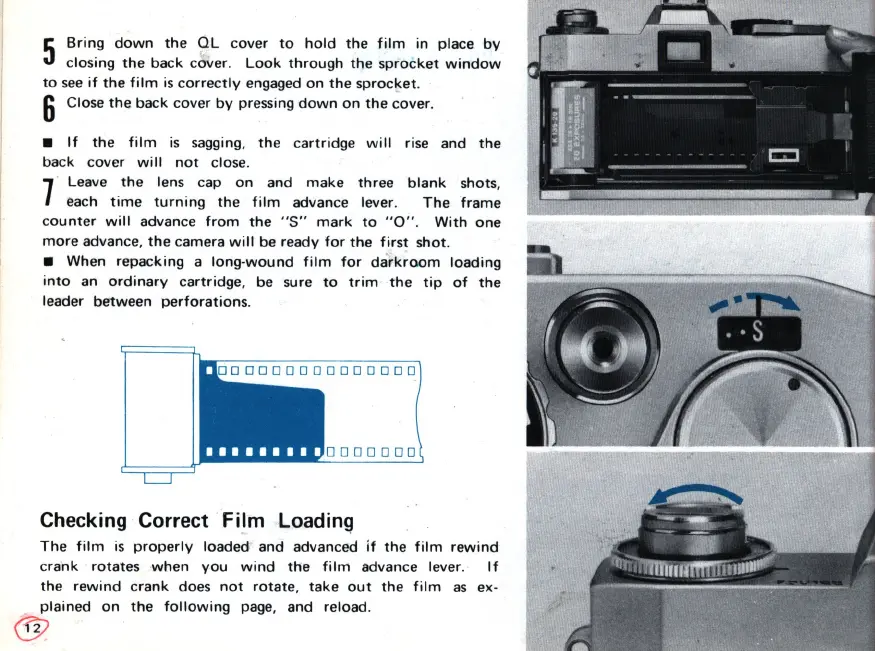
5
Bring
down
the
QL
cover
to
hold
the
film
in
place
by
closing
the
back
cover.
Look
through
the
sprocket
window
to
see
if
the
fi
1m
is
correctly
engaged
on
the
sprocket
.
6 Close
the
back
cover
by
pressing
down
on
the
cover
.
If
the
film
is
sagging,
the
cartridge
will
rise and
the
back
cover
will
not
close.
7
Leave
the
lens cap
on
and
make
three
blank
shots,
each
time
turning
the
film
advance lever.
The
frame
counter
will
advance
from
the
"s"
mark
to
" 0 " .
With
one
more
advance,
the
camera
will
be ready
for
the
first
shot
.
When
repacking
a
long-wound
film
for
darkroom
loading
into
an
ordinary
cartridge,
be sure
to
trim
the
tip
of
the
leader
between
perforations
.
I I
•••••••••
0000000
0000000
Checking Correct Film
Loadin~
The
film
is
properly
loaded
and advanced
if
the
film
rewind
c
rank
rotates
when
you
wind
the
film
advance lever.
If
the
rewind
c
rank
does
not
rotate,
take
out
the
film
as
ex-
plained
on
the
following
page, and
reload
.
@

Related product manuals