EasyManua.ls Logo

Canon EX AUTO - Shutter Speed Adjustment

Canon EX AUTO
40 pages
Print Icon
To Next Page IconTo Next Page
To Previous Page IconTo Previous Page
Loading...
Shutter
Speed
Adjustment
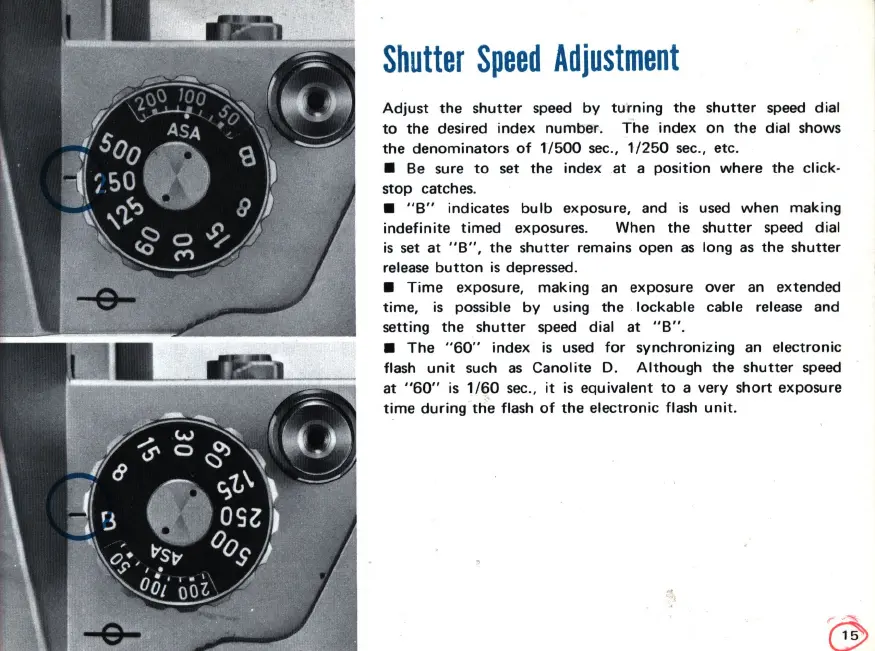
Adjust
the
shutter
speed
by
turning
the
shutter
speed
dial
to
the
desired
index
number.
The
index
on
the
dial shows
the
denominators
of
1/500
sec
.,
1/250
sec
., etc.
Be sure
to
set
the
index
at
a
position
where
the
click-
stop
catches.
"B"
indicates
bulb
exposure, and
is
used
when
making
indefinite
timed
exposures. When
the
shutter
speed
dial
is
set
at
"B
" ,
the
shutter
remains
open
as
long
as
the
shutter
release
button
is
depressed.
Time
exposure,
making
an exposure over
an
extended
time,
is
possible
by
using
the
lockable
cable release and
setting
the
shutter
speed dial
at
" B" .
The
"
60"
index
is
used
for
synchronizing
an
electronic
flash
unit
such
as
Canolite
D.
Although
the
shutter
speed
at
"
60"
is
1/60
sec
.,
it
is
equivalent
to
a
very
short
exposure
time
during
the
flash
of
the
electronic
flash
unit
.

Related product manuals