EasyManua.ls Logo

Canon EX AUTO - Double Exposures

Canon EX AUTO
40 pages
Print Icon
To Next Page IconTo Next Page
To Previous Page IconTo Previous Page
Loading...
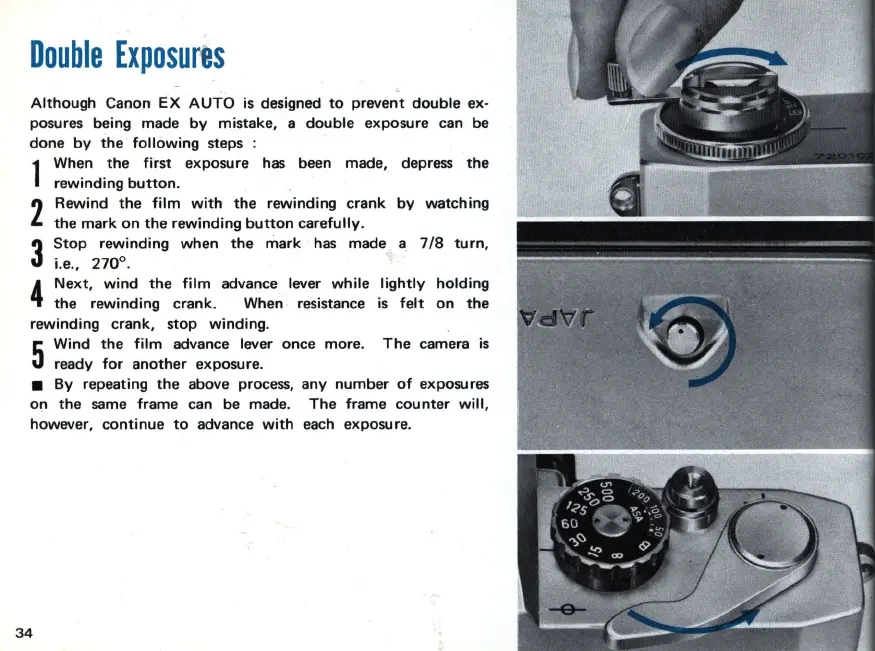
Double
Exposures
Although
Canon
EX
AUTO
is designed
to
prevent
double
ex-
posures being made
by
mistake, a
double
exposure can be
done
by
the
following
steps :
1
When
the
first
exposure
has
been made, depress
the
rewinding
button
.
2
Rewind
the
film
with
the
rewinding
crank
the
mark
on
the
rewinding
button
carefully
.
3
Stop
rewinding
when the
mark
has
made
i.e., 270°.
by
watching
a
7/8
turn,
4
Next,
wind
the
film
advance lever
while
lightly
holding
the
rewinding
crank. When resistance
is
felt
on
the
rewinding crank, stop winding.
5
Wind
the
film
advance lever once
more
.
ready
for
another
exposure.
The
camera
is
By
repeating
the
above process, any
number
of
exposures
on
the
same frame can be made.
The
frame
counter
will,
however,
continue
to
advance
with
each exposure.
34

Related product manuals