EasyManua.ls Logo

Canon EX AUTO - Film Handling; Film Loading

Canon EX AUTO
40 pages
Print Icon
To Next Page IconTo Next Page
To Previous Page IconTo Previous Page
Loading...
Film
Loading
The
Canon
EX
AUTO
accepts
any
standard
35mm
film
roll
in
cartridge
for
daylight
loading. When loading a new
film,
always avoid
direct
sunlight.
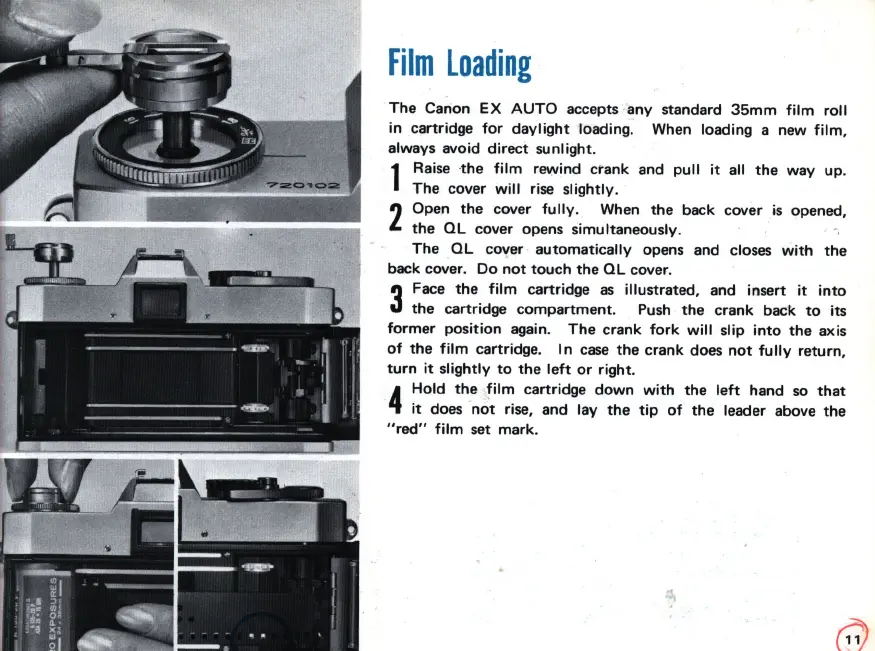
1
Raise ·
the
film
rewind
ctank
and
pull
it
all
the
way
up
.
The
cover
will
rise
slightly.
2
Open
the
cover
fully
. When
the
back cover is opened,
the
QL
cover opens simultaneously.
The
QL
cover
automatically
opens and closes
with
the
back cover.
Do
not
touch
the
QL
cover.
3
Face
the
film
cartridge
as
illustrated, and insert
it
into
the
cartridge
compartment
. Push
the
crank back
to
its
former
position
again.
The
crank
fork
will
slip
into
the
axis
of
the
film
cartridge.
In
case
the
crank does
not
fully
return,
turn
it
slightly
to
the
left
or
right
.
4
Hold
the
film
cartridge
down
with
the
left
hand
so
that
it
does
not
rise, and lay
the
tip
of
the
leader above the
"red"
film
set
mark
.

Related product manuals