EasyManua.ls Logo

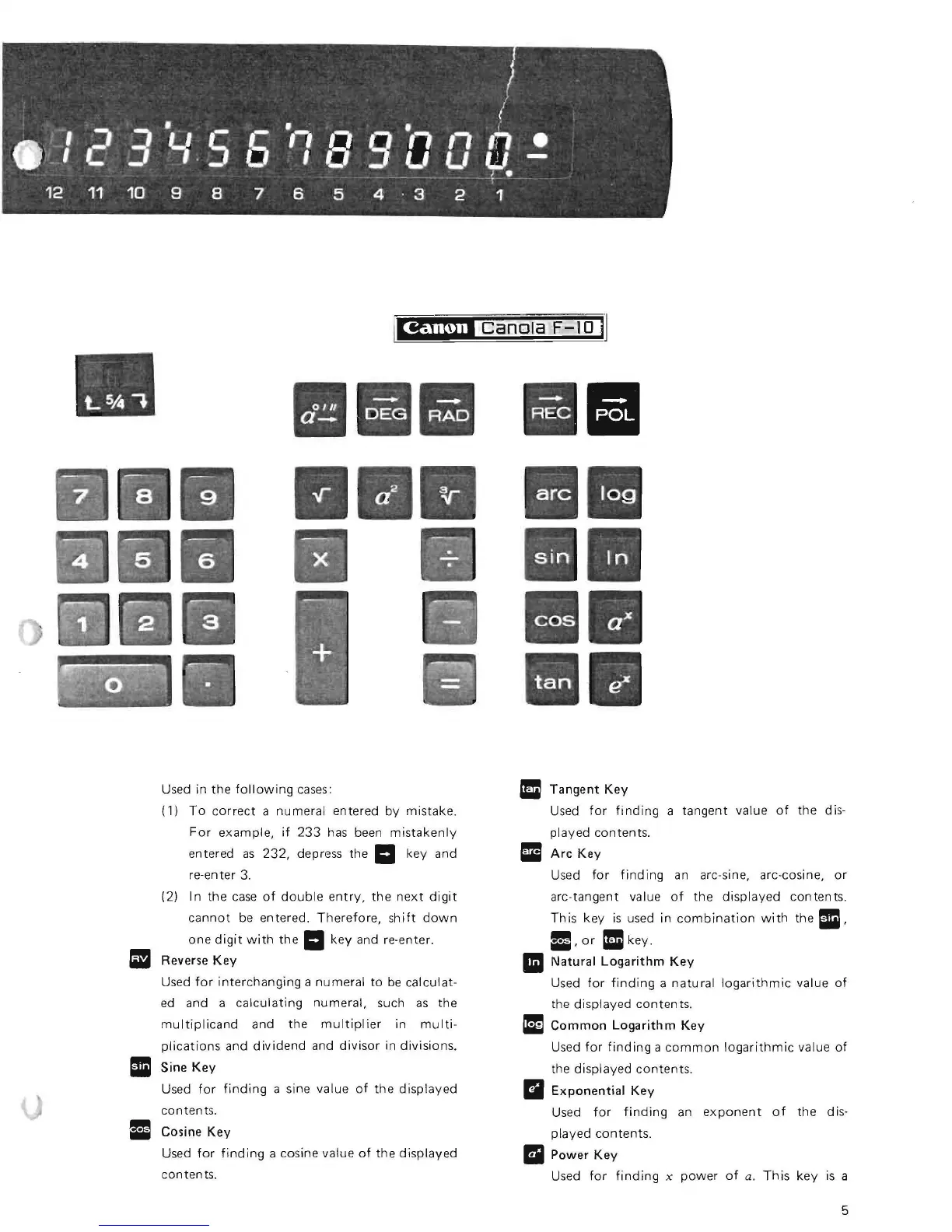
Canon F-10 - Scientific Function Keys; Correction and Interchanging Keys

Canon F-10
16 pages
Print Icon
To Next Page IconTo Next Page
To Previous Page IconTo Previous Page
Loading...
I
e
!~-
}
2 3 Y.S G '18 9 a a G
f
12
11
10
9 8 7 6 5 4 · 3 2 1
Used in
the
following
cases:
(1)
To
correct
a
numeral
entered
by
mistake.
For
example,
if
233
has been
mistakenly
entered
as
232,
depress the
II
key and
re-en
ter
3.
(2)
In
the
case
of
double
entry,
the
next
digit
cannot
be entered.
Therefore,
shift
down
one
digit
with
the
II
key
and re·enter.
Reverse
Key
Used
for
interchanging
a
numeral
to
be
calculat-
ed
and a
calculating
numeral,
such
as
the
multiplicand
and
the
multiplier
in
multi-
plications
and
dividend
and
divisor
in
divisions.
II
Sine
Key
Used
for
finding
a sine value
of
the
displayed
contents.
31
Cosine
Key
Used
for
finding
a cosine value
of
the
displayed
con ten
t5.
II
a
Tangent
Key
Used
for
finding
a
tangent
value
of
the
dis-
played
contents.
III
Arc
Key
Used
for
finding
an
arc-sine, arc-cosine,
or
arc-tangent value
of
the
displayed
contents.
Th
is
key
is
used in
combination
with
the
II,
31,
or
III
key.
II
Natural
Logarithm
Key
Used
for
finding
a
natural
logarithmic
value
of
the
displayed
con ten
ts.
III
Common
Logarithm
Key
Used
for
finding
a
common
logarithmic
value
of
the
displayed
contents.
II
Exponential
Key
Used
for
finding
an
exponent
of
the
dis-
played
contents.
II
Power
Key
Used
for
finding
x
power
of
a.
This
key
is
a
5

Related product manuals