Acquiring GPS Signals
14
Check GPS information as follows when the receiver is attached or
connected to a camera that displays [GPS device settings] in the
menu.
1
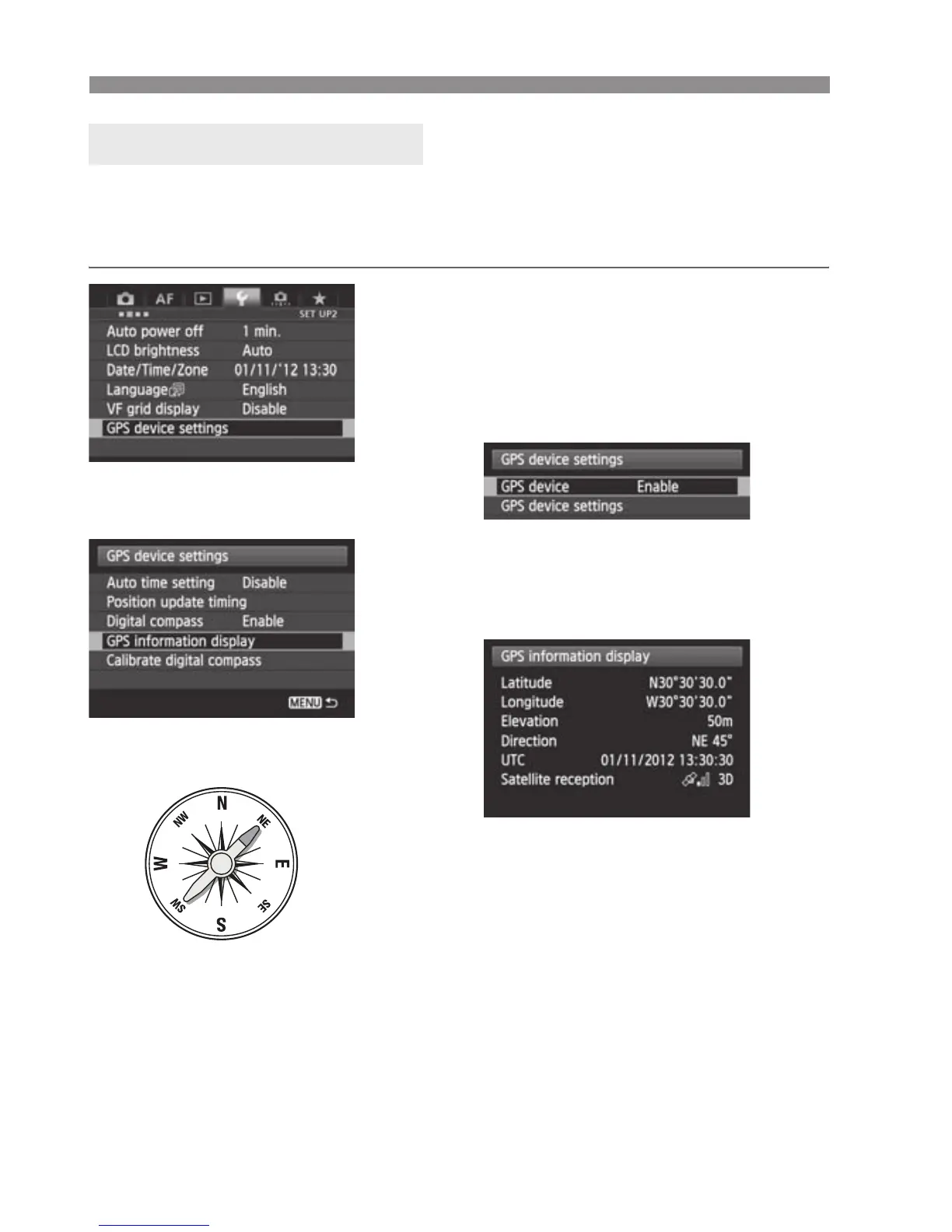
Select [GPS device settings].
On the EOS-1D X and other models
that display the following screen, set
[GPS device] to [Enable], and then
select [GPS device settings].
2
Select [GPS information display].
X Detailed GPS information is
displayed.
In this sample screenshot, [Direction:
NE 45°] indicates that the camera was
facing 45° northeast.
[UTC] (Coordinated Universal Time) is
essentially the same as Greenwich
Mean Time.
The icon <A> indicates signal
conditions. When <C> is displayed,
elevation can also be recorded.
However, elevation cannot be
recorded when <B> is displayed.
Viewing GPS Information
North
0°
South
180°
East
90°
West
270°


 To Next Page