1 - 15
3.4 Verification Items
(1) Service test print
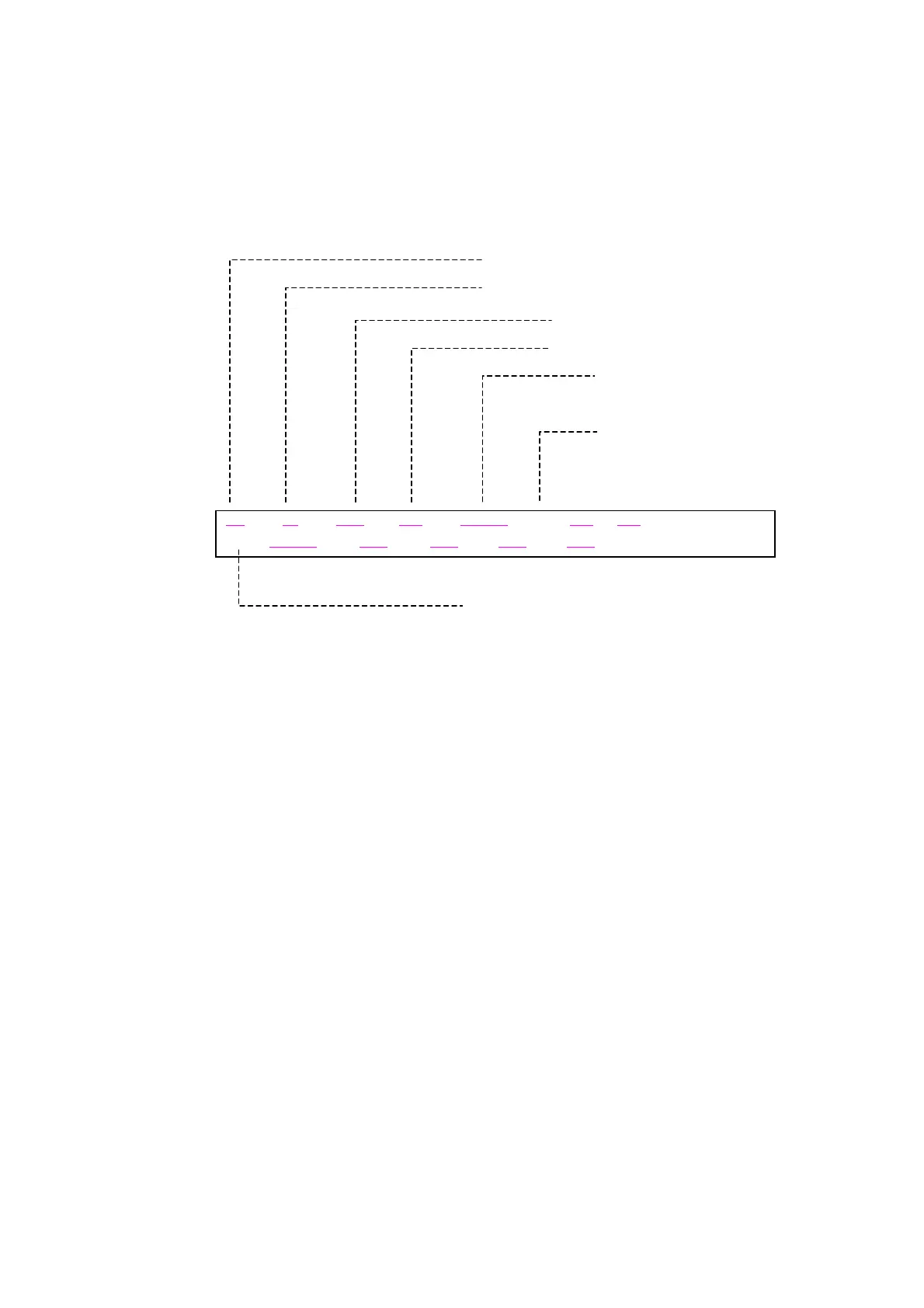
<EEPROM information contents>
On the service test print (sample on the following page), confirm the EEPROM information as shown
below. (The information is given in the upper portion of the printout.)
<Print check items>
On the service test print (sample on the following page), confirm the following items:
- Check 1, nozzle check pattern: Ink shall be ejected from all nozzles.
- Check 2, top of form accuracy: The line shall be within the paper.
- Check 3, vertical straight lines: The line shall not broken.
- Check 4, halftone: There shall be no remarkable streaks or unevenness.
- Check 5, CD-R / automatic print head alignment sensor correction:
The results shall be OK.
- Check 6, media sensor correction: Nothing shall be printed to indicate that the correction has been
implemented.
(If not implemented, “MEDIA SENSOR = NO CALIBRATE” is
printed.)
Destination (model name)
ROM Version
Ink absorber waste ink amount (%)
umber of times the print head is installe
Initial print date after installation
(Default: 1970/01/01)
umber of times of powe
-on
S: Soft-power-on
H: Hard-power-on
Error record
ERDAY: Latest non-error day
OER0: Second operator call error from the last
OER1: Latest operator call error
SER0: Second service call error from the last
SER1: Latest service call error
xxxx Vx.xx D = xxx .x x CH = xxxxx ST = xxxx / xx / xx PWC ( S = xxxxx H= xxxxx )
ER DAY = xxxx / xx / xx
OER0 = xxxxxx OER1 = xxxxxx SER0 = xxxxxx SER1 = xxxxxx


 To Next Page