A-5
A-5
For Macintosh
If the machine is connected to a computer with a USB cable, disconnect the USB cable.
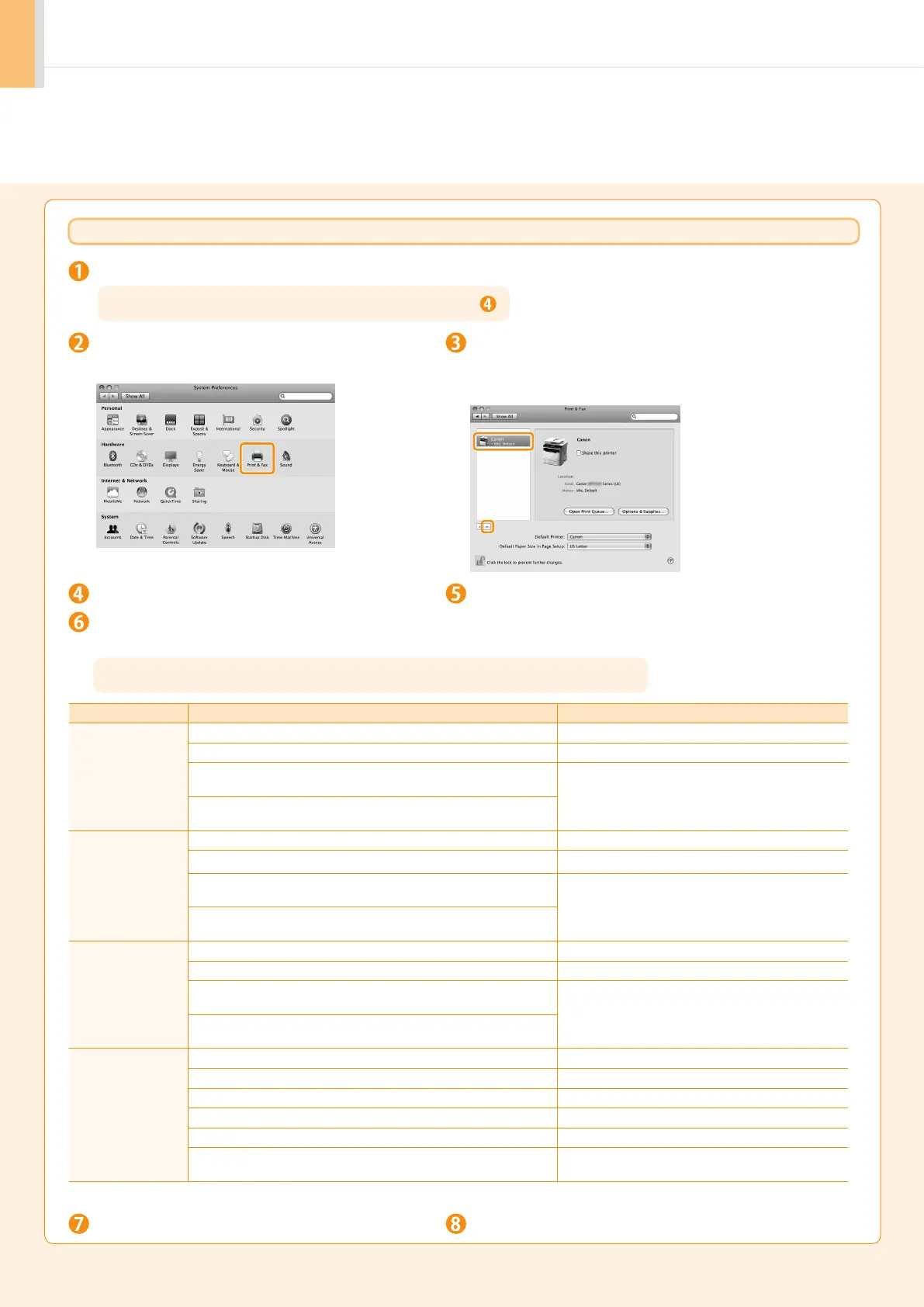
Open [System Preferences], and then click
[Print & Fax].
Select the machine, and then click the [-] icon.
If you are using OS X 10.4.x, click [Print] to display the [Print]
pane, and then click the [—] icon.
Delete all print queues
set from this driver.
Start the Mac OS X Finder.
Close all windows open.
From the menu bar, click [Go] → [Go to Folder].
Restart the computer.
Enter the location of the folder below, click [Go], and then delete a file or folder.
Drag a file or folder to [Trash] icon on the Dock to delete.
If you want to delete the Scanner Driver or MF Toolbox, proceed to step .
If [Authenticate] dialog box appears, enter the administrator’s name and password, and then click [OK].
Software Location of the folder to enter Name of the file or folder to delete
Printer Driver
(UFR II)
/Library/Printers/Canon/ UFR2
/Library/LaunchAgents/ jp.co.canon.UFR2.BG.plist
• When using Mac OS X 10.4.x:
/Library/Printers/PPDs/Contents/Resources/en.Iproj/
CNTDXXXZUS.ppd.gz
(XXX may differ depending on the model.)
• When using Mac OS X 10.5 or later:
/Library/Printers/PPDs/Contents/Resources/
Printer Driver
(CUPSPS2)
/Library/Printers/Canon/ CUPSPS2
/Library/LaunchAgents/ jp.co.canon.CUPSPS2.BG.plist
• When using Mac OS X 10.4.x:
/Library/Printers/PPDs/Contents/Resources/en.lproj/
CNMCXXXS2US.ppd.gz
(XXX may differ depending on the model.)
• When using Mac OS X 10.5 or later:
/Library/Printers/PPDs/Contents/Resources/
Fax Driver
/Library/Printers/Canon/ CUPSFAX
/Library/LaunchAgents/ jp.co.canon.CUPSFAX.BG.plist
• When using Mac OS X 10.4.x:
/Library/Printers/PPDs/Contents/Resources/en.Iproj/
CNTDXXXFUS.ppd.gz
(XXX may differ depending on the model.)
• When using Mac OS X 10.5 or later:
/Library/Printers/PPDs/Contents/Resources/
Scanner Driver /
MF Toolbox
/Applications/Canon MF Utilities/ MF Toolbox
/Library/Application Support/Canon/ ScanGear MF
/Library/Application Support/Canon/ WMCLibrary.framework
/Library/Application Support/Canon/ WMCReg.plist
/Library/Image Capture/Devices/* Canon MFScanner.app*
/Library/Image Capture/TWAIN Data Sources/
Canon XXX.ds
(XXX may differ depending on the model.)
* Only when using Mac OS X 10.6












 To Next Page