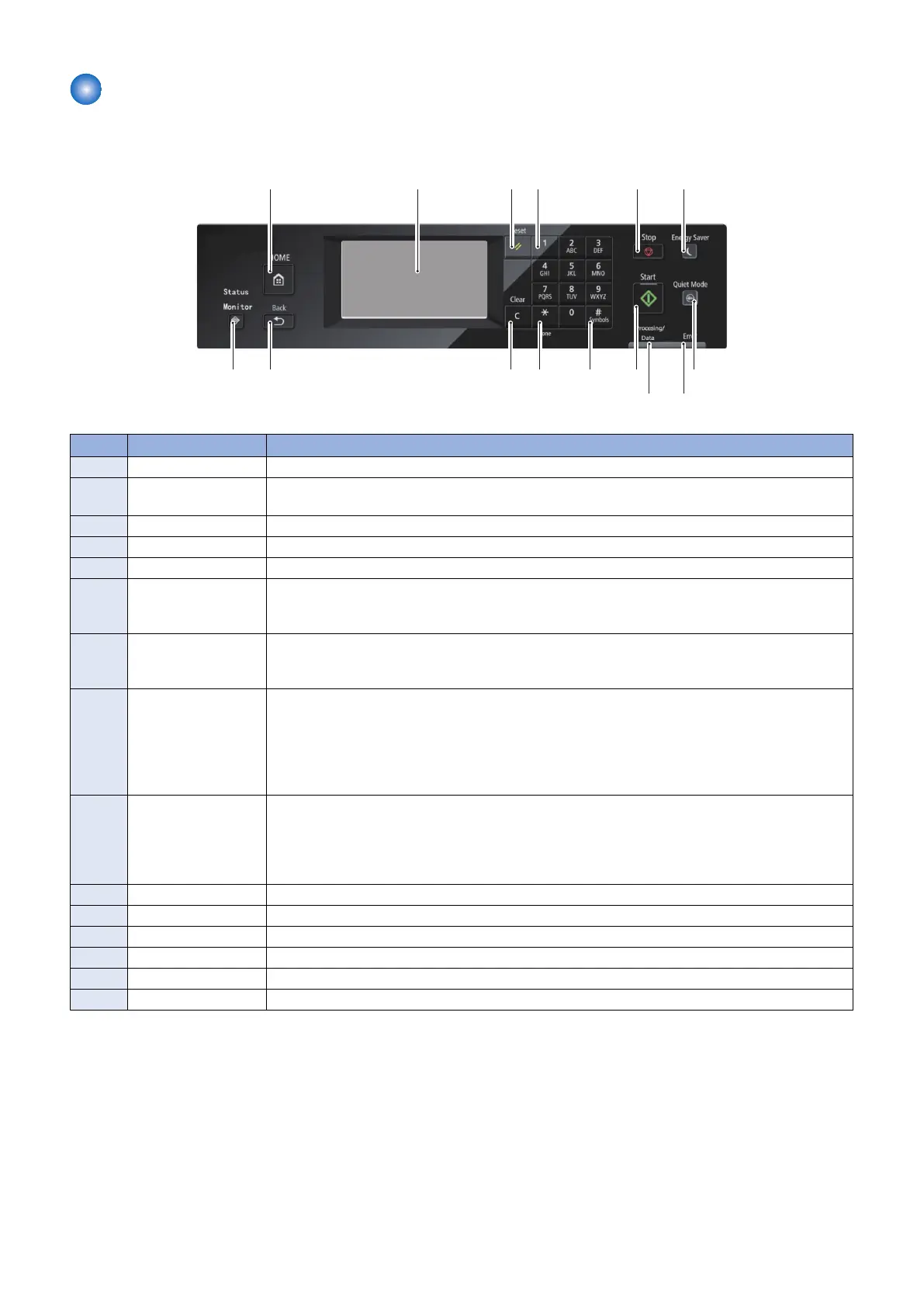
Control Panel
■ Touch Panel Model
[5]
[1]
[10]
[15]
[6]
[14]
[7]
[9]
[3]
[13]
[8]
[4]
[12] [11]
[2]
No. Key / LED name Function
[1] [Home] key Press to return to the home screen.
[2] Display Displays a message or operation status. Displays menu, selected item, texts, numbers and other
information when changing settings. Operation is performed by tapping the touch panel.
[3] [Reset] key Press to reset the settings (to change the settings of copy/scan/fax to standard mode).
[4] Numeric key Press to enter the number of copies, zoom value and the names and numbers of address book.
[5] [Stop] key Press to stop a job.
[6] [Energy Saver] key Press to manually enter/recover from energy saver mode.
• Off: In normal machine operation
• On (Green): In energy saving mode
[7] [Quiet mode] key Press to switch On / Off of the quiet mode.
• Off: In normal machine operation
• On (Green): In quiet mode
[8] Error LED Indicates Error status
• Off: No Error
• On (Orange): When an error that cannot be recovered by the user (service call) occurs
• Blinking (Orange): When an error that can be recovered by the user (such as paper jam, no
paper, etc.) occurs
* On status overrides Blinking status when the both occur simultaneously.
[9] Processing/Data LED Indicates Job status
• Off: No Job
• On (Green): Job waiting
• Blinking (Green): Job being executed
* On status overrides Blinking status when the both occur simultaneously.
[10] [Start] key Press to start a job.
[11] [Symbols] key Press to enter symbols.
[12] [Tone] key Use to send the tone signal from the dial line.
[13] [Clear] key Press to clear numbers such as number of copies, or text.
[14] [Back] key Press to return to the screen one layer above.
[15] [Status Monitor] key Press to check the status of printing, copying, scanning and outputting the Report.
1. Product Overview
20








 To Next Page