9
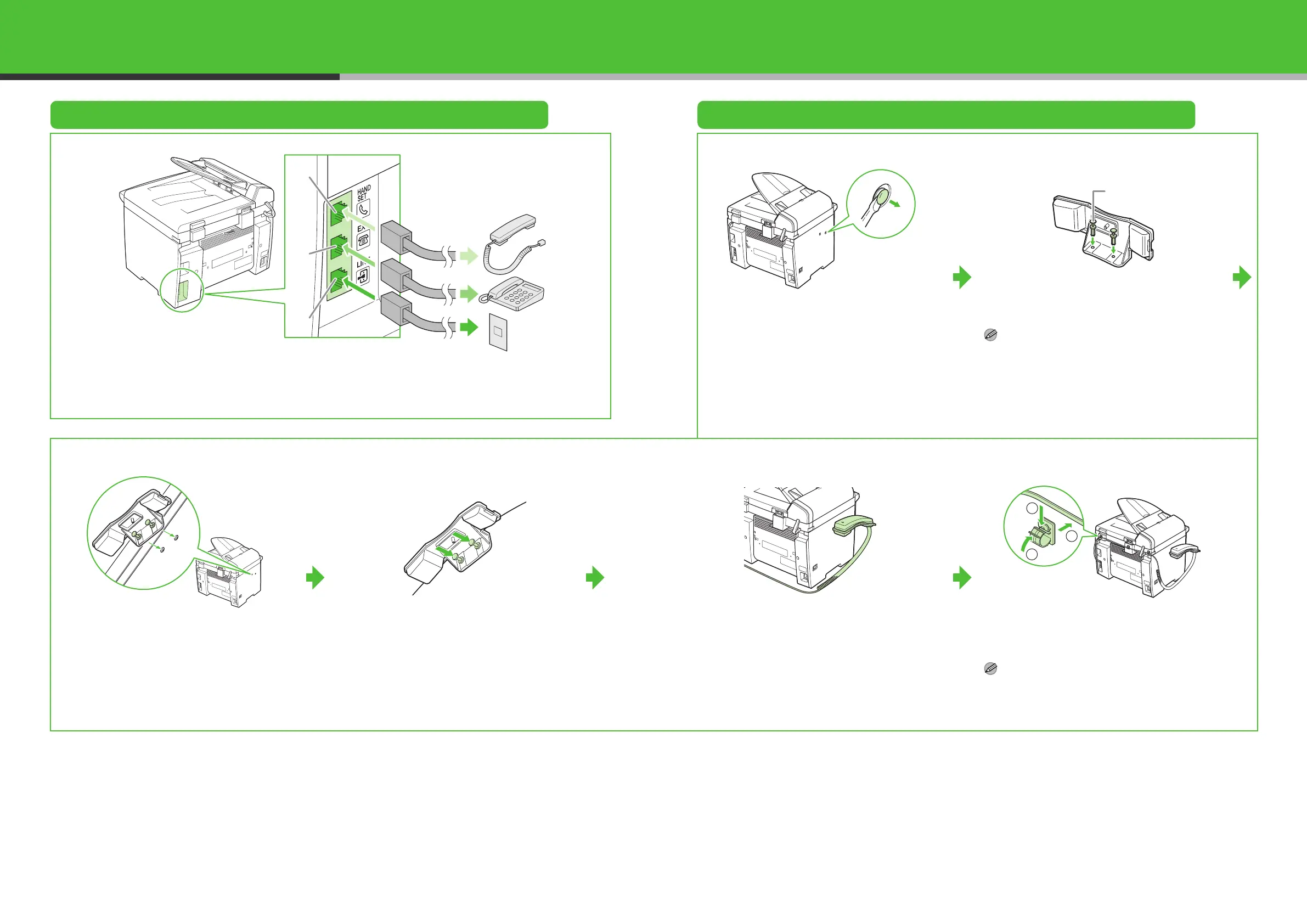
Connect Telephone Cables and Install Handset
Connect Telephone Cables Install Handset (Optional)
Connect the optional handset to the handset jack (A).
Connect your external telephone to the external device jack (B) if required.
Connect the supplied telephone cable to the telephone line jack (C) and the wall jack.
1
Use a screwdriver to remove the covers on the
left side of the machine.
2
Insert the plugs with pins (A) into the holes on
the handset cradle.
NOTE
Do not insert the pins all the way into the plugs at this
point.
3
Insert the plugs (with the cradle) into the holes
on the machine.
4
Carefully push the pins into the plugs as far as
they will go.
5
Place the handset on the cradle.
6
Attach the handset clamps to the back side of
the machine, hook the handset cable on the
clamps, and close the clamps.
NOTE
If using the handset or an external telephone, make
sure to set the fax receive mode to <FaxTel> or
<MANUAL>. For how to set the receive mode, see
“Set the Receive Mode,” on p. 20.
B
C
A
A
1
2
3
10
(MF4140/MF4150 Only)













 To Next Page