13
Set the Date and Time (MF4140/MF4150 Only)
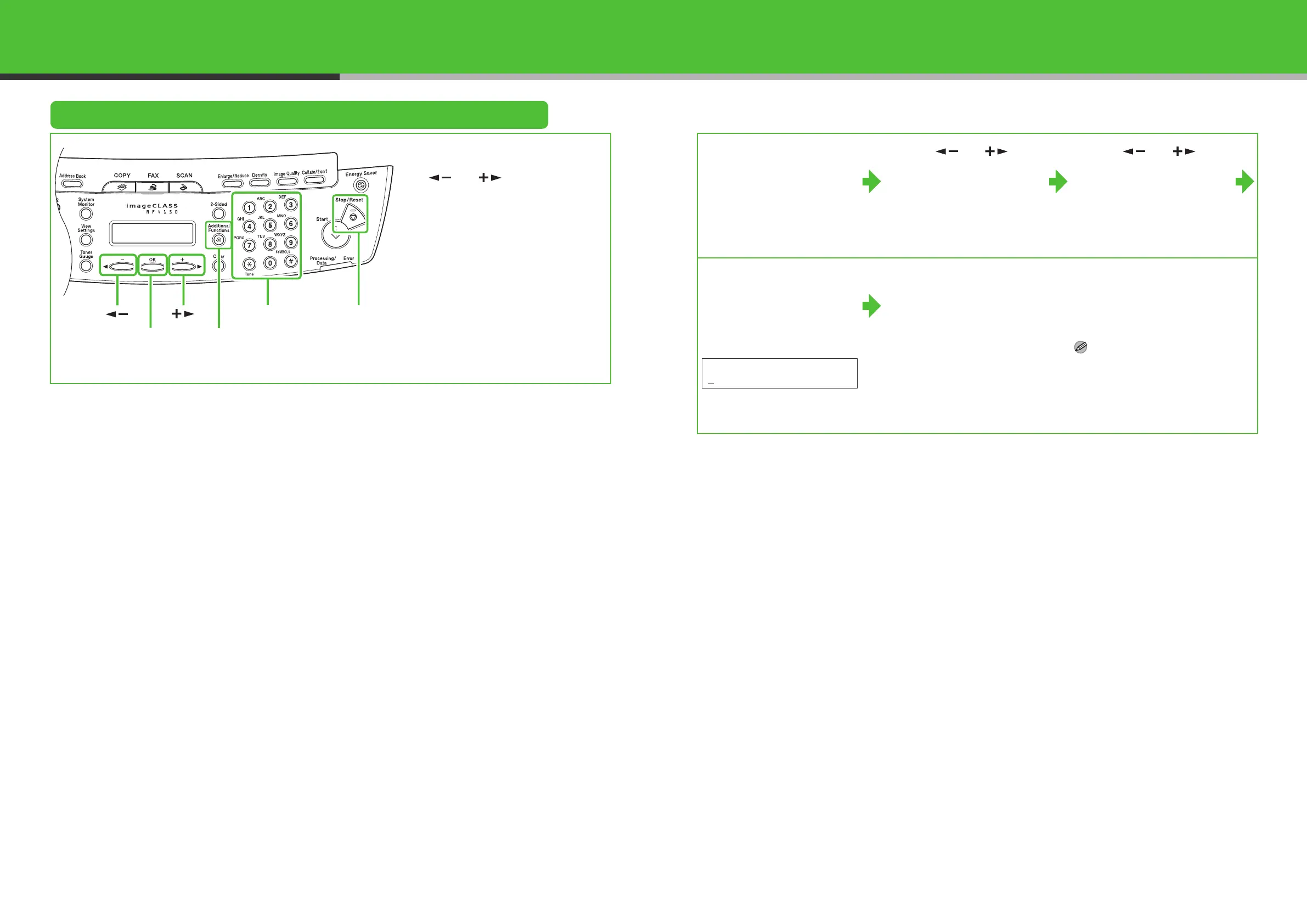
● Entering Information
– Numeric keys: Enters numbers.
– [ ] or [ ]: Moves the cursor
position.
– [OK]: Confirms the entry.
[OK]
Numeric Keys
[]
[]
[Additional Functions]
[Stop/Reset]
1 Press [Additional
Functions].
2
Use [ ] or [ ] to
select <4 TIMER
SETTINGS>, then press
[OK].
3 Use [ ] or [ ] to
select <2 DATE&TIME
SETTING>, then press
[OK].
4 Use the numeric keys to
enter the time (in 24-
hour format) and date
(day/month/year), then
press [OK].
5 Press [Stop/Reset] to
return to the standby
mode.
NOTE
You can select the date format
among three types listed below at
<3 DATE TYPE SELECT>.
– <DD/MM YYYY>
– <YYYY MM/DD>
– <MM/DD/YYYY>
Ex.
DATE&TIME SETTING
11:19 31 12 ´06
14













 To Next Page