15
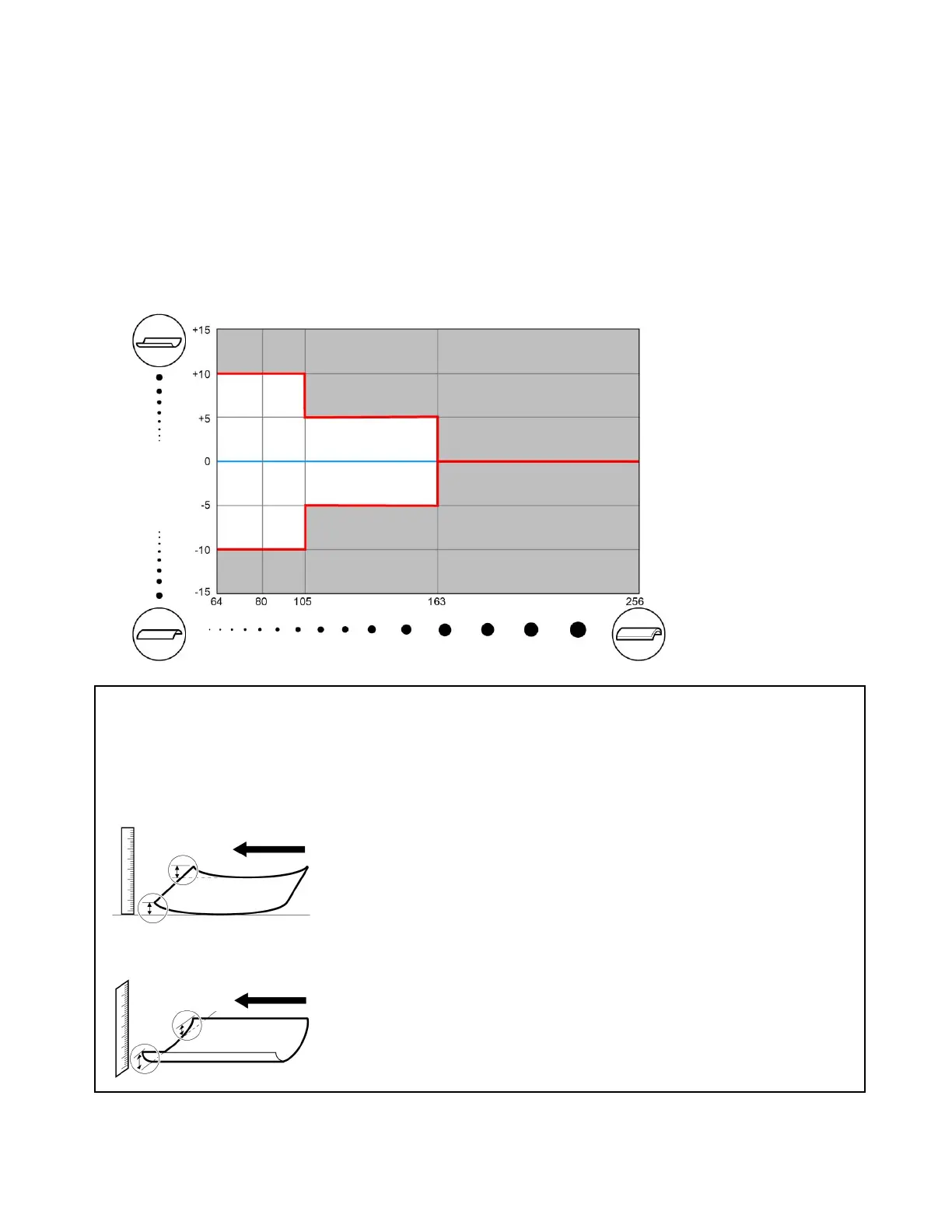
Acceptable curl range when the curl is parallel to the feed direction
When the curl is parallel to the feed direction, there is a gap between the paper and the slide guides on the
stack bypass or size change plates on the paper deck, and there is a risk of paper being fed at a slant. If
you cannot avoid using curled paper, always ensure that the curl is within the range given in the graph
below. However, Heavy Paper or Card Stock (164 to 256 g/m
2
) with this kind of curl cannot be used.
With Heavy Paper or Card Stock (164 to 256 g/m
2
), transport problems may occur regardless of the
amount of curl. For LTR or smaller sizes, we recommend using paper with a grain parallel to the long edge
(A). For sizes 11” x 17” or larger, we recommend using paper with a grain parallel to the short edge (B).
Measuring Paper Curl
Place the paper on a horizontal surface. Place a ruler against the leading edge relative to the paper
transport direction, and measure the curl at both ends. If it is a down curl, flip the paper over before
measuring the curl.
Measuring a perpendicular curl
Measuring a parallel curl
Acceptable Curl
Range
Up
Down
Curl
(mm)
Thin
Paper
Heavy Paper
or Card Stock
Plain
Paper
Heavy Paper
or Card Stock
Paper Weight (g/m
2
)
Transport Direction
Transport Direction












 To Next Page