4
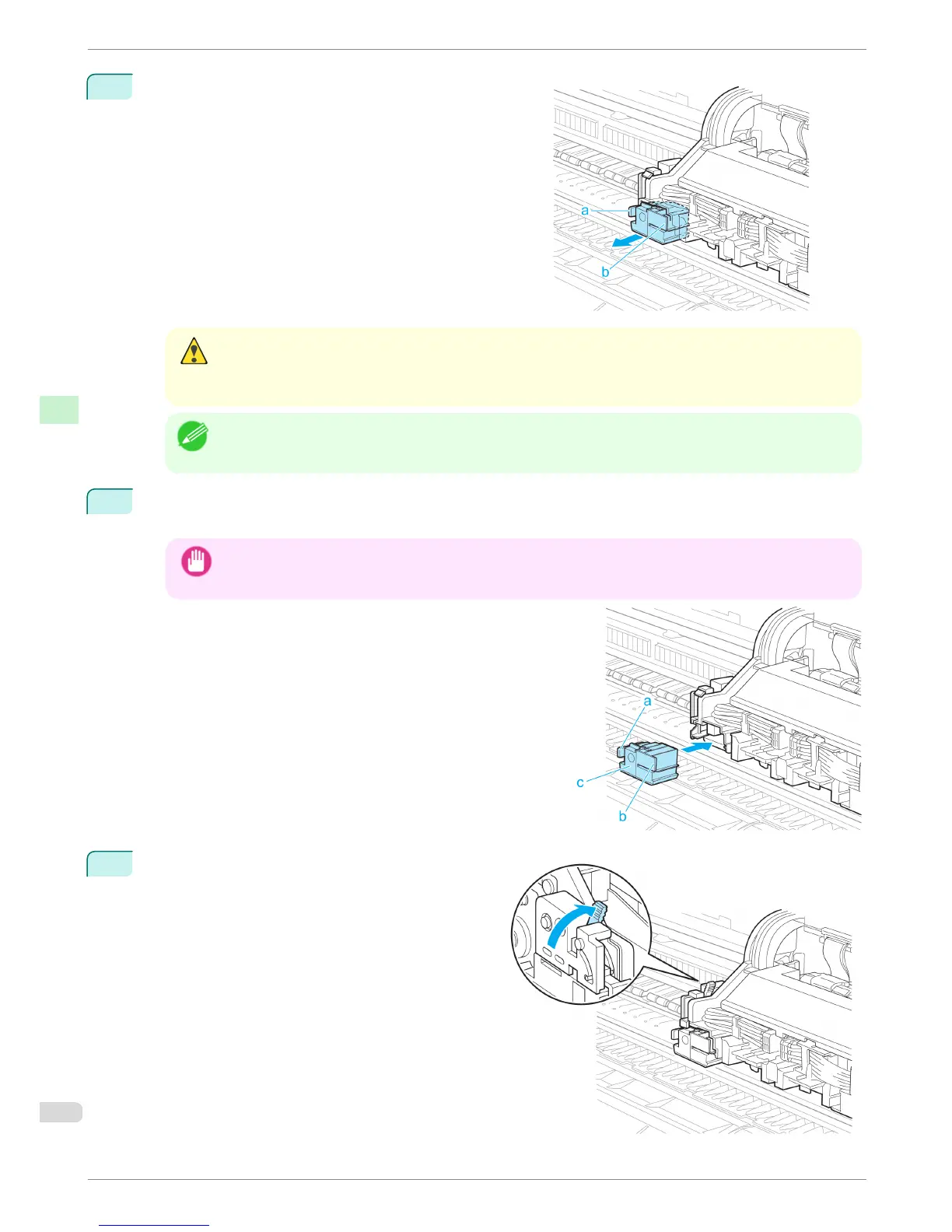
Holding the Cutter Unit by the Lock Lever (a) and grip (b),
remove it from the Carriage.
Caution
• Never touch any part of the Cutter Unit except the Lock Lever (a) and grip (b). This may stain your hands or
cause injury. Additionally, this may damage the printer.
• Do not disassemble the Cutter Unit. Touching the blade may cause injury.
Note
• Dispose of the used Cutter Unit in accordance with local regulations.
5
Holding the new Cutter Unit by the Lock Lever (a) and grip (b), insert it on the Carriage until it clicks into
place (c).
Important
• After installing the Cutter Unit, hold it only by the grip (b) and pull the Cutter Unit forward to make sure it does
not come off. It may damage the printer if the Cutter Unit comes off.
6
Lift the Cutter Unit Detachment Lever to lock it.
Replacing the Cutter Unit
iPF8400
Basic Guide
Consumables and Maintenance Cutter Unit
44














 To Next Page