85
E
Using the Full
Range of Features
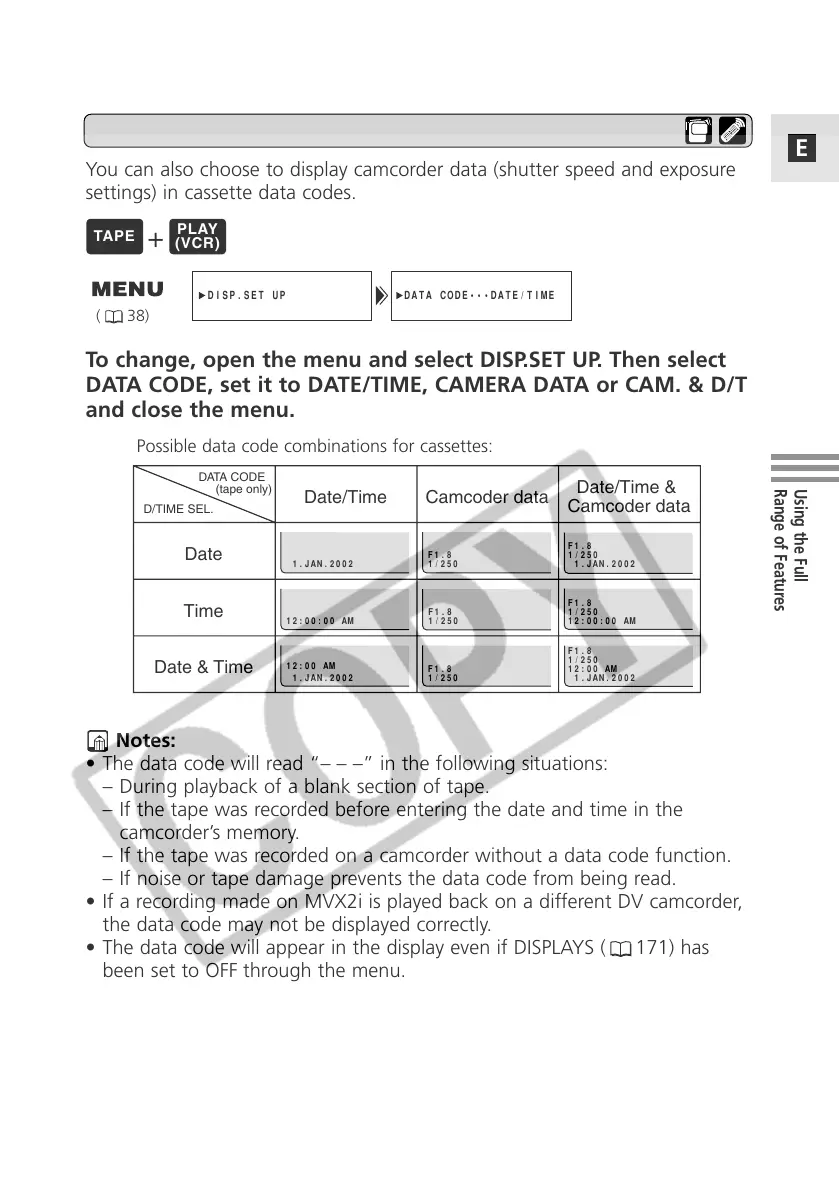
You can also choose to display camcorder data (shutter speed and exposure
settings) in cassette data codes.
DATA CODE•••DATE/TIME
DISP.SET UP
( 38)
Setting the Data Code
Date/Time Camcoder data
Date/Time &
Camcoder data
Time
Date & Time
Date
DATA CODE
(tape only)
D/TIME SEL.
F1.8
1/250
F1.8
1/250
1.JAN.2002
12:00:00 AM
12:00 AM
1.JAN.2002
F1.8
1/250
F1.8
1/250
1.JAN.2002
F1.8
1/250
12:00:00 AM
F1.8
1/250
12:00 AM
1.JAN.2002
Notes:
• The data code will read “– – –” in the following situations:
– During playback of a blank section of tape.
– If the tape was recorded before entering the date and time in the
camcorder’s memory.
– If the tape was recorded on a camcorder without a data code function.
– If noise or tape damage prevents the data code from being read.
• If a recording made on MVX2i is played back on a different DV camcorder,
the data code may not be displayed correctly.
• The data code will appear in the display even if DISPLAYS ( 171) has
been set to OFF through the menu.
Possible data code combinations for cassettes:
To change, open the menu and select DISP.SET UP. Then select
DATA CODE, set it to DATE/TIME, CAMERA DATA or CAM. & D/T
and close the menu.
+



 To Next Page