EasyManua.ls Logo

Canon PC300 - Page 12

Canon PC300
129 pages
Print Icon
To Next Page IconTo Next Page
To Previous Page IconTo Previous Page
Loading...
Ss
GENERAL
DESCRIPTION
:
IV.
OPERATION
A.
Control
Panel
4
4Darken
4.
PC320/325/FC230
@
|
dix
®
<4
|
||
|
Lighten
|Darken
if
@
@™©
®O
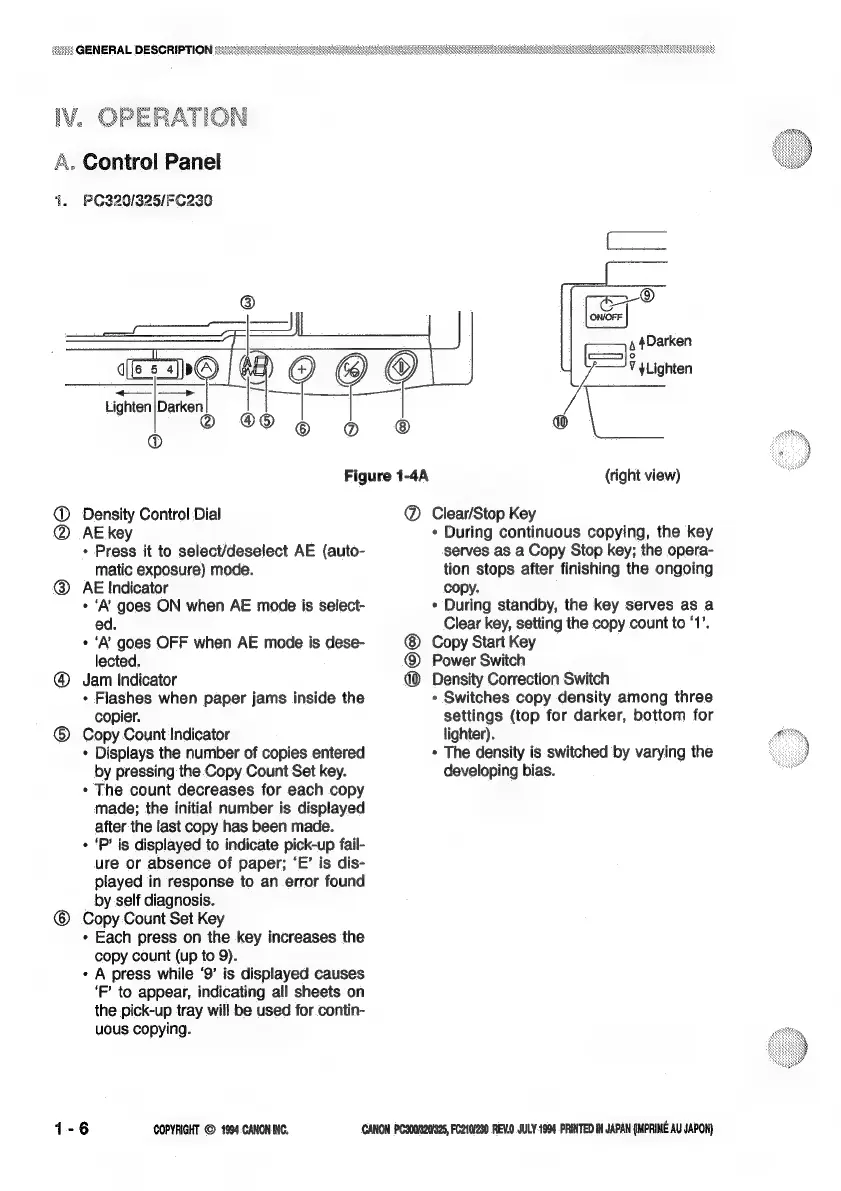
Figure
1-4A
Density
Control
Dial
AE
key
¢
Press
it
to
select/deselect
AE
(auto-
matic
exposure)
mode.
AE
Indicator
e
‘A’
goes
ON
when
AE
mode
is
select-
ed.
«
‘A’
goes
OFF
when
AE
mode
is
dese-
lected.
@
Jam
Indicator
¢
Flashes
when
paper
jams
inside
the
copier.
©
Copy
Count
Indicator
*
Displays
the
number
of
copies
entered
by
pressing
the
Copy
Count
Set
key.
*
The
count
decreases
for
each copy
made;
the
initial
number
is
displayed
after
the
last
copy
has
been
made.
¢
‘P’
is
displayed
to
indicate
pick-up
fail-
ure
or
absence
of
paper;
‘E’
is
dis-
played
in
response
to
an
error
found
by
self
diagnosis.
©
Copy
Count
Set
Key
*
Each
press
on
the
key
increases
the
copy
count
(up
to
9).
¢
A
press
while
‘9’
is
displayed
causes
‘F’
to
appear,
indicating
all
sheets
on
the
pick-up
tray
will
be
used
for
contin-
uous
copying.
(SIS)
COPYRIGHT
©
1904
CANON
INC.
71
=
V
yLighten
\_
(right
view)
@
Clear/Stop
Key
¢
During
continuous
copying,
the
key
serves
as
a
Copy
Stop
key;
the
opera-
tion
stops
after
finishing
the
ongoing
copy.
*
During
standby,
the
key
serves
as
a
Clear
key,
setting
the
copy
count
to
‘1’.
Copy
Start
Key
@
Power
Switch
@
Density
Correction
Switch
*
Switches
copy
density
among
three
settings
(top
for
darker,
bottom
for
lighter).
»*
The
density
is
switched
by
varying
the
developing
bias.
CANON
PC300/320/925,
FC210/280
REV.0
JULY
1994.PRINTED
IN
JAPAN
{MPRIME
AU
JAPON)

Related product manuals