Table of
Contents
Chapter 1
What is
ImageBrowser?
Chapter 2
Downloading and
Printing Images
Chapter 3
What You Can Do with
a Camera Connected
Chapter 4
Viewing Images
Chapter 5
Organizing Images
Chapter 6
Using Supplementary
Features
Appendices Index
ImageBrowser Software User Guide 29
Back Next
Print All Images
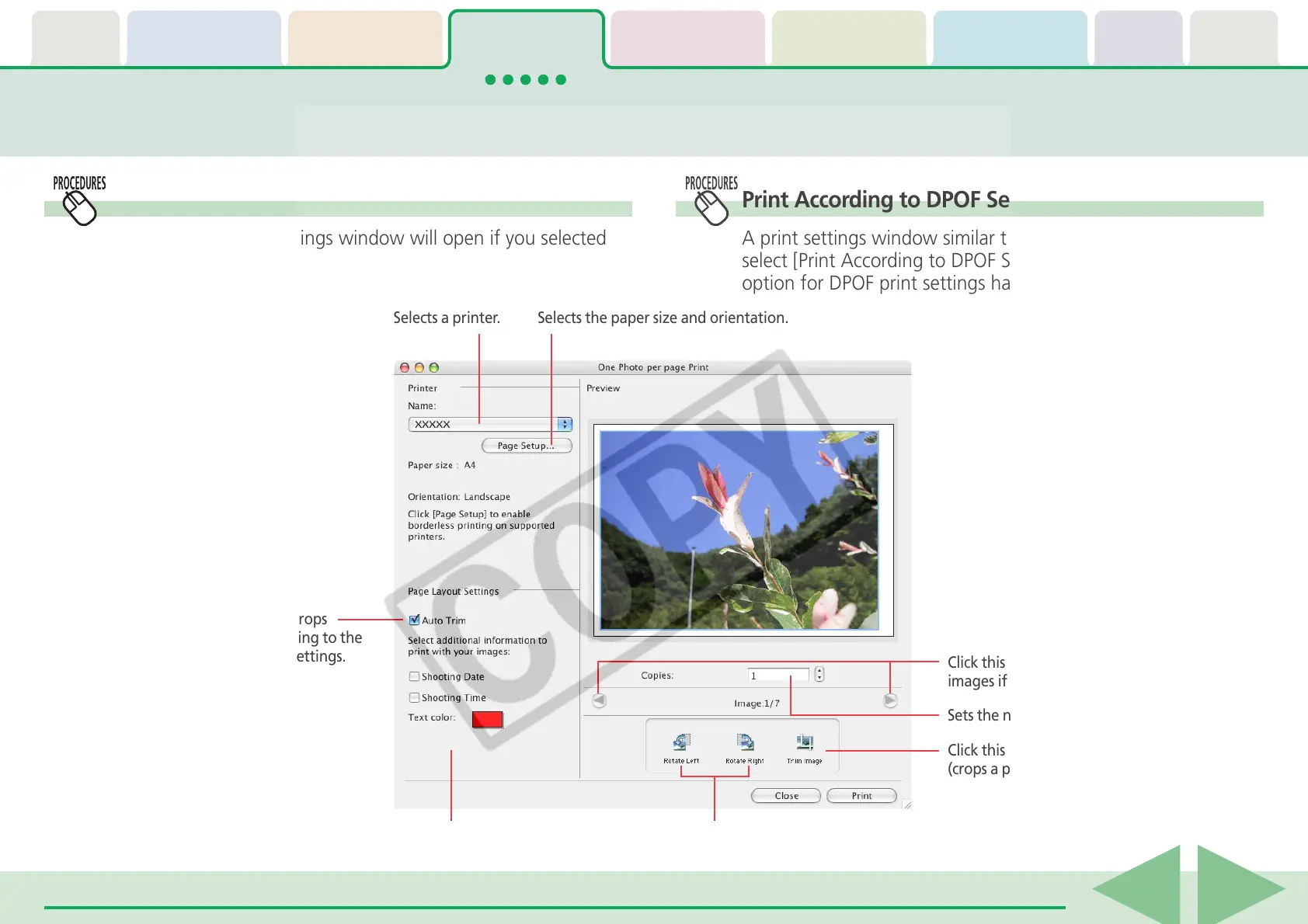
The following print settings window will open if you selected
[Print All Images].
Printing Images in the Camera (2/4)
Rotates images.
Sets the auto trim (crops
image edges according to the
page proportions) settings.
Sets the shooting date/time imprint
and color settings.
Click this to use the trimming function
(crops a portion of the image).
Sets the number of print copies.
Click this button to switch between
images if multiple images were selected.
Print According to DPOF Settings—Standard
A print settings window similar to the following will open if you
select [Print According to DPOF Settings] and the standard
option for DPOF print settings has been set using the camera.
Selects a printer. Selects the paper size and orientation.











 To Next Page