Table of
Contents
Chapter 1
What is
ImageBrowser?
Chapter 2
Downloading and
Printing Images
Chapter 3
What You Can Do with
a Camera Connected
Chapter 4
Viewing Images
Chapter 5
Organizing Images
Chapter 6
Using Supplementary
Features
Appendices Index
ImageBrowser Software User Guide 91
Back Next
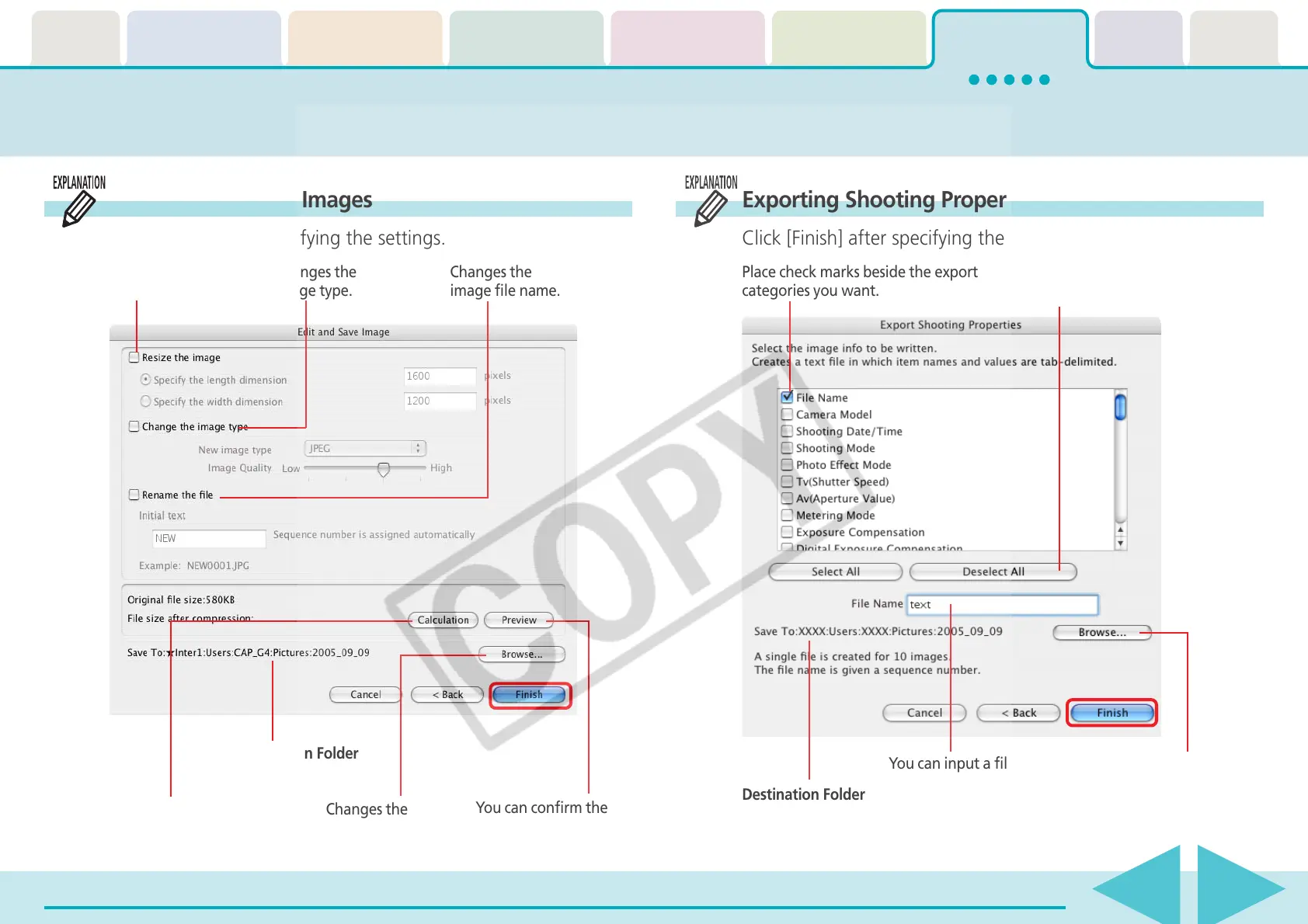
Exporting Images (2/ 3)
Editing and Saving Images
Click [Finish] after specifying the settings.
Exporting Shooting Properties
Click [Finish] after specifying the settings.
Changes the
image size.
Changes the
image type.
Changes the
image file name.
You can confirm the
post-conversion image.
Changes the
destination folder.
Destination Folder
Calculates the post-
conversion file size.
Place check marks beside the export
categories you want.
You can insert or remove
all check marks at once.
Changes the destination
folder.
You can input a file name.
Destination Folder











 To Next Page