Table of
Contents
Chapter 1
What is
ImageBrowser?
Chapter 2
Downloading and
Printing Images
Chapter 3
What You Can Do with
a Camera Connected
Chapter 4
Viewing Images
Chapter 5
Organizing Images
Chapter 6
Using Supplementary
Features
Appendices Index
ImageBrowser Software User Guide 52
Back Next
Changing the Browser Window Display (2/2)
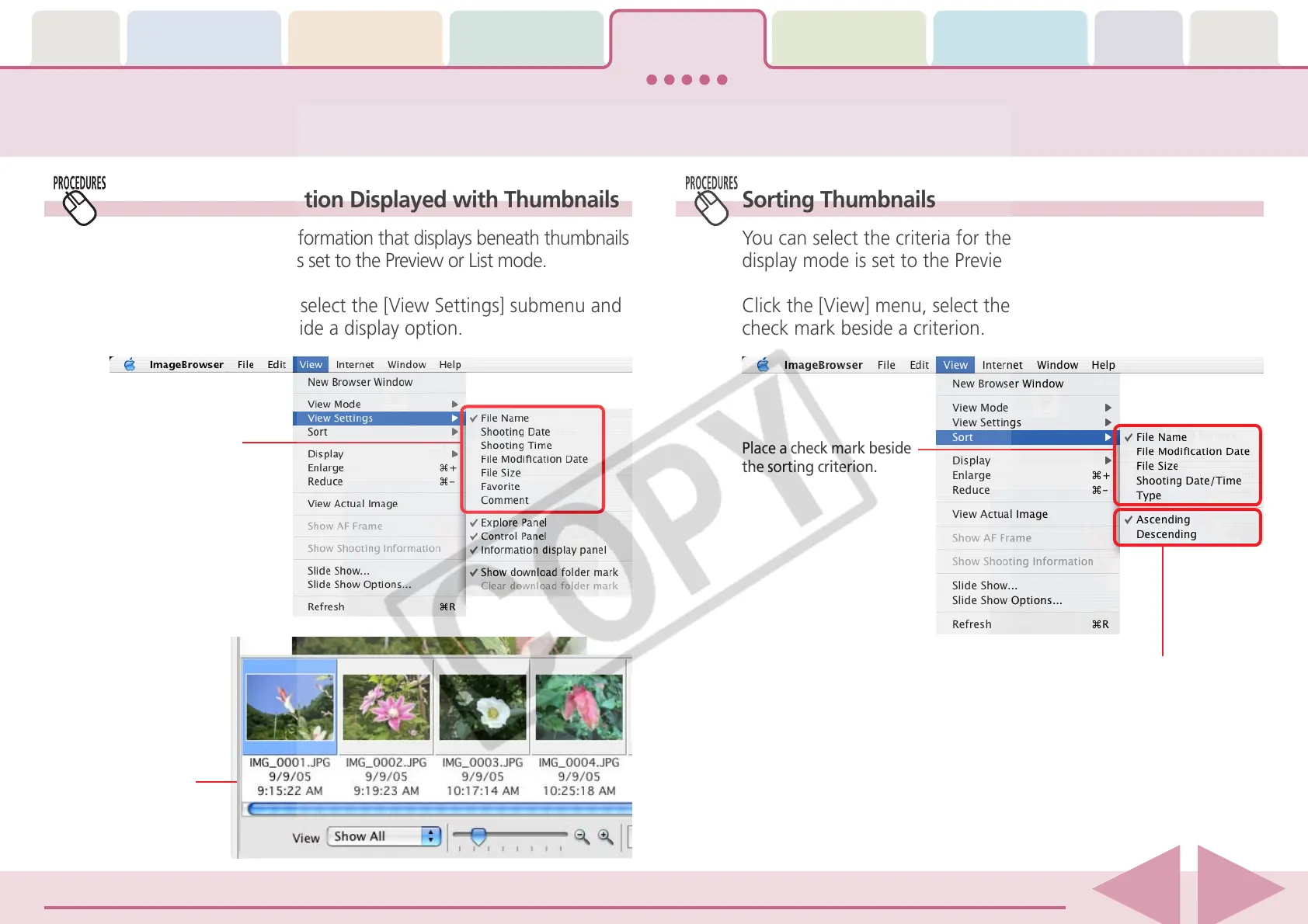
Setting the Information Displayed with Thumbnails
You can set the image information that displays beneath thumbnails
when the display mode is set to the Preview or List mode.
Click the [View] menu, select the [View Settings] submenu and
place a check mark beside a display option.
Sorting Thumbnails
You can select the criteria for the display order when the
display mode is set to the Preview or List mode.
Click the [View] menu, select the [Sort] submenu and place a
check mark beside a criterion.
Place a check mark
beside a display option.
Example showing the
“File Name”,
“Shooting Date” and
“Shooting Time”
selected.
Switch between ascending
and descending order.
Place a check mark beside
the sorting criterion.











 To Next Page