24
Settings that Can Be Set with the
Camera
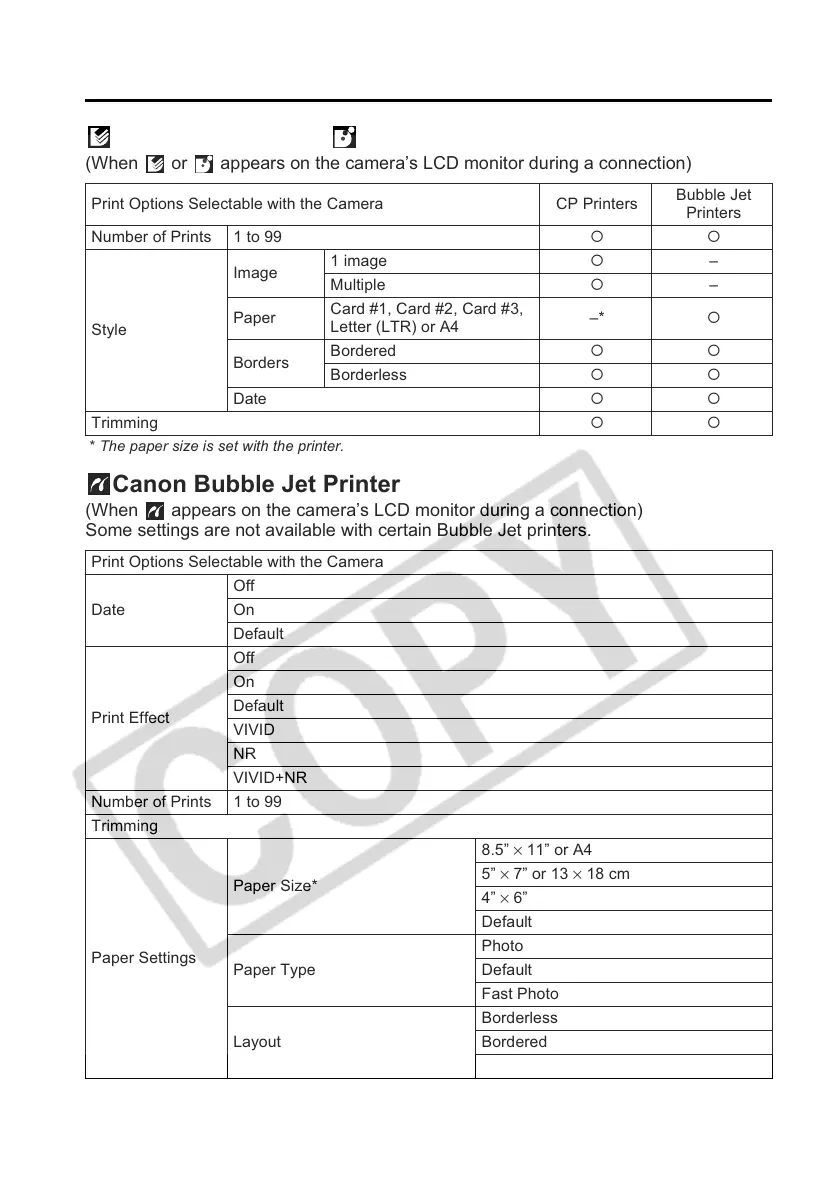
Canon CP Printers/ Canon Bubble Jet Printers
(When or appears on the camera’s LCD monitor during a connection)
* The paper size is set with the printer.
Canon Bubble Jet Printer
(When appears on the camera’s LCD monitor during a connection)
Some settings are not available with certain Bubble Jet printers.
* Paper sizes vary according to region.
Print Options Selectable with the Camera CP Printers
Bubble Jet
Printers
Number of Prints 1 to 99 {{
Style
Image
1 image { –
Multiple { –
Paper
Card #1, Card #2, Card #3,
Letter (LTR) or A4
–* {
Borders
Bordered {{
Borderless {{
Date {{
Trimming {{
Print Options Selectable with the Camera
Date
Off
On
Default
Print Effect
Off
On
Default
VIVID
NR
VIVID+NR
Number of Prints 1 to 99
Trimming
Paper Settings
Paper Size*
8.5” × 11” or A4
5” × 7” or 13 × 18 cm
4” × 6”
Default
Paper Type
Photo
Default
Fast Photo
Layout
Borderless
Bordered
Default



 To Next Page