28
Cover
Contents
Part Names
Basic Operations
Printing via USB
Cable
Troubleshooting
Appendix
Printing via Wi-Fi
Print Settings
Printing with the Date (Date)
08/08/2013
Add camera shooting dates when you print.
Off (default) / On
• To prevent two instances of the date on images already labeled by
the camera, select [ Off].
• Turning off SELPHY will restore the default setting of [ Off].
• The date added to prints cannot be changed, because it is the date assigned
by the camera when the photos were taken.
• To change how the date displays, adjust [Date Format] (=
29).
• Dates are not printed when [Page Layout] (=
25) is set to [ Index] or
[
Shuffle].
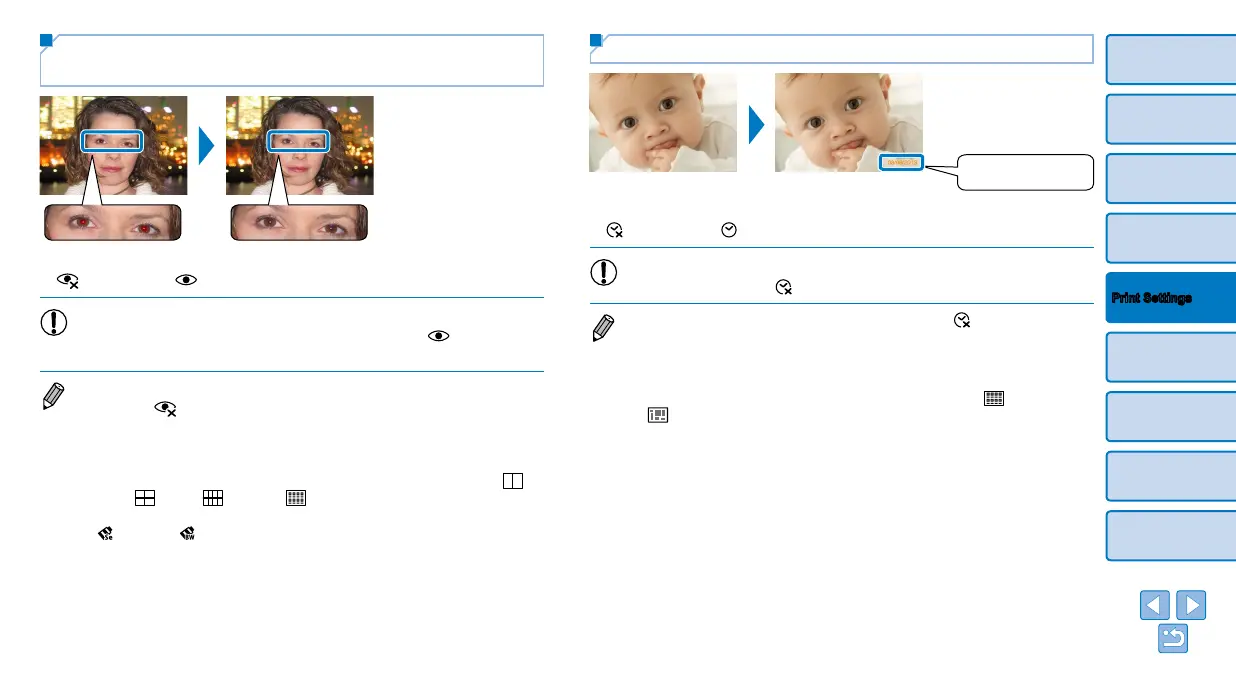
Reducing the Appearance of Red-Eye
(Correct Red-Eye)
Correct images affected by red-eye.
Off (default) / On
• Red-eye correction may mistakenly be applied to areas of the image
other than the affected eyes. To avoid this, select [ On] only for
images affected by red-eye.
• Turning off SELPHY or removing the memory card will restore the default
setting of [
Off].
• Red-eye may not be detected or corrected well on faces covering a very large/
small area of the screen, on bright/dark faces, in shots from the side of or at an
angle to the face, or when part of the face is not visible.
• Red-eye correction is not applied when [Page Layout] (=
25) is set to [
2-up], [
4-up], [ 8-up], or [ Index].
• Similarly, red-eye correction is not applied when [My Colors] (=
27) is set to
[
Sepia] or [ B/W].
• The degree of correction may vary depending on cropping, page layout, and
paper size.





 To Next Page