Custom Picture Settings
98
Available Custom Picture Settings
Menu items Options / Additional information
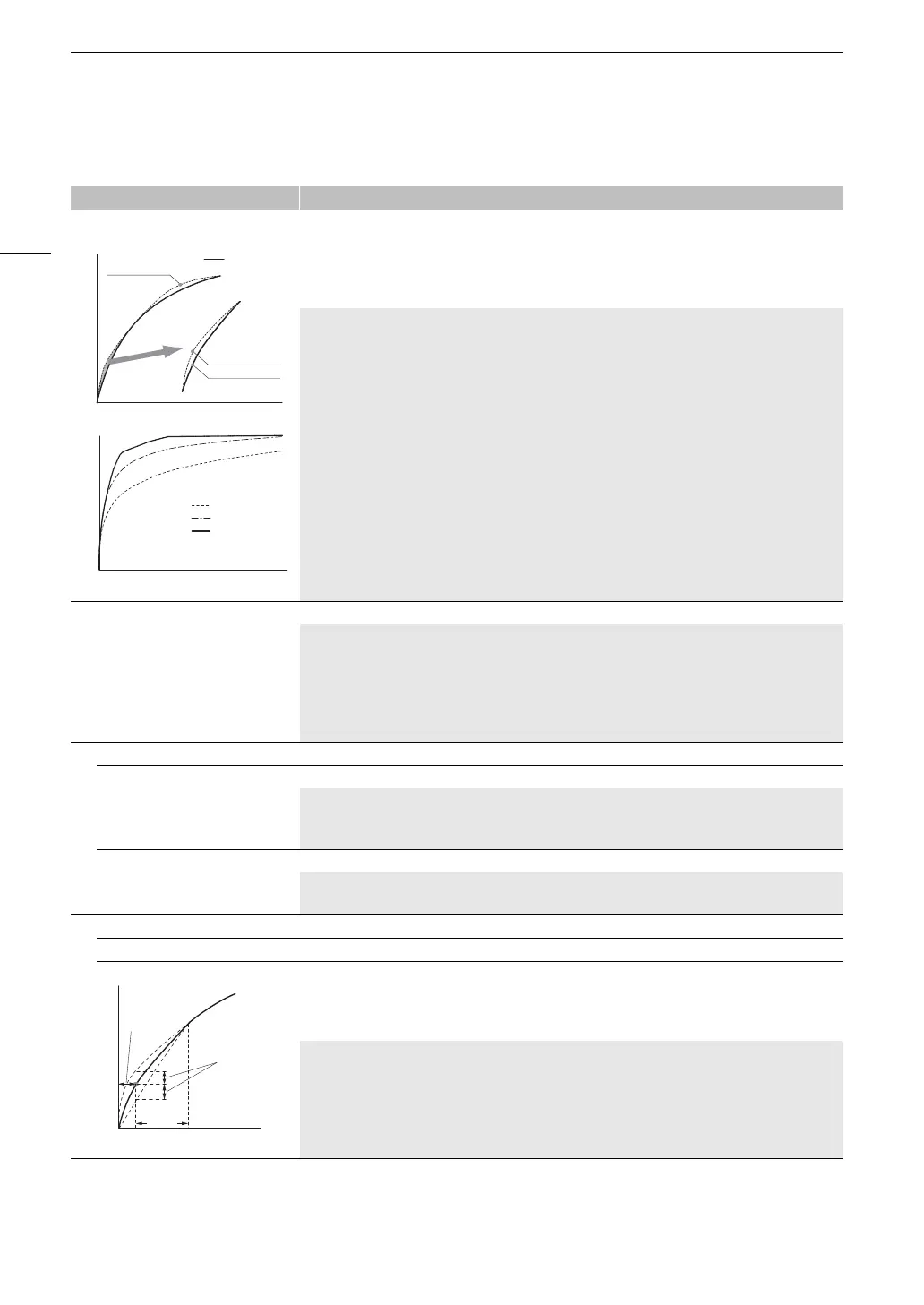
[Gamma/Color Space] [Canon Log 3 / BT.709], [BT.709 Wide DR / BT.709], [BT.709 Normal / BT.709], [BT.709 Standard /
BT.709], [EOS Std. / BT.709 ]
Combination of gamma curve and color space settings that affects the overall look and color space of
the image.
Gamma curve
[Canon Log 3]: Logarithmic gamma curve that requires image processing in post-production.
[BT.709 Wide DR]: Gamma curve with a very wide dynamic range. Optimized for playback on TV
monitors.
[BT.709 Normal]: Standard picture for playback on TV monitors.
[BT.709 Standard]: Setting suitable for playback on TV monitors. Produces a more faithful black
gradation in the shadows (dark areas of the image) than with the [BT.709 Normal] setting.
[EOS Std.]: Approximates the look of an EOS interchangeable lens camera when the picture style is
set to [Standard]. Produces higher contrast than with the [BT.709 Normal] setting.
Color space
[BT.709]: Standard color space that is compatible with ITU-R BT.709 specifications.
[Color Matrix] [Neutral], [Production Camera], [EOS Std.], [Video]
The color matrix affects the overall color tonality of the image.
[Neutral]: Reproduces neutral colors.
[Production Camera]: Reproduces colors more suitable for motion picture production.
[EOS Std.]: Approximates the look of an EOS interchangeable lens camera when the picture style is
set to [Standard].
[Video]: Reproduces colors with a contrast suitable for TV broadcasting.
[Black]
[Master Pedestal] –50 to +50 (±0)
Increases or decreases the black level. Higher settings will make dark areas brighter but decrease
contrast. This setting is not available when the gamma curve component of the [Gamma/Color
Space] setting is set to [Canon Log 3].
[Master Black Red],
[Master Black Green],
[Master Black Blue]
–50 to +50 (±0)
These settings correct the color cast in blacks. These settings are not available when the gamma
curve component of the [Gamma/Color Space] setting is set to [Canon Log 3].
[Black Gamma]
[Level] –50 to +50 (±0)
[Range], [Point] –20 to +50 (±0)
These settings control the lower part of the gamma curve (dark areas of the image). These settings
are only available when the gamma curve component of the [Gamma/Color Space] setting is set to
one of the [BT.709 Normal], [BT.709 Standard] or [EOS Std.] options.
[Level]: Raises or lowers the lower part of the gamma curve.
[Range]: Selects the adjustment range from the selected [Point].
[Point]: Determines the shape of the lower part of the gamma curve.
BT.709 Normal
BT.709 Standard
BT.709 Standard
BT.709 Normal
BT.709 Normal
BT.709 Wide DR
Canon Log 3
Input
Output
[Point]
[
Range
]
[Level]



 To Next Page