99
Custom Picture Settings
[Low Key Saturation]
[Activate] [On], [Off]
Set this setting to [On] to enable the adjustment of color saturation in dark areas with the [Level]
setting.
[Level] –50 to +50 (±0)
Specifies how saturated colors are in dark areas.
[Knee]
[Activate] [On], [Off]
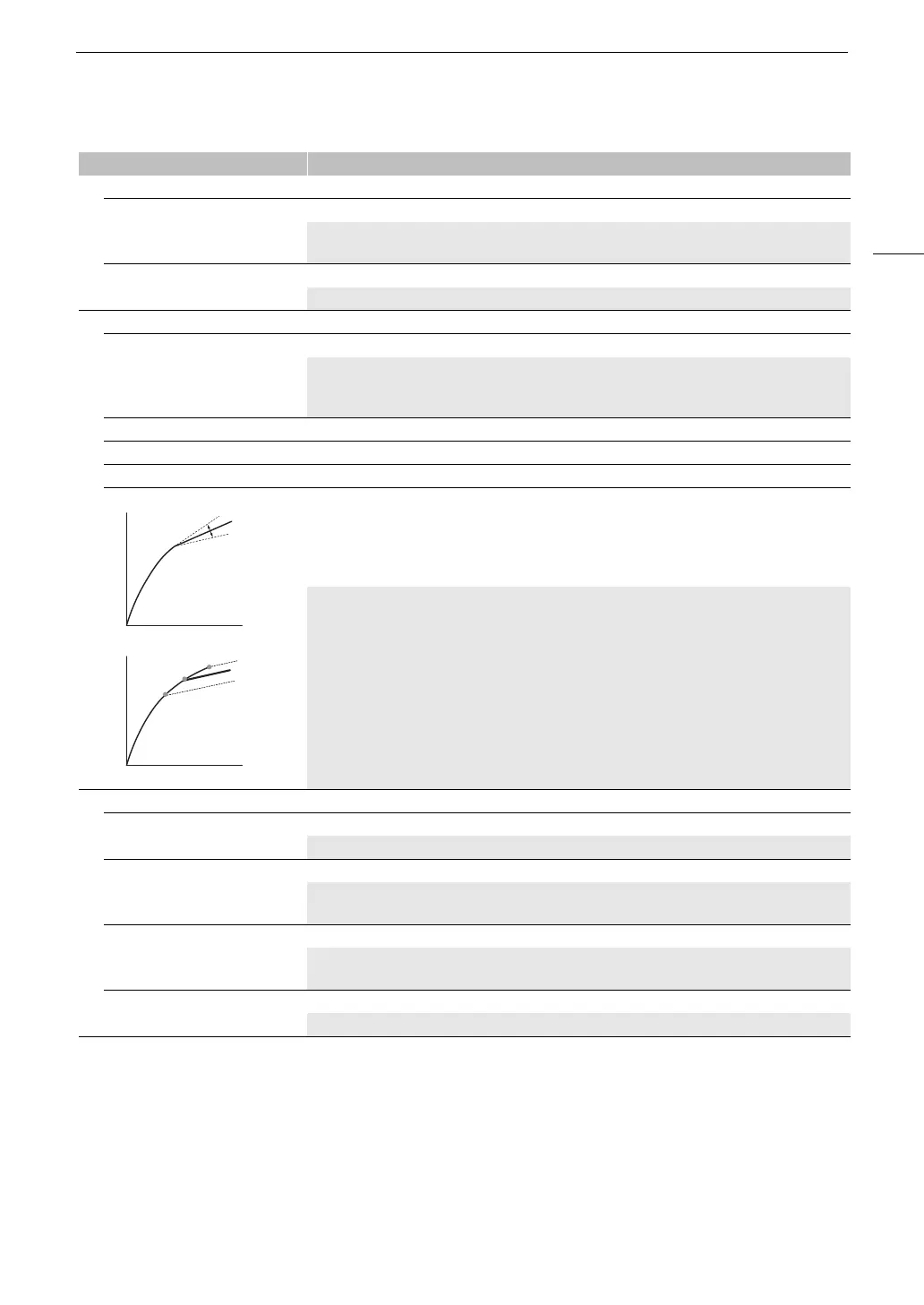
Set this setting to [On] to enable the adjustment of the knee point with the following settings. These
settings are only available when the gamma curve component of the [Gamma/Color Space] setting is
set to one of the [BT.709 Normal] or [BT.709 Standard] options.
[Automatic] [On], [Off]
[Slope] –35 to +50 (±0)
[Point] 50 to 109 (95)
[Saturation] –10 to +10 (±0)
These settings control the upper part of the gamma curve (highlights of the image). By compressing
the highlights, you can prevent parts of the image from being overexposed.
[Automatic]: Set this setting to [On] to enable the automatic adjustment of the [Knee] settings.
[Slope]: Determines the slope of the gamma curve above the knee point.
[Point]: Sets the knee point of the gamma curve.
[Saturation]: Adjusts the color saturation in the highlights.
[Sharpness]
[Level] –10 to +50 (±0)
Sets the sharpness level of the video output signal and the recorded signal.
[Detail Frequency] –8 to +8 (±0)
Sets the center frequency of horizontal sharpness. Setting higher values increases the frequency,
which, in turn, increases the sharpness.
[Coring Level] –30 to +50 (±0)
Sets the level of correction of artifacts caused by high sharpness levels (coring). Higher values
prevent sharpness from being applied to minute details, resulting in less noise.
[Limit] –50 to +50 (±0)
Restricts how much sharpness is applied.
Menu items Options / Additional information
Input
OutputOutput
Input
[Slope]
[Point]



 To Next Page