EasyManua.ls Logo

Canyon CNS-SW71 - User Manual

Canyon CNS-SW71
68 pages
Print Icon
To Next Page IconTo Next Page
Loading...
Quick Guide v3
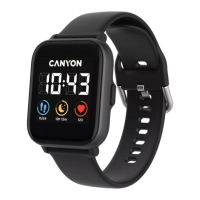
CNS-SW71
Smartwatch
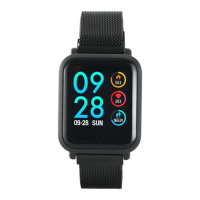
Metal strap with magnet
buckle

Questions and Answers

Summary

Product Features and Complete Set

Smartwatch Features

Highlights key features like durable metal case, iOS/Android compatibility, multi-sport mode, weather, IP68 waterproofing, and camera remote.

Whats Included in the Set

Lists all items in the package: smartwatch, metal strap, TPU strap, built-in battery, USB cable, and user manual.

Smartwatch Operation

Charging the Device

Instructions for charging via USB magnetic cable, including requirements and time, and advice on compatible power sources.

Strap Disassembly and Assembly

Guides on how to detach and attach wristbands using the levers on the watch body.

Turning the Smartwatch On and Off

Steps to power the device on by holding the sensor button and turn it off via the power menu.

Smartphone Connectivity

Troubleshooting Guide

Safety and Warranty Information

Device Safety Precautions

Advises on protecting the device from water, heat, and physical impact, including warnings about hot water.

Warranty Liabilities

Details warranty period, conditions for repair, replacement, or refund, and manufacturer information.

Summary

Product Features and Complete Set

Smartwatch Features

Highlights key features like durable metal case, iOS/Android compatibility, multi-sport mode, weather, IP68 waterproofing, and camera remote.

Whats Included in the Set

Lists all items in the package: smartwatch, metal strap, TPU strap, built-in battery, USB cable, and user manual.

Smartwatch Operation

Charging the Device

Instructions for charging via USB magnetic cable, including requirements and time, and advice on compatible power sources.

Strap Disassembly and Assembly

Guides on how to detach and attach wristbands using the levers on the watch body.

Turning the Smartwatch On and Off

Steps to power the device on by holding the sensor button and turn it off via the power menu.

Smartphone Connectivity

Troubleshooting Guide

Safety and Warranty Information

Device Safety Precautions

Advises on protecting the device from water, heat, and physical impact, including warnings about hot water.

Warranty Liabilities

Details warranty period, conditions for repair, replacement, or refund, and manufacturer information.

Canyon CNS-SW71 Specifications

General IconGeneral
Battery LifeUp to 5 days
Water ResistanceIP68
Battery Capacity180 mAh
Bluetooth5.0
CompatibilityAndroid, iOS
SensorsHeart rate monitor, Accelerometer

Related product manuals