
 Need help?
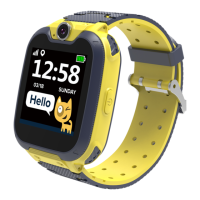
Do you have a question about the Canyon TONY KW-31 and is the answer not in the manual?
Instructions for charging the smartwatch before its first use.
Verify that all necessary accessories are present with the smartwatch.
Guide on selecting and inserting the 2G Micro-SIM card into the watch.
Steps for opening the cover, removing the battery, and installing the SIM card.
How to turn the device on/off and initiate an SOS call using the power button.
How to add, save, and manage phone contacts on the smartwatch.
Instructions for dialing phone numbers and initiating calls from the watch.
Receiving, viewing, and managing SMS messages on the smartwatch.
How to use the camera function to take photos and manage them.
Accessing and managing saved photos taken with the smartwatch camera.
Instructions for playing music, including SD card setup and playback controls.
How to use the voice recorder feature to capture audio.
Using the built-in calculator for basic arithmetic operations.
Setting and managing multiple alarm times on the smartwatch.
Overview of utility tools including Calendar, Stopwatch, Timer, and File Manager.
Information on the seven pre-installed games available on the smartwatch.
How to configure language, time, date, call log, and silent mode.
Resolving issues with incoming or outgoing calls not working correctly.
Troubleshooting when the user's voice is not heard by the other party.
Solving problems where pictures or voice records are not saved properly.
Steps to resolve issues when the music player fails to play songs.



 To Next Page
 General