Instruction manual C324624 Please keep this instruction manual for future reference
DISSEMBLING THE OVEN DOOR
To make it easier to clean the inside of your oven, the oven door can be removed, by proceeding
as follows:
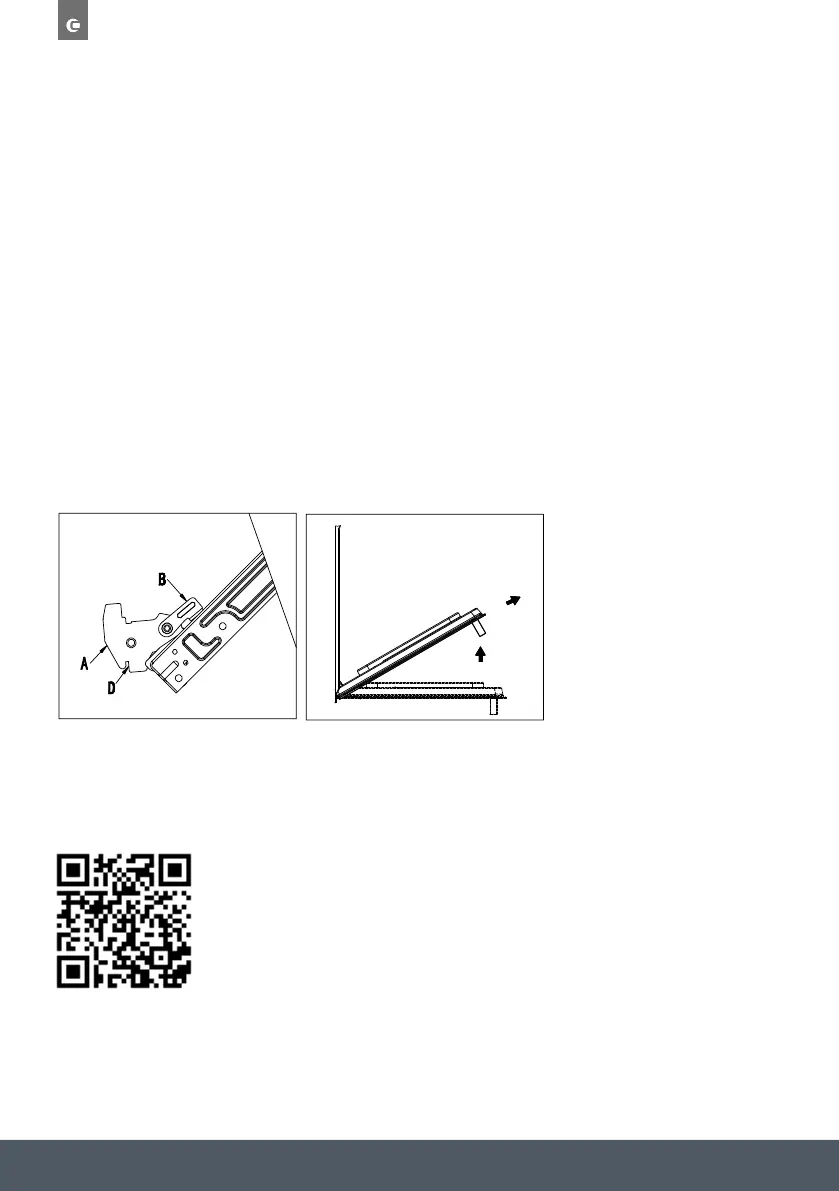
› Open the door completely and lift the 2 levers ‘B’;
› Now, shut the door slightly, you can lift it out by pulling out the hooks ‘A’ as shown below.
ASSEMBLING THE OVEN DOOR
› With the door in a vertical position, insert the two hooks ‘A’ into the slots.
› Ensure that ‘D’ is hooked perfectly onto the edge of the slot (move the oven door backwards
and forward slightly)
› Keep the oven door open fully, unhook the 2 levers ‘B’ downwards and then shut the
door again.
Scan the QR code below to access the ‘How to video’.


 To Next Page