EasyManua.ls Logo

Capresso C1000 - User Manual

Capresso C1000
18 pages
Print Icon
To Next Page IconTo Next Page
Loading...
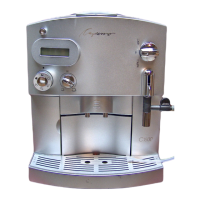
USER COMPONENTS
1. Height-adjustable Coffee Spout
2. Operating Display (see fig. 3)
3. Removable Water Tank
4. Low Water Flotation Device (see fig. 4, call-out #4)
5. CLARIS Water Care Cartridge (installed)
6. Hinged Water Tank Lid
7. Ground Coffee Funnel
8. Lid for Ground Coffee Funnel
9. Lid for Bean Container
10. Sticker with Serial # and 800 #
11. Selector Switch (see fig. 2)
12. Detachable Hot Water / Frother / Steam Nozzle
13. Removable Grid (see fig. 1a)
14. Removable Drawer / Used Water Tray (see fig. 1a)
15. Water Hardness Indicator Strip
16. CLARIS Water Care Cartridge (unpacked)
17. Two Cleaning Tablets
18. Measuring Scoop
19. Tray for Used Coffee Container (see fig. 1a)
20. Used Coffee Container (see fig. 1a)
9
8
7
6
5
4
3
2
1
10
11
12
13
14
15
16
17
18
Fig. 1
Fig. 1a
14
13
19
20
Question and Answer IconNeed help?

Do you have a question about the Capresso C1000 and is the answer not in the manual?

Capresso C1000 Specifications

General IconGeneral
BrandCapresso
ModelC1000
CategoryCoffee Maker
LanguageEnglish

Summary

User Components Identification

Height-adjustable Coffee Spout

Adjustable spout for coffee delivery.

Operating Display

Control panel with buttons and indicators for machine status.

Removable Water Tank

Tank for holding water supply, easily removable.

CLARIS Water Care Cartridge

Water filter cartridge for improved water quality.

Selector Switch

Control for switching between coffee and steam functions.

Detachable Hot Water; Frother; Steam Nozzle

Versatile nozzle for hot water, milk frothing, and steaming.

Removable Drawer; Used Water Tray

Collects used coffee grounds and drip water.

Measuring Scoop

Tool for measuring ground coffee.

Two Cleaning Tablets

Tablets for cleaning the brewing unit.

Selector Switch and Operation Modes

Coffee Position

Setting for brewing coffee.

Steam;Hot Water Position

Setting for steam and hot water functions.

Operating Display Buttons and Indicators

Main On;Off Button

Button to power the machine on and off.

1-Cup Coffee Button

Button to brew a single cup of coffee.

2-Cup Coffee Button

Button to brew two cups of coffee.

Ground Coffee Button

Button to activate brewing with ground coffee.

Hot Water Button

Button to dispense hot water.

Coffee Volume Dial

Dial to adjust the amount of coffee brewed.

Indicator Light Functions

Meaning of various status and warning lights on the display.

Product Introduction and Registration

Product Registration Guide

Instructions for registering the product for warranty.

Welcome to the Capresso C1000

Introduction and guide to using the machine.

Understanding Crema Coffee

Explanation of crema and its significance in espresso.

Essential Safety and Usage Guidelines

Critical Usage Prohibitions (Please Do Not...)

Critical warnings to avoid damage and voiding warranty.

Recommended Usage Practices (Please Do...)

Recommended actions for proper machine use and care.

Default Factory Settings

Default configurations for auto shut-off and water hardness.

Machine Preparation and Initial Setup

Filling the Water Tank

Steps for filling the water reservoir correctly.

Filling the Bean Container

Instructions for loading coffee beans into the hopper.

Handling Oily Coffee Beans

Special handling for oily coffee beans to prevent clogging.

First Time Preparation Procedure

Initial setup and rinsing procedure before first coffee.

Coffee Volume Adjustment and Water Filtration

Adjusting Coffee Volume

How to set the desired coffee quantity using the dial.

Claris Water Cartridge Benefits

Information on the water filter, its benefits, and replacement.

Espresso Brewing and Coffee Quality

Installing the Claris Cartridge

Step-by-step guide to installing the water filter.

Making Espresso and Crema Coffee

Process for brewing espresso with crema.

Tips for Achieving Hotter Coffee

Advice on achieving hotter coffee temperatures.

Machine Operation and Grinder Settings

Turning the Machine On

Procedure for powering up and initial heating.

Selecting Coffee Strength

Adjusting coffee intensity by varying coffee amount.

Adjusting the Coffee Grinder

How to set the coffee bean grinder fineness.

Using Pre-Ground Coffee

Instructions for using pre-ground coffee.

Specialized Functions: Hot Water, Frothing, Steaming

Preventing Machine Clogging

Steps to avoid blockages in the machine.

Dispensing Hot Water via Frother

Using the frother for hot water dispensing.

Milk Frothing and Steaming Techniques

Techniques for frothing and steaming milk for beverages.

Machine Monitoring and Maintenance Alerts

Resetting the Machine

Procedure to reset the machine after certain operations.

Cleaning the Frother Nozzle

Steps to clean the milk frothing nozzle.

Automatic Monitoring Control Lights

Overview of indicator lights for maintenance needs.

Emptying the Used Coffee Grounds Drawer

How to empty the used coffee grounds drawer.

Drawer Status, Water Level and Settings Adjustment

Drawer and Tray Status Indicators

Troubleshooting for missing or improperly inserted drawer/tray.

Refilling the Water Tank Indicator

Indicator and procedure for refilling the water tank.

Changing Machine Factory Settings

How to modify default machine settings.

Cleaning Procedures and Water Hardness

Adjusting Water Hardness Settings

Configuring machine for local water hardness levels.

General Machine Cleaning

Routine cleaning procedures for the machine's exterior and parts.

Special Cleaning of the Inner Metal Screen

Cleaning the internal screen, especially for oily beans.

Automated Cleaning and Rinsing Cycles

Clearing the Machine for Transport

Procedure for preparing the machine for transport or service.

Performing a Rinse Cycle

Performing a hot water rinse cycle.

Cleaning with Special Tablets

Using cleaning tablets for internal brewing chamber maintenance.

Decalcifying the Coffee Machine

Decalcifying Procedure Guide

Step-by-step guide to remove limescale deposits from the machine.

Troubleshooting: Display and Indicator Alerts

Interpreting Display Message Indicators

Interpreting error codes and indicator light combinations.

Troubleshooting: Common Operational Issues

Addressing Common Operational Problems

Solutions for issues like no coffee or insufficient milk froth.

Related product manuals