EasyManua.ls Logo

Cardiac Science 5300 - User Manual

Cardiac Science 5300
182 pages
Print Icon
To Next Page IconTo Next Page
Loading...
Instruction Manual
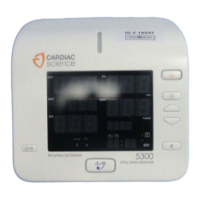
Cardiac Science 5300 and
Cardiac Science 5350
Vital Signs Monitor
70-00582-01 A

Table of Contents

Questions and Answers

  • K
    Katie ShepherdAug 3, 2025
    What to do if Cardiac Science Medical Equipment shows 'E40' message?
    • S
      shernandezAug 3, 2025
      If the Cardiac Science Medical Equipment displays an 'E40' message, it typically indicates a defective probe. Replace the probe, then insert the new probe into and out of the probe well to reset the message.
  • M
    Michael StewartAug 9, 2025
    Why is the temperature reading unreasonable on my Cardiac Science Medical Equipment?
    • C
      Calvin PattonAug 9, 2025
      If the temperature reading on your Cardiac Science Medical Equipment seems unreasonable, make sure the probe is correctly inserted into the probe well. If it's out of the well when you power up the device, insert it and try the measurement again.
  • J
    Jocelyn WoodAug 15, 2025
    What to do if pressure does not rise on Cardiac Science 5300 Medical Equipment?
    • J
      Jennifer ArmstrongAug 15, 2025
      If the pressure isn't rising after pressing the Cuff Start/Stop switch on your Cardiac Science Medical Equipment, first check the air hose connection to make sure it is secure. Also, inspect the cuff for any air leaks. If there's a leak, replace the cuff and check for any kinks in the hose, removing them as necessary.
  • J
    Jason ToddAug 21, 2025
    How to fix no temperature measurement on Cardiac Science Medical Equipment?
    • J
      John RodriguezAug 21, 2025
      To resolve the issue of no temperature measurement with the Cardiac Science Medical Equipment, ensure the probe is properly connected. If it's disconnected, connect it securely. If the probe is defective, replace it with a new one.
  • M
    Mitchell HallAug 27, 2025
    How to stop Cardiac Science Medical Equipment main unit from heating up?
    • G
      Gina CombsAug 27, 2025
      To address the issue of the main unit of your Cardiac Science Medical Equipment heating up, ensure that there is adequate ventilation around the device.

Summary

Safety

Intended Use

Describes the purpose and patient populations for the monitor.

Warnings and Cautions

Details safety alerts, general warnings, and cautions for safe operation.

Outline

Configured Products

Lists the standard accessories and components included with the main unit.

Names and Functions of Parts

Identifies and describes the function of each part of the main unit.

Preparation

Preparations Before Use

Covers initial setup steps like installing the battery and connecting power.

Non-Invasive Blood Pressure Measurement

Measurement Preparation

Details connecting the air hose, cuff selection, and pre-measurement checks.

How to Apply the Cuff

Explains proper cuff application techniques for adults, children, and neonates.

Manual Measurement

Describes how to perform a manual NIBP measurement and interpret results.

Pulse Oximeter (SpO2)

Measurement Preparation

Explains connecting SpO2 sensors (Nellcor and Masimo models).

SpO2 Sensor Selection

Details the different types of SpO2 sensors and their applications.

Temperature Measurement

Measurement Preparation

Details connecting the body temperature probe.

Alarms

Alarm Settings

Explains how to set various alarm limits for the 5350 model.

Alarm Operations

Describes how alarms are triggered, silenced, and recovered from.

Setup

How to Setup

Introduces the two modes for adjusting settings: Setting Mode and Utility Mode.

Setting Mode

Explains the procedure for accessing and using Setting Mode for configurations.

Utility Mode

Details the procedure for accessing and using Utility Mode for configurations.

Internal Battery

Battery Indicator, Icon Display & Charging

Covers battery indicators, icons, charging status, and low battery warnings.

Appendix A

Error Code Table

Lists system, NIBP, SpO2, and temperature error codes with causes and checks.

Troubleshooting

Provides solutions for common symptoms and issues with the device.

Cardiac Science 5300 Specifications

General IconGeneral
Device TypeAutomated External Defibrillator (AED)
WaveformBiphasic
Battery TypeLithium
IP RatingIP55
Voice PromptsYes
Visual PromptsYes
CPR FeedbackYes
ECG AnalysisYes
CPR CoachingYes
Model5300
Energy SelectionAutomated
Battery Life4 years (standby)
Operating Temperature0°C to 50°C (32°F to 122°F)
Storage Temperature-20°C to 60°C (-4°F to 140°F)
Shock DeliveryAutomated
Self-TestingDaily, weekly, monthly

Related product manuals