EasyManua.ls Logo

Cardiac Science Powerheart G5 - User Manual

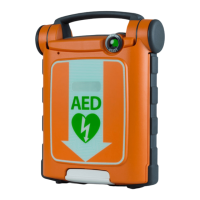
Cardiac Science Powerheart G5
96 pages
Print Icon
To Next Page IconTo Next Page
Loading...
User Guide
70-00569-02 G
Cardiac Science® Powerheart® G5
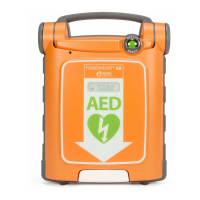
Automated External Defibrillator
®
®

Table of Contents

Questions and Answers

  • A
    Angela BruceAug 16, 2025
    What to do if the battery indicator is red on Cardiac Science Powerheart G5 and it beeps?
    • K
      kathrynkaiserAug 16, 2025
      If the battery indicator is red and the device beeps intermittently when the lid is closed, it means the battery capacity is low. Replace the battery. If the beeping continues after replacing the battery, contact Cardiac Science Technical Support or your local representative.
  • R
    Robert HenryAug 19, 2025
    What to do if pads indicator is lit on Cardiac Science Powerheart G5?
    • C
      Christopher HowellAug 19, 2025
      Ensure that the pads are securely connected to the AED. During a rescue, make sure the pad connector is securely connected to the AED and the pads are placed properly on the patient’s chest.
  • N
    Nina RogersAug 22, 2025
    What to do if Cardiac Science Medical Equipment says 'PADS EXPIRED'?
    • A
      Alexander RosarioAug 22, 2025
      If your Cardiac Science Medical Equipment displays 'PADS EXPIRED', it means the connected defibrillation pads are past their 'use by' date. Replace the pads to resolve this issue.
  • B
    Barbara BerryAug 25, 2025
    What to do if Cardiac Science Medical Equipment says 'EXTREMELY LOW BATTERY'?
    • T
      Teresa AndersenAug 26, 2025
      If your Cardiac Science Medical Equipment shows 'EXTREMELY LOW BATTERY', it means the battery charge is too low to support a rescue. Replace the battery immediately.
  • S
    Scott MaysAug 28, 2025
    How to fix a red Rescue Ready status indicator on Cardiac Science Medical Equipment?
    • B
      Brittany BuckleyAug 28, 2025
      Close and reopen the lid of the AED. The Rescue Ready indicator is red and the indicator may return to green. Enter Diagnostic mode for more information.
  • A
    alexanderlindseyAug 31, 2025
    What to do if Cardiac Science Powerheart G5 Medical Equipment says 'PADS USED'?
    • J
      Jeremy NguyenAug 31, 2025
      If your Cardiac Science Medical Equipment displays 'PADS USED', it means the connected defibrillation pads have already been used in a rescue. Replace the defibrillation pads.
  • J
    jonpattersonSep 3, 2025
    What to do if Cardiac Science Medical Equipment says 'CHECK PADS'?
    • L
      litracySep 3, 2025
      If your Cardiac Science Medical Equipment displays 'CHECK PADS', it indicates an issue with the defibrillation pads. Ensure the connector is securely plugged into the AED. If the problem persists, replace the pads.
  • P
    pfowlerSep 6, 2025
    What to do if Cardiac Science Powerheart G5 says 'CHECK CONNECTOR IS PLUGGED INTO AED'?
    • C
      Christopher TorresSep 6, 2025
      If your Cardiac Science Medical Equipment displays 'CHECK CONNECTOR IS PLUGGED INTO AED', it means the defibrillation pads have become disconnected from the AED. Ensure that the pads are securely plugged into the AED and then resume the rescue.
  • K
    Kenneth ThompsonSep 9, 2025
    Why is the battery indicator red on my Cardiac Science Powerheart G5 Medical Equipment?
    • A
      Andrew PowellSep 9, 2025
      If the battery indicator is red on your Cardiac Science Medical Equipment, it indicates that the battery capacity is low. Replace the battery.
  • H
    hughesmichelleSep 12, 2025
    What to do if Cardiac Science Powerheart G5 Medical Equipment displays 'OPEN LID'?
    • D
      dchavezSep 12, 2025
      If your Cardiac Science Medical Equipment displays 'OPEN LID', it means the lid is closed during a rescue. Ensure that the AED lid is fully open.

Summary

About the AED

AED Overview

Provides a general description of the AED's purpose and available models.

Steps of a Rescue

Assess the Patient

Outlines how to determine if a patient requires AED assistance.

Prepare the Patient

Details steps for preparing the patient for AED application.

Place Defibrillation Pads

Instructions on correctly applying defibrillation pads to the patient.

Analyze Patient ECG

Explains the AED's process for analyzing the patient's heart rhythm.

Deliver Defibrillation Shock

Guides the user on delivering a shock to the patient.

Perform CPR

Provides instructions on performing cardiopulmonary resuscitation (CPR).

Prepare AED for Next Rescue

Steps to ensure the AED is ready for subsequent use.

Safety Information

Indications for Use

Specifies when and for whom the AED is indicated for use.

Safety Alert Descriptions

Explains the meaning of DANGER, WARNING, and CAUTION alerts.

General Warnings and Cautions

Lists critical safety warnings and precautions for AED operation.

Troubleshooting the AED

AED Self-Tests

Explains the AED's automatic self-testing procedures.

Troubleshooting Indicators

Helps diagnose issues based on AED indicator lights.

Maintenance and Service Messages

Provides solutions for AED maintenance and service messages.

RescueCoach Voice and Text Prompts

Semi-Automatic Therapy Delivery

Prompts for delivering therapy with semi-automatic models.

Automatic Therapy Delivery

Prompts for delivering therapy with automatic models.

CPR Guidance Prompts

Prompts and text for performing CPR.

Limited Warranty Information

Cardiac Science Powerheart G5 Specifications

General IconGeneral
ModelPowerheart G5
ManufacturerCardiac Science
TypeAutomated External Defibrillator (AED)
Battery TypeIntelliSense lithium battery
Self-TestDaily, weekly, and monthly self-tests
IP RatingIP55
Operating Temperature0°C to 50°C (32°F to 122°F)
ECG MonitoringYes
WaveformBiphasic
Energy ProtocolEscalating
Battery Life4 years (standby)
Dimensions30 cm x 23 cm x 9 cm
DisplayLCD display
Warranty8 years
Storage Temperature-20°C to 60°C (-4°F to 140°F)
Relative Humidity5% to 95% (non-condensing)
Altitude Range0 to 15, 000 feet (0 to 4, 572 meters)
CPR FeedbackOptional
Data StorageInternal memory, up to 90 minutes of ECG data
ConnectivityUSB
Voice PromptsRescueCoach voice prompts guide users through the rescue process

Related product manuals