23
PROBLEM CAUSE REMEDY
The Dialler is not accepting or
displaying the programming
commands as shown on Pages 7-9
• If using a cordless phone you have
forgotten to press ‘talk’ button rst
• The “FUNCTION” switch is not in
the “SET” position.
• The phone you are using to program
is not compatible
• The AC power adapter plug has come
out of the power outlet.
• The cable from the phone is not
connected to the port marked ‘TEL’ on
the Smart Dialler
• If cordless phone ensure you press
‘talk’ rst before programming
• Place the “FUNCTION” switch
to “SET” position.
• Try another phone.
• Plug in adapter and turn on power
• Ensure phone cable from xed phone
or cordless cradle is connected to
‘TEL’ port on Dialler
Warning voice message heard saying
“mains power is not detected”.
• A Power failure
• The AC power adapter plug has
come out of the power outlet
• Power adapter fuse link blown
due to power surge.
• Power measuring zenode may
have blown.
• Wait until power supply resumes.
• Plug the adapter back in.
• Replace Power Adapter.
Contact CareAlert Aust: 1300 75 85 95
New Zealand: 0800 67 77 87
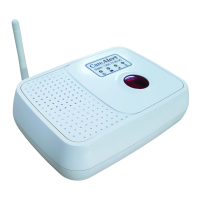
The Mobile Signal LED on my base
station is ashing/o
• You are in an area that does not pick
up the Optus network signal
• You are using a sim card that is not
supported by the CA-0417 frequency
module of 900 and 2100mHz
• Sim Card not installed correctly or No
sim Card installed
•
Sim card maybe searching for a signal
• Check the area to nd what sim
will pick up the best signal
• Change sim card to suit
• Remove mains power, phone line
and battery and check installation
of sim card - restore power & check
• LED will cease ashing once signal
has been found.



 To Next Page