24
PROBLEM CAUSE REMEDY
In a power blackout situation, the
Dialler will not function.
• The 6-Volt rechargeable battery is not
holding its charge.
• The Power Adaptor internal surge
protector fuse has blown.
• Replace the Rechargable
Battery (should be replaced
every two years).
• Replace the Power Adapter.
Order on line:
Australia www.carealert.com.au
New Zealand www.carealert.co.nz
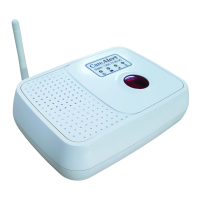
The Smart Dialler is not
responding when the “Call Button”
or “Emergency Buttons” are pressed
on the remote pendant.
• Flat battery in the remote pendant.
• The “FUNCTION” switch is not on
“Alarm” or “Mute” position
• The pendant is not paired to the dialler
• The cordless phone is too close
to the dialler.
• Faulty Pendant
• Replace the Battery.
• Set the “FUNCTION” switch
to “Alarm” or “Mute”.
• Follow the Instructions to pair the
pendant and dialler found on pg 12
• Separate the cordless phone and
Smart Dialler by a greater distance
especially if the cordless phone is a
higher powered type
• Replace Pendant



 To Next Page