43
ENG
mpxone +0300086EN rel. 2.2 - 13.11.2023
Functions
Auxiliary (par. DOc)
The actuator can be activated/deactivated using a command from the supervisor and based on the changeover in day/night
status (linked to the curtain switch or the setting of the time bands); activation/deactivation of the actuator is signalled by the
AUX icon switching on/off . The AUX output to be activated or deactivated based on the night/day time band can be selected
(see parameters tS1...8, tE1...8 and H9).
Code Description Def Min Max UOM User User terminal
DOc Assign auxiliary digital output - see DOA 004- SNO
H9 Output switched with time bands 0 = Light 1 = AUX 001- SNO
Auxiliary serving the main on the secondary devices (par. DOd)
From the main controller, the action of the auxiliary output is broadcast via LAN to the secondary devices whose digital output
is confi gured with DOd greater than 0. Activation (or deactivation) of the actuator is signalled by the AUX icon switching on (off )
on the secondary user terminal.
Code Description Def Min Max UOM User User terminal
DOd Assign auxiliary digital output serving the main on the secondary
devices - see DOA
004- SNO
Light (par. DOE)
The actuator can be activated/deactivated directly using the functions on the user terminal, using a command from the super-
visor and based on the changeover in day/night status (linked to the curtain/door switch or the setting of the time bands); acti-
vation/deactivation of the actuator is signalled by the light icon switching on/off . The light output to be activated or deactivated
based on the night/day time band can be selected (see parameters tS1...8, tE1...8 and H9).
Code Description Def Min Max UOM User User terminal
DOE Assign auxiliary digital output serving the main on the secondary
devices - see DOA
404- SNO
Auxiliary serving the main on the secondary devices (par. DOF)
From the main, the action of the light output is broadcast via LAN to the secondary devices whose digital output is confi gured
with DOF greater than 0. Activation (or deactivation) of the actuator is signalled by the light icon switching on (off ) on the sec-
ondary user terminal.
Code Description Def Min Max UOM User User terminal
DOF Assign light digital output serving the main on the secondary devices
- see DOA
004- SNO
Defrost (par. DOG)
The actuator is activated/deactivated based on the defrost settings (see the paragraph “Defrost”). Activation/deactivation of the
actuator is signalled by the defrost icon switching on/off on the user terminal.
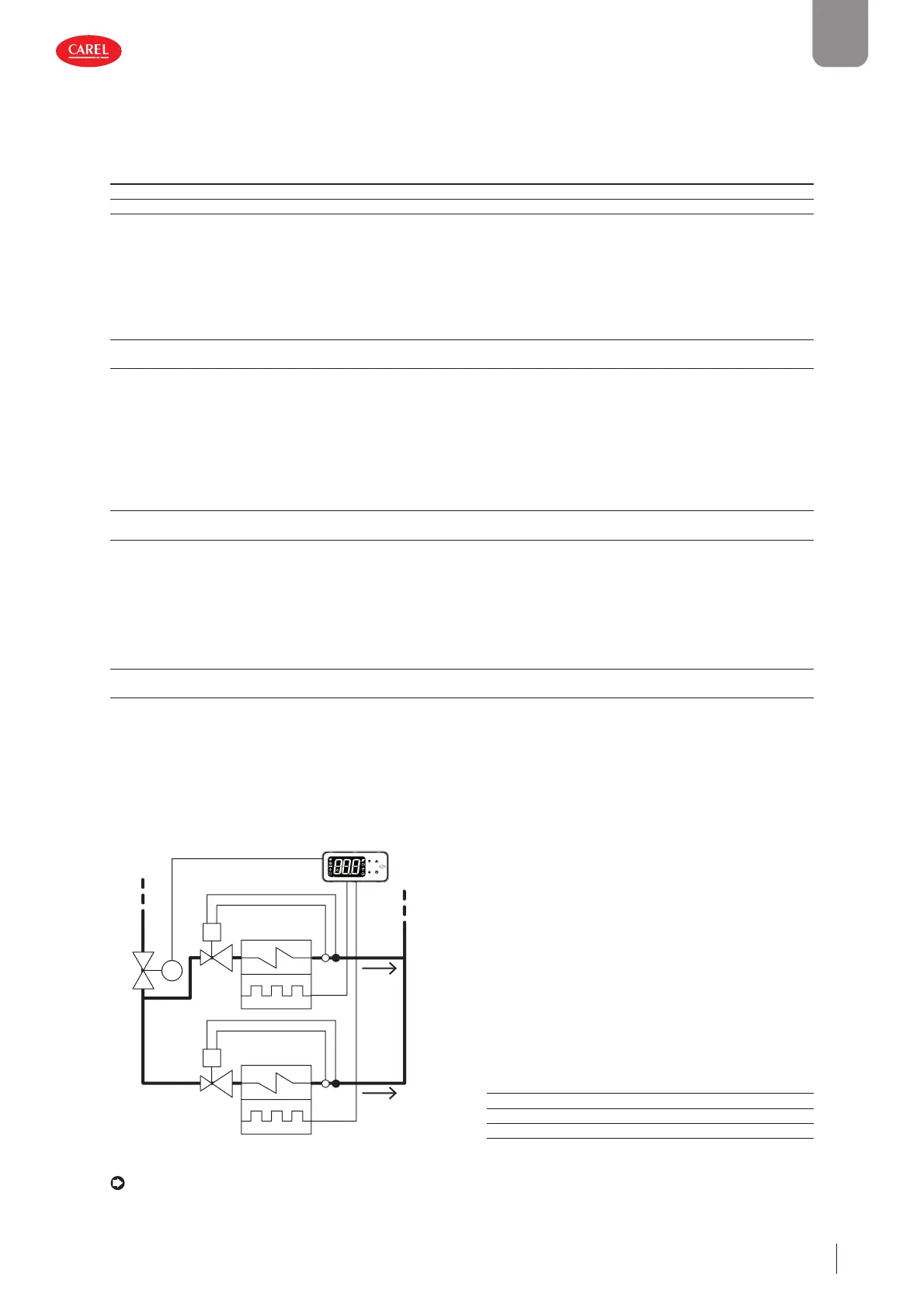
Auxiliary evaporator defrost (par. DOH)
A heater can be activated for defrosting the main and auxiliary evaporator.
300086_020_R01
M
E
E
V
V
SV
T
T
Ref. Description
E Evaporator with electric defroster
V Thermostatic expansion valve
SV Solenoid valve
Fig. 5.d
Notice: this function is not compatible with management of the electronic expansion valve.
MPXone can manage defrosts with one or two outputs and one or two end defrost probes. The table below summarises the
possible cases:


 To Next Page
 Loading...







