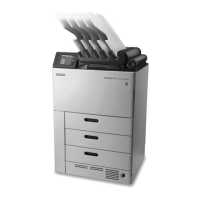
Installation Tools
A new feature for LINUX OS systems is the ability to use various web browsers including
CHROME, FIREFOX, or INTERNET EXPLORER to access DRYVIEW Laser Imager WebLink
pages. The following versions are tested as compatible to access WebLink pages,
although other browsers may also work:
• MICROSOFT EDGE
• GOOGLE CHROME, 76.0.3809.100 (or higher)
• MOZILLA FIREFOX, 64.0.2 (or higher)
For the “basic install” the latest Secure Link and WebLink versions are not required,
however for advanced troubleshooting/set up it is required to install on your service
laptop Secure Link Client version 3.2.4.02 or higher. Please refer to Carestream Service
Assets web page for further information.
The following tools are required to complete installation of the DRYVIEW Laser
Imagers:
• WINDOWS 10 Laptop
• PHILLIPS Screwdriver - for unpacking
• Side-Cutting Pliers - for unpacking
• Voltmeter - for checking source AC power
• Latest Secure Link and WebLink versions
Film Availability
Important:
Prior to installation, you must order and have available the appropriate lm. The DRYVIEW Laser
Imager may support the following lm sizes (support can vary by location and imager
conguration):
• 20 x 25 cm (8 x 10 in.)
• 25 x 30 cm (10 x 12 in.)
• 28 x 35 cm (11 x 14 in.)
• 35 x 43 cm (14 x 17 in.)
• General radiography and mammography lm types are available. Contact your Carestream
Authorzed Distributor or Dealer to order DRYVIEW Laser Imaging Film.
AN9405
6 2024-03-06


 To Next Page