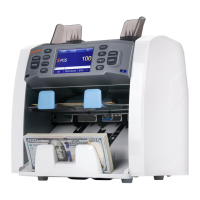
Note: In "COUNT" mode, the counterfeit detecting function is switched off.
3. Cumulative Counting
When you need cumulative counting, press the "ADD" button on the control panel, if "ADD" is
displayed on the LCD, the machine will count starting from the original number displayed on the
LCD. When the counting is completed, the number displayed on the LCD is the total value of all
consecutive stacks of banknotes. When the total number of banknotes reaches 9999+1, or total
value reaches 999999+1, the number will be reset to 0.
Note: To ensure accurate counting in ADD counting mode, in case of jam or other
problem, the latest batch will not be added to the total. It can be re-counted.
4. Batch Counting
When you need to count out equal batches of banknotes, press the "BATCH" button. When
"100" is displayed on the LCD, the "BATCH" function has been turned on and the current batch
setting is 100. Each time you press the "BATCH" button, "100, 50, 20, 10 and ---" will be
displayed in turn.
When switched to "---", the batch function is disabled. You can press or hold the "+1/+10"
button to increase the batch number by 1 or 10 according to the requirement of the banknotes
counting. The batch value may be set in the range of 1 ~200. After setting the batch number, put
the banknotes on the hopper, and the machine will start counting automatically. At reaching the
batch number of banknotes, the machine will stop automatically. When the batch is removed from
the stacker, next batch will be counted out.


 To Next Page
 Loading...