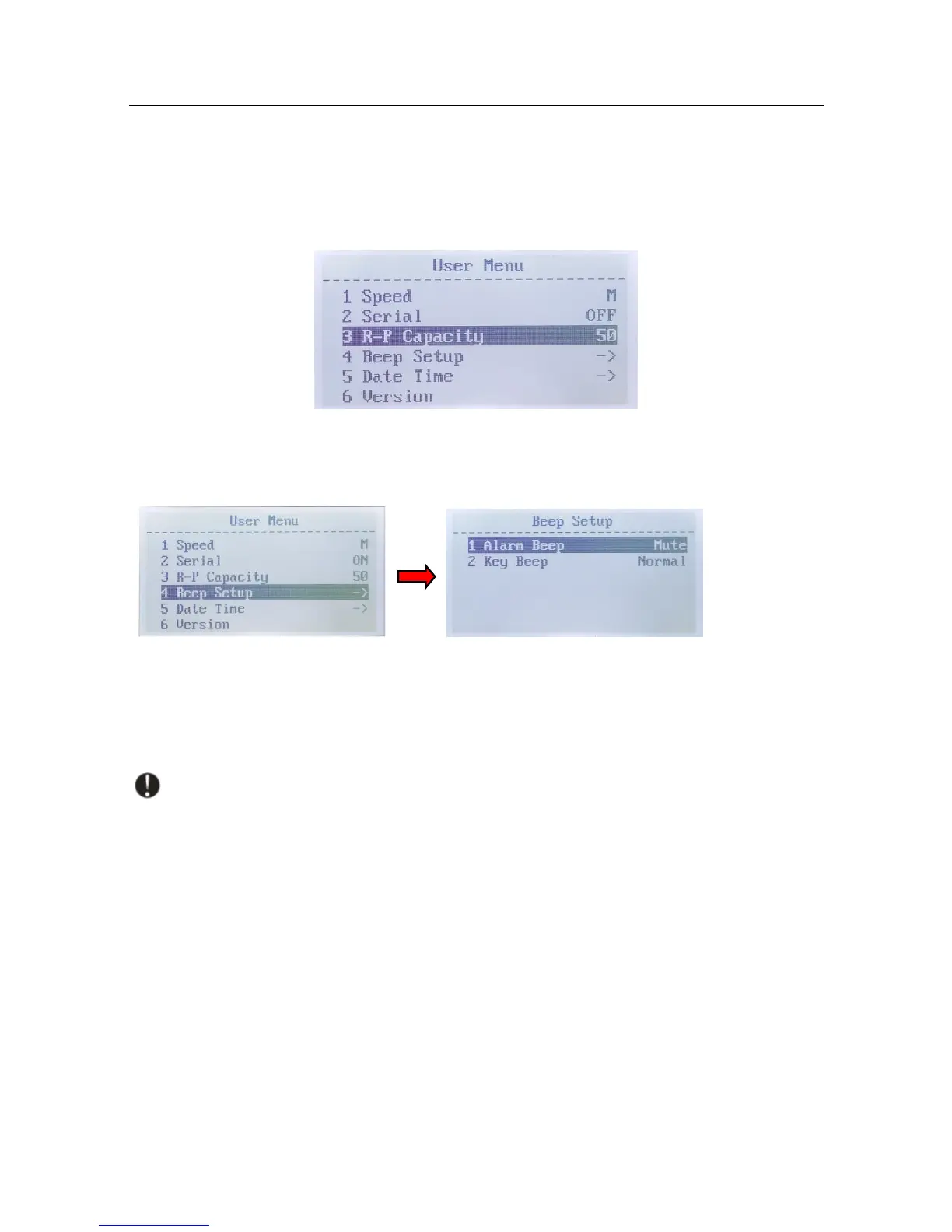
3. Capacity of the Reject Pocket
Navigate to "3 R-P Capacity", press the "BATCH" button or "+1/+10" button to select the
capacity of the reject pocket (50, 40, 30 and 20 are available). Press "RESET" button to save the
change. Press "MENU" button to exit.
4. Sounds Setting
Navigate to "4 Beep Setup", press "RESET" button to enter the sounds setting.
Alarm Beep Setting
Navigate to "1 Alarm Beep", press the "BATCH" button or "+1/+10" button to switch between
Alarm Beep Normal and Mute. Press "RESET" button to save the change. Press "MENU" button to
exit.
Note: When Alarm Beep is on, the machine will give beep sound when there is banknote
rejected while counting.
Key Beep Setting
Navigate to "2 Key Beep", press the "BATCH" button or "+1/+10" button to switch between
Key Beep Normal and Mute. Press "RESET" button to save the change. Press "MENU" button to
exit.
5. Date and Time Setting
Navigate to "5 Date Time", press the "RESET" button, and set date format.


 To Next Page