The document provided is an owner's guide for a Carrier Recreational Vehicle (RV) Air Conditioner, specifically a heat pump unit designed for ducted systems. This guide covers the operation, installation, and maintenance of the Air V unit, aiming to provide users with comprehensive information for optimal comfort and economic operation.
Function Description
The Carrier Air V is a sophisticated RV air conditioning unit that functions as a heat pump, providing both cooling and heating capabilities for recreational vehicles. Beyond simply altering temperature, it also filters and dehumidifies the room's air, contributing to a more comfortable indoor environment. In cooling mode, the unit works to lower the ambient temperature, while in heating mode, it operates as a heat pump. The system is designed to shut down automatically in heating mode under conditions that would cause the outdoor coil to freeze up, typically near freezing temperatures, to prevent damage and ensure efficient operation. For vehicles equipped with a furnace, the unit can automatically switch to furnace operation if the outdoor ambient or coil temperature drops below a certain threshold, indicated by an "AUX.HEAT" LED. If no furnace is present, the system will shut down until conditions allow for heat pump operation to resume. The unit is designed for quiet operation, aiming to provide maximum cooling and heating comfort without excessive noise.
Usage Features
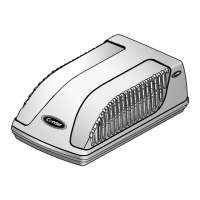
The Air V unit is controlled primarily via a remote control, offering a range of functions for user convenience. The ceiling unit itself features a display with indicator lights for various modes: an orange light for "TIMER" mode (on/off timer), a green light for "UNIT ON" when the unit is operating, and a red light for "AUXILIARY HEAT" when the system switches to furnace operation.
The remote control includes several buttons for operation:
- On/Off Button: Initiates or stops unit operation. A three-minute compressor delay is built-in to prevent overloading if the unit is turned off and immediately back on.
- Mode Selector Button: Allows selection between "COOL," "DRY," "FAN," "HEAT," and "FURN." (furnace) modes. In "DRY" mode, the microcomputer automatically cycles the fan on and off to efficiently remove moisture. In "FAN" mode, only the fan operates to circulate air. "FURN." mode is an optional function for vehicles with a furnace.
- Fan Speed Selector Button: Adjusts fan speed to "HIGH," "LOW," or "AUTO." In "AUTO" mode, the microcomputer controls the fan speed.
- On Timer Button: Sets a desired time (in hours) for the unit to turn on, usable only when the unit is off.
- Temperature Selector Buttons (Up/Down Arrows): Adjusts the desired room temperature within a range of 63°F to 90°F. The unit automatically turns the compressor on or off to maintain the set temperature, though the fan may continue to circulate air even when the compressor is off.
- Off Timer Button: Sets a desired time (in hours) for the unit to turn off, usable only when the unit is on.
In case the remote control is lost, damaged, or its battery is discharged, "HEAT EMERGENCY" and "COOL EMERGENCY" buttons are available on the ceiling unit. Pressing these buttons when the unit is off will initiate automatic operation in either heating (preset to 73°F, AUTO fan, timer disabled) or cooling (preset to 75°F, AUTO fan, timer disabled) mode, respectively. A "TEST MODE" is also available for installers to operate the unit independently of temperature settings for testing purposes.
The remote control display provides visual feedback on the selected operating mode, fan speed, set temperature, and timer settings. It also indicates when a signal from the remote control is transmitted, accompanied by an audible beep from the unit.
Maintenance Features
Regular maintenance is crucial for the longevity and efficient operation of the Carrier Air V unit. The owner's guide outlines several key maintenance procedures:
- Cleaning Air Filters: The air filters are highly efficient at removing airborne particles and should be cleaned regularly, generally once a month or more frequently depending on air quality. To clean, filters are pulled slightly down and out, then washed with clean water or vacuumed with a household vacuum cleaner.
- Washing Condenser Coil: The condenser coil should be washed twice a year to ensure proper heat exchange. This involves removing the exterior cover.
- Cleaning Water Drains: The water drains should be cleaned yearly to prevent blockages and ensure proper condensate removal. This also requires removing the exterior cover.
The manual emphasizes safety precautions during maintenance, particularly regarding electrical components. Users are warned not to touch capacitor terminals without ensuring electric discharge, as high voltage may persist even after power is turned off. Caution is also advised when handling the refrigerant cycle due to high internal pressure.
The guide also includes a troubleshooting section to help users diagnose and resolve common issues, such as the unit not operating, not cooling/heating effectively, making unusual noises, or dripping water. This section provides possible causes and corresponding solutions, encouraging users to attempt these steps before contacting a service representative.


 To Next Page

 General