10
3. KEY Part
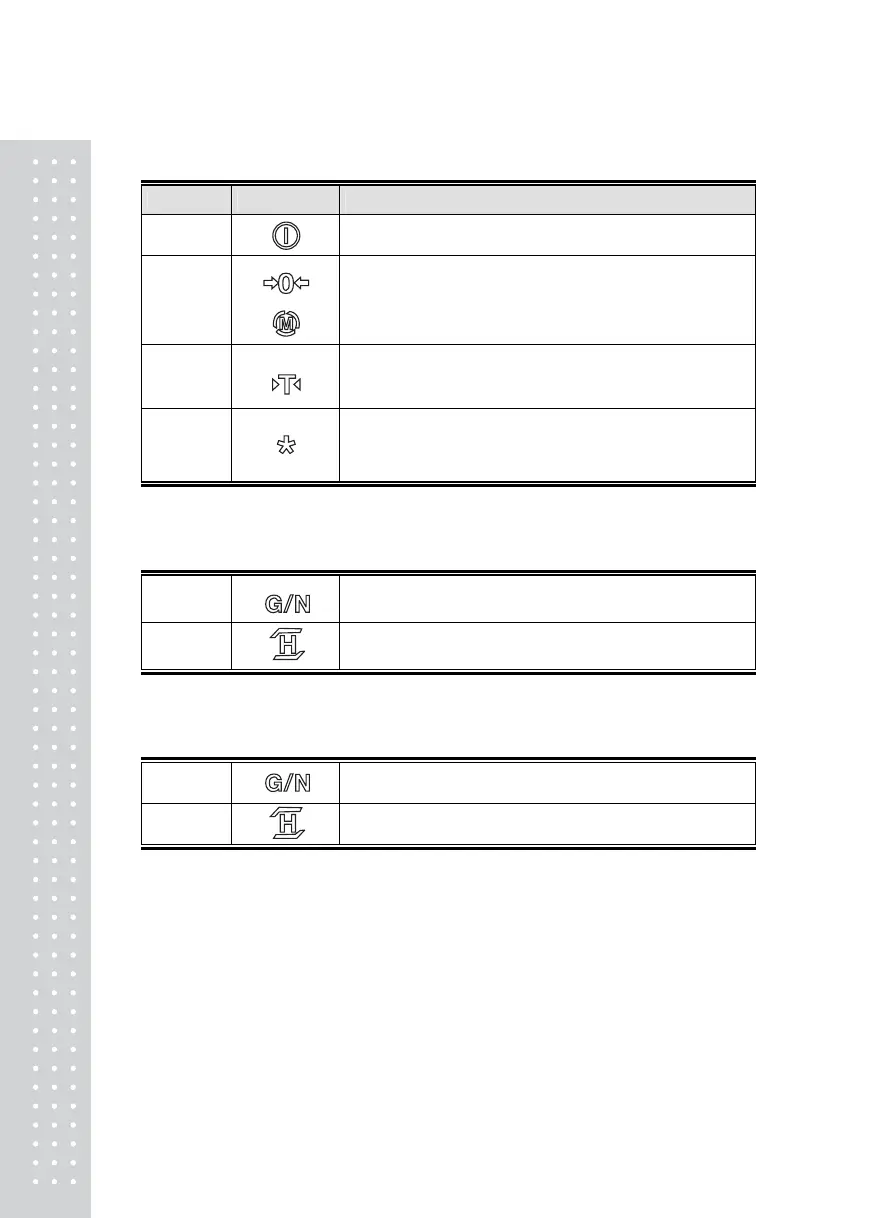
KEY SYMBOL DESCRIPTION
ON / OFF
Use to power ON / OFF (Press for approx 3 seconds)
ZERO /
MODE
Use in case of rezero (within 2% of max. capacity),
To enter the system mode by pressing for 2 seconds
TARE
Use at weighing in use of TARE
Enter the TIME SETTING MODE by pressing for 2 seconds
*
Use to turn ON / OFF Back Light (Option) or
to print out in the case that F_2 is set to 4.
Enter the CONVERSION MODE by pressing for 2 seconds.
■ Hi/Low Comparing Mode key or Weighing Mode Key
NET /
GROSS
Use to display NET weight or GROSS weight.
Enter the TEST MODE by pressing for 2 seconds
HOLD Use to weight the moving object (Manual, Automatic)
■ Counting Mode Key
U.W.
Use to display the unit weight (for approx. 5 seconds)
W. Use to display the current weight (for approx. 5 seconds)



 To Next Page