6871082-R2 3
INSTALLATION
cascade
®
C-675514-1
CL0097.eps
A
B
B
Follow the steps shown to install the attachment on the truck.
Read and understand all WARNING and CAUTION statements.
If a procedure is not understood, ask a supervisor or call the
nearest Cascade Service Department for assistance.
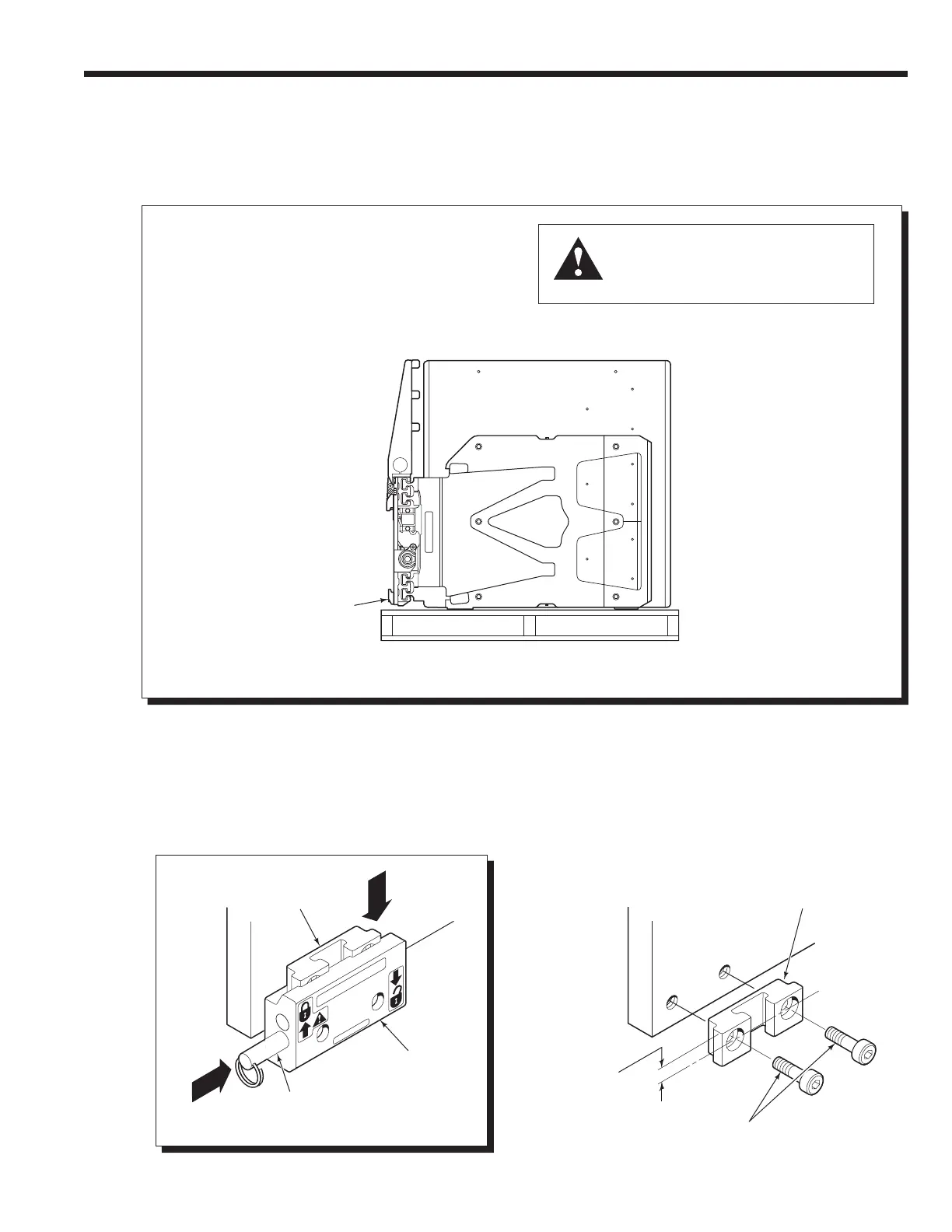
Unlock quick-change lower
mounting hooks
A Remove pin and drop hooks into unlocked
position.
B Reinstall pin in lower hole.
Attach overhead hoist
A Remove banding. If required, set the
attachment upright on pallet. Use
chains or straps as necessary.
B Remove bolt-on lower mounting hooks
(if equipped).
Tighten capscrews to 165 ft.-lbs. (225 Nm)
Pin
LH Lower
Hook
NOTE: Guides can be reversed to
change hook-to-carriage clearance.
Refer to lower hook installation, Step 6.
Guide
0.62 in. (16 mm)
offset on top
provides max.
hook clearance.
2
1
WARNING: Verify that the overhead
hoist and chains or straps are rated for
the weight of the attachment. Refer to
nameplate for attachment weight.
Side View
(Standard Attachment Shown)


 To Next Page