1591-3
• Each time you input a digit, the cursor automatically moves to the right.
• If you make a mistake while inputting numbers, use C and B to move the
cursor to the location of the error and input the correct data.
6. After inputting data, you can use
÷
/MC
and
+
/M
+
to return to the new data
display and continue from step 3 to input more data.
7. After inputting all the data you want, press A to store it and return to the
Telememo Mode.
• When you press A to store data, the message
SORT appears on the
display for a few seconds. After the sort operation is complete, the normal
Telememo Mode display (without the cursor) appears.
• The text area of the display can show only six characters at a time, so
longer text scrolls continuously from right to left.
• If the message
{FULL appears in the text area of the display, it means
that memory is full. To store more data, you will first have to delete some of
the data stored in memory.
• If you do not perform any button operation for a few minutes while the
cursor is on the display, the watch automatically returns to the normal
Telememo Mode (without the cursor).
To recall Telememo data
In the Telememo Mode, press
+
/M
+
to scroll forward through stored data items
or
÷
/MC
to scroll in reverse.
• Holding down either key scrolls through the data at high speed.
To edit Telememo data items
1. In the Telememo Mode, scroll through the data items and display the one
you want to edit.
2. Press A and a cursor appears in the text area.
3. Use B and C to move the cursor to the character you want to change.
4. Use the key pad to make any changes you want.
• For details on inputting characters, see “About text and number input”.
5. After making the changes you want, press A to store them and return to
the Telememo Mode.
To delete Telememo data
1. In the Telememo Mode, scroll through the data items and display the one
you want to delete.
2. Press A and a cursor appears in the text area.
3. Hold down E until the watch emits a beep.
• At this time the cursor appears in the text area, ready for input.
4. Input data or press A to return to the Telememo Mode.
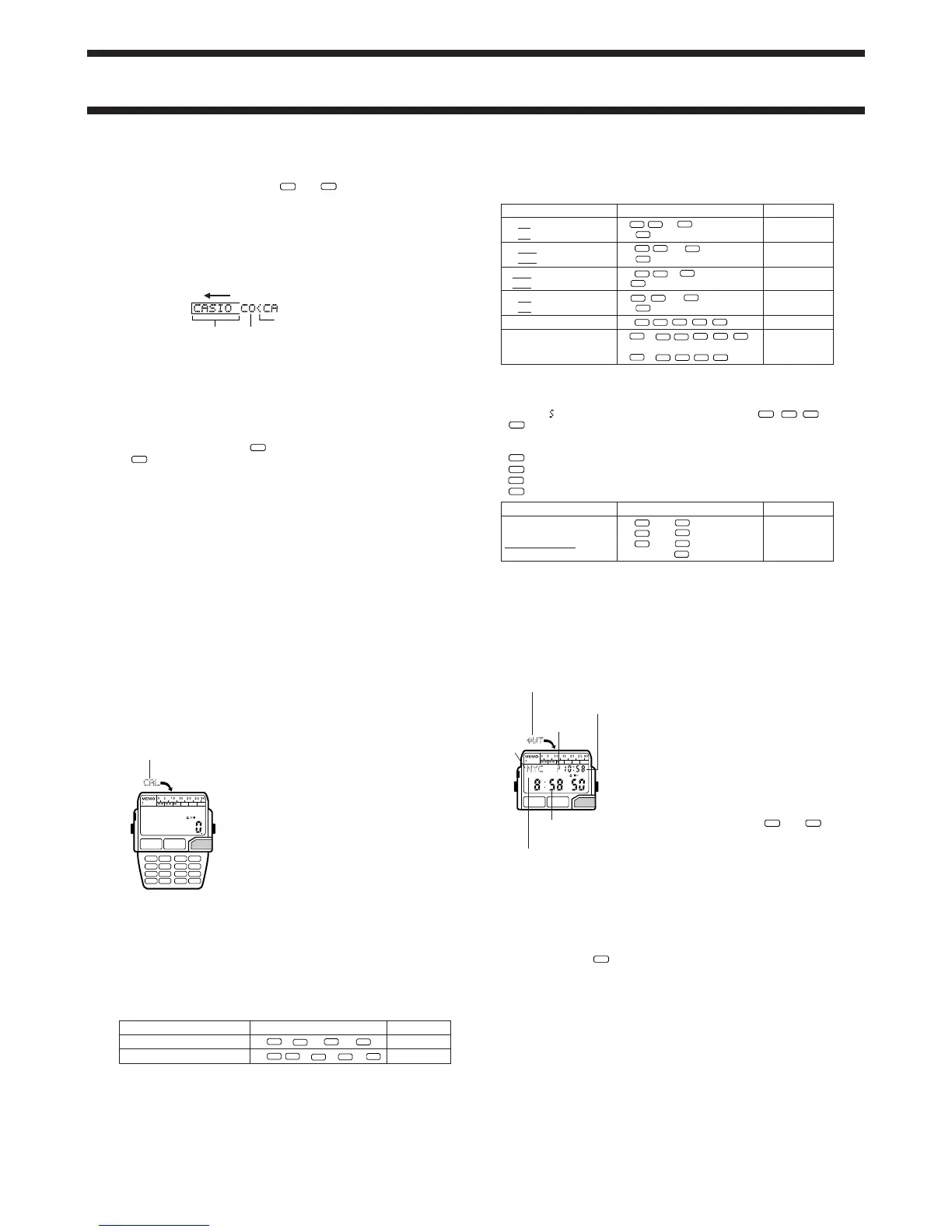
CALCULATOR MODE
The Calculator Mode lets you perform addition,
subtraction, multiplication, and division and other
operations using 8-digit values (7 digits for negative
values, because one digit is used by the minus
sign).
• If you do not operate any button for 6 or 7
minutes while in the Calculator Mode, the watch
automatically goes back to the Timekeeping
Mode.
To use the calculator
• Input calculation just as you do with any standard
calculator, as shown in the examples below. Be
sure to press E to clear the calculator before
beginning each calculation.
• If the result of a calculation exceeds 8 digits, an
E (error) indicator appears on the display. Press
E to clear the error indicator.
Mode indicator
D
E
+
/M
+
×
/MR –/M–
7
890
4
56
• PM
1
23
A
BC
÷
/MC
SPC
=
Basic Calculations
The +, -, X, and d indicators appear on the display whenever you press the
corresponding operation key.
Example Operation Display
12.3 + 74 – 90 = –3.7 12
• PM
3
+/M+
74
–/M–
90
SPC
=
x3.&
(12 – 0.5) × 3 ÷ 7 = 4.9285714 12
–/M–
• PM
5
×/MR
3
÷/MC
7
SPC
=
4.9285&14
Constant Calculations
Input the number you want to use as a constant, and then press one of the
arithmetic keys twice. This causes the
K indicator to appear on the display,
indicating constant calculations.
Example Operation Display
10 + 7 = 17 7
+/M+
+/M+
10
SPC
=
+K 1&.
12 + 7 = 19 12
SPC
=
+K 19.
78 – 12 = 66 12
–/M–
–/M–
78
SPC
=
-K 66.
45 – 12 = 33 45
SPC
=
-K 33.
2 × 12 = 24 12
×/MR
×/MR
2
SPC
=
XK 24.
5 × 12 = 60 5
SPC
=
XK 60.
45 ÷ 9 = 5 9
÷/MC
÷/MC
45
SPC
=
dK 5.
72 ÷ 9 = 8 72
SPC
=
dK 8.
17 + 17 + 17 + 17 = 68 17
+/M+
+/M+
SPC
=
SPC
=
SPC
=
+K 68.
(2.3)
4
= 27.9841 2
• PM
3
×/MR
×/MR
SPC
=
SPC
=
SPC
=
XK 2&.9841
To perform the above (2.3
2
)
2
2
• PM
3
×/MR
SPC
=
×/MR
SPC
=
Independent Memory
• To perform each of the following memory operations, press D to shift the
keypad (
indicator appears on display), and then press
÷/MC
,
×
/MR
,
–/M–
, or
+
/M
+
.
• The
M indicator is shown on the display while there is a value stored in
independent memory.
–/M–
: Subtracts the displayed value from independent memory.
+
/M
+
: Adds the displayed value to independent memory.
÷/MC
: Clears independent memory (M indicator disappears).
×
/MR
: Recalls independent memory contents.
To switch the key input tone on and off
In the Calculator Mode, press A to switch the key input tone on and off. The
key input on/off setting you make in the Calculator Mode is applied to all other
modes, except the Stopwatch Mode.
Example Operation Display
80 × 9 = 720 80
×/MR
9 D
+/M+
M &20.
–) 50 × 6 = 300 50
×/MR
6 D
–/M–
M 300.
20 × 3 = 60 20
×/MR
3 D
+/M+
M 60.
480 D
×/MR
M 480.
WORLD TIME MODE
The World Time Mode shows the current time in
24 time zones around the world. When you set the
time for any time zone, all other zones are adjusted
accordingly.
• For full information on city codes, see the “CITY
CODE TABLE”.
• The time zone that is displayed when you leave
the World Time Mode will still be displayed when
you enter the World Time Mode again.
To set the World Time
1. In the World Time Mode, use
÷
/MC
and
+
/M
+
to
scroll through the time zones and find the one
you want.
2. Press A and the left hour digit flashes on the
display because it is
selected
.
3. Press B or C to move the flashing digit between the hour and minutes
settings.
4. While any digit is selected (flashing), use the key pad to change it.
• The 12-hour/24-hour format of the World Time matches the format you
select in the Timekeeping Mode.
• If you are using the 12-hour timekeeping format, the A (AM) or P (PM)
indicator flashes along with the hour and minutes digits. While these digits
are flashing, press
• PM
to switch between AM and PM.
Mode indicator
D
E
A
A
BC
PM indicator
Timekeeping
Mode time
City
code
Current time in the
selected city
AM indicator
• The seconds count of the World Time is synchronized with the seconds
count in the Timekeeping Mode.
5. After you set the time, press A to return to the normal World Time Mode
(digits stop flashing).
Continuously scrolls
Text area
Last letter of text
Separator (inserted automatically)


 To Next Page
 Loading...