EasyManua.ls Logo

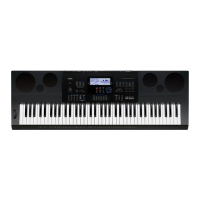
Casio CTK-6300in - User Manual

Casio CTK-6300in
130 pages
Print Icon
To Next Page IconTo Next Page
Loading...
E
CTK6300IN-E-1A
USER’S GUIDE
Please keep all information for future reference.
Safety Precautions
Before trying to use the keyboard, be sure to read the
separate “Safety Precautions”.
CTK
-
6300IN

Table of Contents

Questions and Answers

  • H
    hooverbriannaAug 15, 2025
    How to fix Casio CTK-6300in Electronic Keyboard if power will not turn on?
    • P
      pfrostAug 15, 2025
      If your Casio Electronic Keyboard is not turning on, try the following: * Check the AC adapter or ensure the batteries are correctly installed. * Replace the batteries with new ones or use the AC adapter. * If a 'Please Wait' message appeared during an operation, it might have caused an internal issue. If the above steps don't work, reset the keyboard by holding down the R-2 ([B] E.PIANO) and R-5 ([E] STRINGS) buttons, then press the L-1 (P) button to turn it on. Be aware that this will erase all data and restore factory settings.
  • M
    Mrs. Marissa Navarro MDAug 19, 2025
    What to do if nothing happens when I press any keyboard key on Casio CTK-6300in Electronic Keyboard?
    • P
      Patrick LoganAug 19, 2025
      If nothing happens when you press any key on your Casio Electronic Keyboard, consider the following: * Adjust the main volume setting. * Check if anything is connected to the T-6 (PHONES) jack on the back. * Turn the power off and on again to reset the keyboard settings.
  • J
    Jordan LewisAug 21, 2025
    Why does my Casio CTK-6300in suddenly powers down after a few minutes?
    • E
      espinozarachelAug 22, 2025
      If your Casio Electronic Keyboard suddenly powers down after a few minutes, it is likely due to the Auto Power Off feature being activated.
  • F
    Felicia MayAug 25, 2025
    What to do if the display keeps going out or is flashing on Casio Electronic Keyboard?
    • T
      thomasjonesAug 26, 2025
      If the display of your Casio Electronic Keyboard keeps going out or is flashing, try replacing the batteries with new ones or using the AC adapter.
  • E
    Eddie WatersAug 27, 2025
    What to do if Casio CTK-6300in Electronic Keyboard outputs a loud sound and then suddenly powers down?
    • D
      Dakota AlvaradoAug 27, 2025
      If your Casio Electronic Keyboard outputs a loud sound and then suddenly powers down, try replacing the batteries with new ones or switching to AC adapter power.
  • L
    lucastanyaAug 30, 2025
    What to do if nothing happens when I start an Auto Accompaniment on Casio CTK-6300in?
    • D
      dixonstephanieAug 30, 2025
      If nothing happens when you start an Auto Accompaniment on your Casio Electronic Keyboard: * For rhythms E:029 to E:038, you need to play a chord on the keyboard. * Check and adjust the accompaniment volume setting. * If no user rhythm is stored, Auto Accompaniment won't start for rhythms F:001 to F:010 when pressing the L-16 (START/STOP) button. * Try turning the power off and back on to reset the keyboard settings.
  • R
    Richard SextonSep 2, 2025
    What to do if nothing happens or notes do not play normally when I play on the left side of the Casio CTK-6300in?
    • M
      martinkaylaSep 2, 2025
      If nothing happens or notes don't play normally when you play on the left side of the keyboard of your Casio Electronic Keyboard, press the L-17 (ACCOMP ON/OFF) button to disable chord input with chord keyboard.
  • X
    xdunnSep 5, 2025
    Why the metronome does not sound on my Casio CTK-6300in?
    • N
      Nancy HahnSep 5, 2025
      If the metronome on your Casio Electronic Keyboard does not sound: * Check and adjust the metronome volume setting. * Turn the power off and back on to reset the keyboard settings.
  • L
    Lisa SmithSep 8, 2025
    Why screen contents are visible only from straight ahead on Casio CTK-6300in?
    • R
      Robin WiseSep 8, 2025
      If the screen contents of your Casio Electronic Keyboard are visible only from straight ahead, it is due to production limitations and does not indicate a malfunction.
  • J
    Jonathan WilliamsSep 12, 2025
    How to find something that should be included with the Casio Electronic Keyboard?
    • J
      Jonathan KeithSep 12, 2025
      If you can’t find something that should be included with your Casio Electronic Keyboard, carefully check inside all of the packing materials.

Summary

Safety Precautions

General Guide

Selecting and Playing a Tone

Layering and Splitting Tones

How to play two or three different tones simultaneously.

Applying Effects to a Sound

Selecting an Effect

Procedure to select reverb, chorus, or DSP effects.

Using the Mixer

Using the Tone Editor

Creating a User Tone

Step-by-step guide to creating and saving a user tone.

Music Presets

Saving Keyboard Setups to Registration Memory

To save a setup to registration memory

Instructions for storing keyboard setups for instant recall.

Using the Song Sequencer

Using a Memory Card

Reference

Troubleshooting

Provides solutions for common operational symptoms and issues.

Operating Precautions

Important safety and handling precautions for product use.

Casio CTK-6300in Specifications

General IconGeneral
Number of Keys61
Touch ResponseYes
Sound SourceAHL
MetronomeYes
Amplifier Output2.5W + 2.5W
DisplayLCD
Effects10 Reverb, 5 Chorus
RecorderYes
Speakers12cm x 2
Power SupplyAC adaptor or batteries
TerminalsUSB
Song Bank152
ConnectionsUSB
Polyphony48 (24 for certain tones)

Related product manuals