EasyManua.ls Logo

Casio fx-6200G - Page 44

Casio fx-6200G
60 pages
Print Icon
To Next Page IconTo Next Page
To Previous Page IconTo Previous Page
Loading...
t
|
|
{
§]
bs}
play
changes
fo
the
text
screen
automatically.
To
changing
the
factor
value,
press
(3)
or
&d.
Gg(or
&)
Press
Gili)
(fea)
to
reduce
the
graph
according
to
the
factors
you
specified.
Gr)
Goeen)
Quy.
al
“Whenever
you
try
to
change
the
factor
value
while
a
graph
Is
displayed,
the
dis-
return
to
the
graph
screen
after
Let’s
take
another
look
at
the
range
parameters.
Xmin
;
-540
Ymin
:
-3.2
Xmax:
540
Ymax:
3.2
Xscl
:
180
Yscl
:
1
If
you
press
Gwin”)
again,
the
graph
is
reduced
once
more
by
the
factors
you
specified.
To
return
the
graph
to
its
original
size,
press
Si)fieay).
—8Z—
|
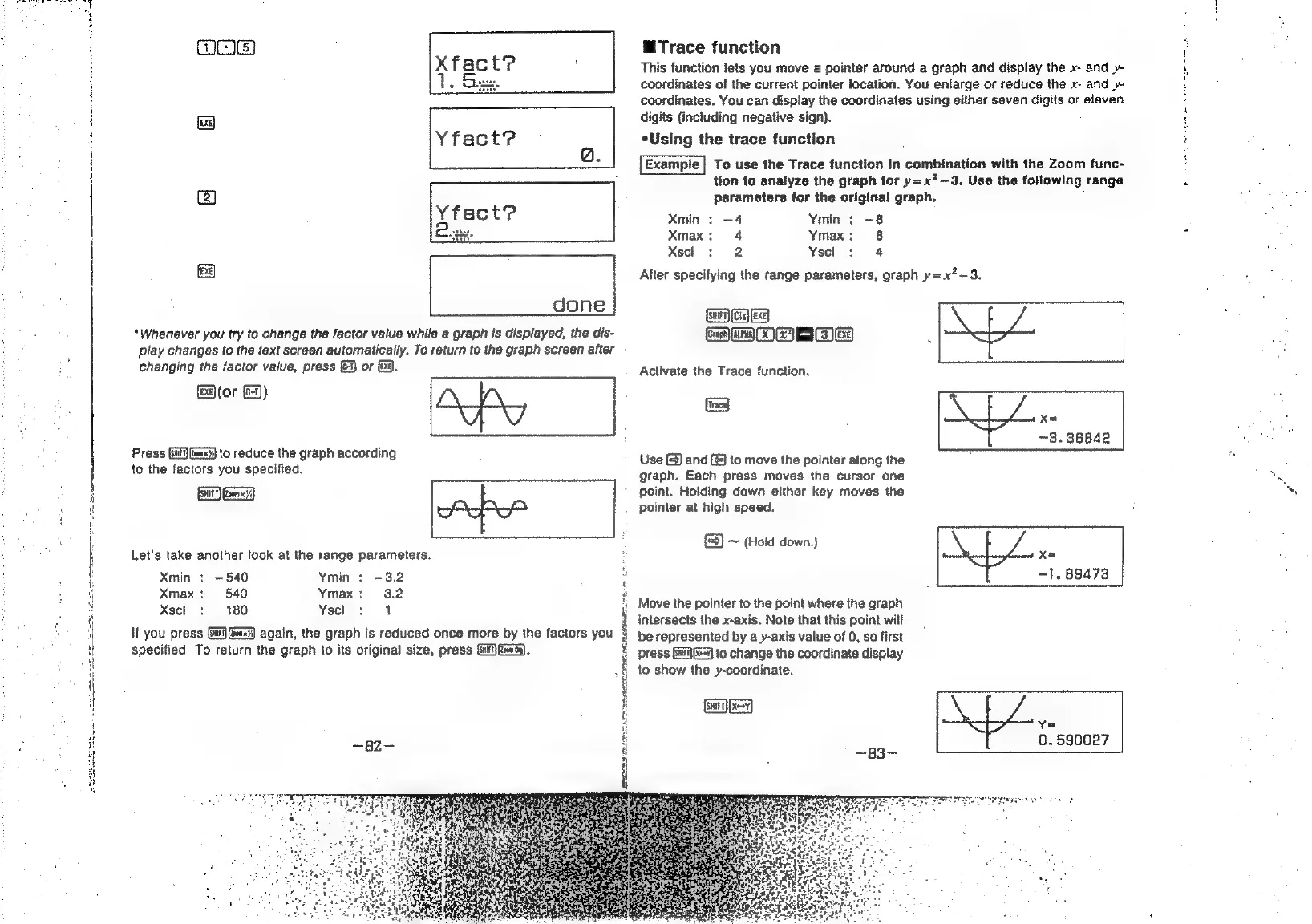
@iTrace
function
This
function
lets
you
move
a
pointer
around
a
graph
and
display
the
x-
and
y-
coordinates
of
the
current
pointer
location.
You
enlarge
or
reduce
the
x-
and
y-
coordinates.
You
can
display
the
coordinates
using
either
seven
digits
or
elaven
digits
{including
negative
sign).
eUsing
the
trace
function
To
use
the
Trace
function
In
combination
with
the
Zoom
func-
tion
to
analyze
the
graph
for
y=x?—3.
Use
the
following
range
parameters
for
the
original
graph.
Xmin
:
-4
Ymin
:
+8
Xmax:
4
Ymax:
8
Xscl
2
2
Ysel
:
4
After
specifying
the
range
parameters,
graph
y=x?—3.
Activate
the
Trace
function.
(ie)
a
Ke
~3.
36842
Use
(&)
and
(©)
to
move
the
pointer
along
the
Xe
—1.
88473
aE
(Cis)
Exe}
Crs)
a)
ea
aa)
[A]
graph.
Each
press
moves
the
cursor
one
point.
Holding
down
either
key
moves
the
pointer
at
high
speed.
~
(Hold
down.)
Move
the
pointer
to
the
point
where
the
graph
intersects
the
x-axis.
Note
that
this
point
will
be
represented
by
a
y-axis
value
of 0,
so
first
press
Gi)
Ky
to
change
the
coordinate
display
to
show
the
y-coordinate.
Se)
Yu
0.590027
~83

Related product manuals