EasyManua.ls Logo

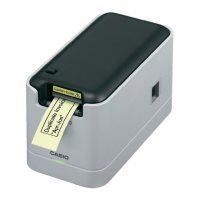
Casio MEP-U10 - User Manual

Casio MEP-U10
30 pages
Print Icon
To Next Page IconTo Next Page
Loading...
RJA526500-001V01
MEP-U10
User’s Guide
EN
Be sure to keep all user documentation handy for future reference.

Questions and Answers

  • M
    Mr. Jonathan Torres DDSAug 10, 2025
    Why is my Casio Label Maker not printing anything?
    • J
      Jordan JacksonAug 10, 2025
      If your Casio Label Maker is not printing, one potential reason is using a non-specified AC adapter; ensure you're using the correct adapter. Another possibility is that the printer head is overheated; wait a while before attempting to print again.
  • R
    randy40Aug 19, 2025
    How to fix unclear printing on Casio Label Maker?
    • M
      mblankenshipAug 19, 2025
      If your Casio Label Maker is producing unclear prints, several factors could be the cause. Start by cleaning the printer head and rubber roller to remove any dirt or debris. Ensure that the tape is correctly loaded in the device. Finally, check and adjust the print density setting to ensure it is appropriate.
  • L
    Larry SingletonAug 30, 2025
    What to do if Casio Label Maker won't connect to computer?
    • C
      Charles MatthewsAug 30, 2025
      If you're having trouble connecting your Casio Label Maker to your computer, there are a few things to try. First, ensure the USB cable is properly connected; try disconnecting and reconnecting it. Next, verify that the USB driver is installed on your computer; if not, install it, and if the connection still fails, try a different USB port. Also, make sure you are using the USB cable that came with the printer.

Summary

Safety Precautions

Safety Symbols and Warnings

Explains safety symbols and covers general warnings for abnormal operation and AC adapter safety.

AC Adapter and Cable Safety

Use Precautions

Software Installation

Software Installation Process

Provides step-by-step instructions and precautions for installing the printer software.

Tape Precautions and Removal

Connecting to Your Computer

Disconnecting the Printer

Printing a Label

Cutting Tape and Affixing Labels

Steps for cutting printed tape and applying labels to suitable surfaces.

User Maintenance

Printer Component and Exterior Cleaning

Instructions for cleaning the printer's internal components and external casing.

Troubleshooting

Casio MEP-U10 Specifications

General IconGeneral
BrandCasio
ModelMEP-U10
CategoryPrinter
LanguageEnglish

Related product manuals